GitGlass, a VS Code-style repo viewer in under 10 KB of vanilla JS
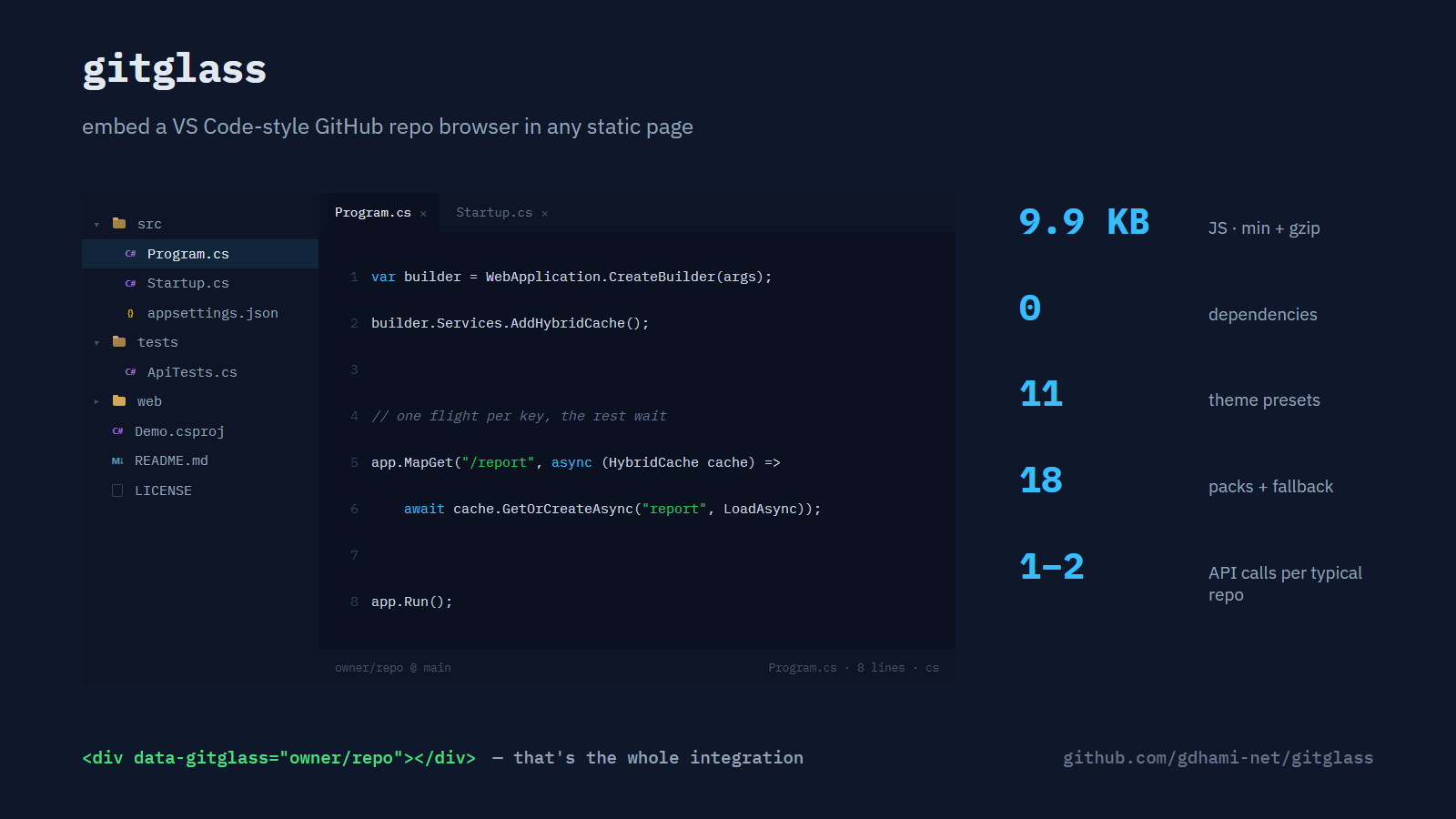
Every post on this blog ships with a small runnable repo. For a while the articles just linked to GitHub, and I could see the problem in my own behaviour: I'd open the link in a new tab, read the one file I cared about, and never come back to the article. I wanted the code inside the page — a file tree, tabs, proper highlighting — without sending anyone away.
The options I found were all the wrong shape. github.dev is a full editor and can't be embedded. The Monaco-based embeds weigh megabytes and bring their loader-and-worker plumbing with them. Gist embeds are flat — no folders, no tree — and a gist isn't your repository. StackBlitz boots a full in-browser dev environment, which is overkill when the reader only wants to read.
So I built the small thing. It's called gitglass, it's MIT licensed, and the viewer you can use a few paragraphs down is the library running in this page.
What you get for 10 KB
One host element, one attribute:
<link rel="stylesheet" href="gitglass.min.css">
<script src="gitglass.min.js"></script>

<div data-gitglass="owner/repo" data-gitglass-theme="github-dark"></div>
That renders a collapsible file tree with file-type icons, tabs you can open and close (middle-click works), a line-number gutter, a status bar, and a fullscreen toggle. Eleven named themes ship in a separate 1.1 KB gzipped stylesheet (one of them, vs-dark, is the built-in default under a name), and every semantically-loaded theme colour is a CSS variable if none of them fit your site. What isn't: file-type badge colours (fixed per language — except YAML, which tracks the theme's dim tone — override the classes if you must), two feedback accents (a close-hover red, a copied-check green), and a handful of neutral borders and shadows that don't change by theme on purpose. The folder glyph is a variable too, for what it's worth; it's just the same ochre in all eleven themes, since nobody's asked for more. The JS is 9.9 KB minified and gzipped; the required stylesheet adds 2.4 KB gzipped. No dependencies, no server of its own.
Programmatic use exists for frameworks, and the important part of it is the last line:
const view = GitGlass.mount(el, { repo: 'gdhami-net/gitglass', theme: 'github-dark', open: 'README.md' });
// later, when your component unmounts:
view.destroy();   // aborts in-flight fetches, removes the DOM
The React, Vue and Svelte wrappers are roughly ten lines of glue each; the Angular one is a proper component and still fits on one screen, because underneath it's plain DOM.
How it stays small
The trick is that GitHub already does the hard part. For anything shy of GitHub's cap on a single listing (a hundred thousand entries, or 7 MB of tree, whichever comes first), the Git trees endpoint returns every path in a repository in one request — minus a short, hand-picked list of image, font, archive, executable and media extensions the viewer filters before building the tree; it's not exhaustive against every binary format, just the common ones — and raw.githubusercontent.com serves file contents with permissive CORS headers. So the viewer normally makes one API call per repo. When no branch is given — the usual case — a failed main attempt retries against master before giving up, so that's two calls for a typo'd repo name, a private repo, or a repo that simply lives on master; pass a branch explicitly and there's no retry at all, just the one call, pass or fail. Either way it caches the tree in sessionStorage and fetches files one at a time as you click them. There's no backend because there's nothing for a backend to do.
Highlighting is where I made the deliberate trade. Real tokenizers are large; a keyword-level highlighter is close to a single regular expression per language — most packs match one pass of comment/string/number/keyword, CSS gets its own pass for selectors and properties instead, JSON and XML each get a shape suited to their syntax. The source is HTML-escaped first either way, and the output can only ever contain the library's own <span> elements. The test suite pushes hostile inputs — script tags, event handlers, SVG payloads — through every language pack to prove that stays true. Eighteen tiny language packs fit in the budget this way, plus a plain-text fallback for everything else — TypeScript and JavaScript share one, C and C++ another — covering everything from C# and SQL to Dockerfiles and YAML. Vue and Svelte files route through the TypeScript pack too, but the pack has no idea where <script> ends: template markup and <style> blocks get the same JS-flavoured treatment as the code, which is approximate at best. It won't colour a generic type parameter the way an IDE would. That's the cost of the size, and for reading code in a blog post I think it's the right side of the trade.
One detail I enjoyed: block comments cross line boundaries, but each rendered line has to be balanced HTML so a line can be highlighted on its own. The highlighter therefore closes any open token span at the end of a line and reopens it on the next — a few lines of code that let the line-based features below exist at all.
Snippets and guided tours
Two things came out of using it on my own posts.
The first is snippet mode. Add a path and a line range to the attribute and you get just that slice, with real line numbers and a link to those exact lines on GitHub:
<div data-gitglass="gdhami-net/gitglass#gitglass.js:L184-L205"></div>This one never touches the rate-limited REST API — it reads the raw file from raw.githubusercontent.com, which sits outside that budget with limits of its own — so it's the cheapest way to quote code that stays in sync with the repository instead of rotting in a screenshot.
The second is guided tours. Drop a JSON script inside the element and each step opens a file, highlights a range, and explains it. The reader walks the repo in the order you chose, with prev/next buttons and arrow keys, once you've clicked anywhere inside the viewer to give it focus. The embed above runs one over gitglass's own source.
The honest limits
It only works for public repositories, and GitHub allows sixty unauthenticated API requests per hour per IP address — an office behind one NAT shares that budget; file contents ride on raw.githubusercontent.com, outside that quota though not unlimited. One tree call per repo per session keeps the API side comfortable for a blog; a page embedding dozens of different repos would hit it. When the API side does, the viewer says so — with the reset time, read straight off the response headers — and links to the repo on GitHub rather than showing a blank box. Individual files always load from raw.githubusercontent.com, never the API, and that endpoint never sends those headers at all — a failed file just gets a message in the status bar, no link. It's read-only by design, because the moment it edits it has to compete with the things it was built to avoid.
Very large repositories are the other edge. Past GitHub's limit on a single tree listing, the viewer switches to listing folders on demand, one request the first time you open each folder — sessionStorage caches it after that — and the status bar says so; that is where the hourly budget starts to matter, and data-gitglass-lazy opts a known-huge repo into that mode from the start. Folders with hundreds of entries render a hundred rows at a time behind a "show more" link, so one giant directory can't freeze the page. And the one-attribute form only auto-detects main or master: a repo whose default branch is anything else needs the programmatic API with a branch option instead.
Use it, argue with it
The repo is at github.com/gdhami-net/gitglass: source, the minified builds, the theme presets, framework examples, and the tests. If you embed it somewhere, I'd genuinely like to see it. If you find a language pack that colours something badly, a pull request with the keyword list is about three lines.