An Angular upload progress bar that shows the server is still working
The bar fills up, hits 100%, and then nothing happens for a few seconds. The file has arrived and the server is scanning it or resizing it, but the page gives no sign of that. So the user clicks Upload again. This week I built a small demo to see how long that dead stretch really lasts, and what better bars look like in Angular 22.
What I ended up with: treat 100% as "sent", not "done". When the last byte leaves the browser, switch to a processing state that moves but shows no number, and keep it there until the server answers. How you draw that state is up to you, and I tried six ways. For a plain straight bar I'd use the native <progress> element, because the role and the value range come with it.
How long the bar sits at 100%
The demo's endpoint reads the whole upload, waits two seconds to stand in for the real work, then answers. In Angular 22 you need the XHR backend for upload progress, because the default fetch backend throws when you set reportUploadProgress. I covered that switch, withXhr(), in the post on getting upload progress back. With it in place, I timed the gap between the last UploadProgress event and the Response in the three browser engines Playwright ships.
The gap was about two seconds, as expected, but it didn't look the way I'd pictured. On localhost, Chromium and Firefox fired exactly one progress event for a 5 MB file, and it already said 100%. So the bar jumps straight to full and sits there. You get the frozen moment on the fastest connection there is.
Then I made the server read slowly, at about 4 MB a second. Now every engine reported 100% while the server was still reading. Firefox was about 450 ms early, Chromium about 350. So 100% means the bytes were handed to the network, and the server may not even have them yet.
Switching to processing on the last byte
A small service keeps a phase and a percent signal and sets them from the event stream. The line to look at is the loaded === total check, because that's where the number should go away:
this.sub = this.http
  .post(this.url(), body, { observe: 'events', reportUploadProgress: true })
  .subscribe({
    next: (event) => {
      if (event.type === HttpEventType.UploadProgress) {
        if (event.total) {
          this.percent.set(Math.round((100 * event.loaded) / event.total));
          // The last byte has left the browser. The server hasn't answered yet.
          if (event.loaded === event.total) this.phase.set('processing');
        } else {
          this.percent.set(null);
        }
      } else if (event.type === HttpEventType.Response) {
        this.phase.set('done');
      }
    },
    error: () => this.phase.set('failed'),
  });
In 22 the older reportProgress is deprecated in favour of reportUploadProgress. total was set on every progress event I saw, in every engine, for a FormData body. Angular's type marks it optional, though, so the bar needs an answer for when it's missing. Mine drops the number until the response. Without total it can't know the last byte has gone, so it has no business saying "processing" either.
Cancel calls unsubscribe(), and Angular's XHR backend aborts the request when you do. Cancelling during processing only stops the browser from waiting, though. The bytes have already left the browser, so if the scan should stop too, the endpoint has to watch for the disconnect (HttpContext.RequestAborted in ASP.NET Core).
Removing the value attribute
A <progress> with no value attribute is indeterminate. It matches :indeterminate, and the browser draws its own busy animation. I checked what binding [value] to null does, since that's the obvious thing to write. You get value="0" and an empty bar, in all three engines. Only removing the attribute works, which MDN's page on the element says too.
So the template binds the attribute, and a computed returns null while the server works:
// <progress max="100" aria-label="Upload" [attr.value]="value()" [attr.aria-valuetext]="text()">

// null removes the value attribute, which is what makes <progress> indeterminate.
readonly value = computed(() => {
  const phase = this.phase();
  if (phase === 'processing') return null;
  if (phase === 'done' || phase === 'failed') return 100;
  return this.percent();
});
Styling is where I got caught. With appearance: none the browser's busy animation is gone in all three engines, and Firefox even draws a bar with no value as full. So you draw the indeterminate state yourself, under :indeterminate, through the vendor pseudo-elements:
progress {
  --track: #e2e8f0;
  --fill: #0284c7;
  --fill-soft: #7dd3fc;
  appearance: none;
  height: 10px;
  border: 0;
  border-radius: 999px;
  overflow: hidden;
  background: var(--track);
}
progress::-webkit-progress-bar { background: var(--track); }
progress::-webkit-progress-value { background: var(--fill); }
progress::-moz-progress-bar { background: var(--fill); }

progress:indeterminate {
  background: repeating-linear-gradient(-45deg, var(--fill) 0 8px, var(--fill-soft) 8px 16px);
  background-size: 22.6px 100%;
  animation: stripe 0.7s linear infinite;
}
progress:indeterminate::-webkit-progress-bar { background: transparent; }
progress:indeterminate::-moz-progress-bar { background: transparent; }

@keyframes stripe { to { background-position: 22.6px 0; } }

@media (prefers-reduced-motion: reduce) {
  progress:indeterminate { animation: none; }
}
A div with role="progressbar" is easier to style, but then you write aria-valuenow yourself and keep it in step. I'd stay native for a straight bar, and use a div only for a shape <progress> can't take, like the ring further down.
Six looks for the same three states
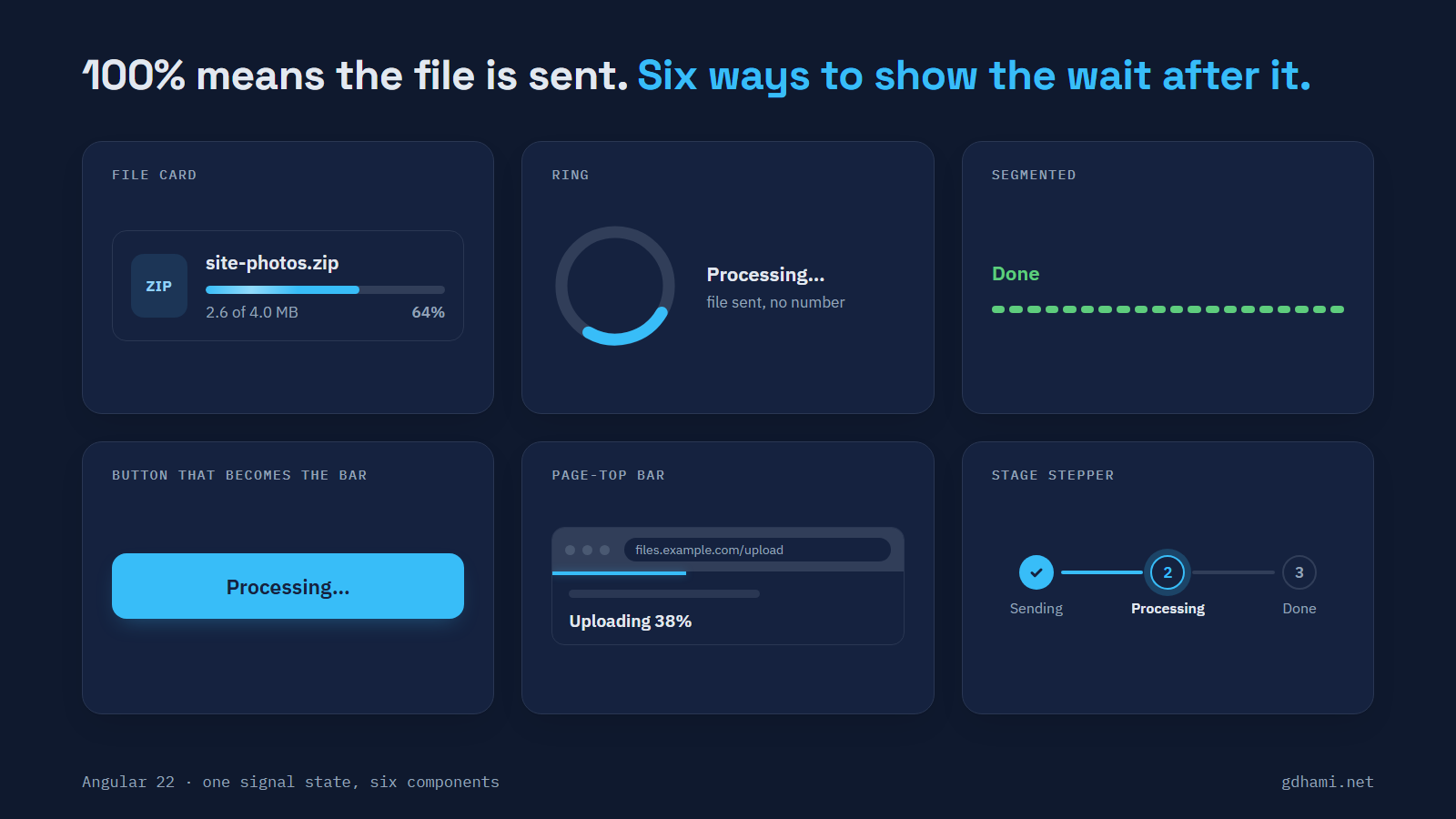
Then I wanted to see how far the look could go. I built six more components that take nothing but phase and percent. There's a file card with a slim gradient bar, a ring, a bar cut into twenty pills, an Upload button that fills up, a thin bar along the top of the page, and a three-step stepper. The render count followed the progress events, not the design, because they all read the same two signals.
Two things in the build were odd. The pills are one native progress element cut up by a CSS mask. WebKit drew a cut-off 21st pill until I made the width a whole multiple of 20 pixels. And the file card's shimmer lives on the vendor pseudo-elements, where it moves in all three engines but document.getAnimations() doesn't list it. A reduced-motion test built on that call passes without looking at it.
For a list of uploads I'd ship the file card, since the name, the size and the cancel sit right where you look. For a one-file form I'd use the button. I wouldn't put an upload on the page-top bar: nothing near the file tells you what's going on.
What I'd leave out
The progress events don't need throttling. With signals and OnPush, the default in Angular 22, Chromium and Firefox rendered about once per event, and WebKit's bursts got folded into frames Angular was drawing anyway.
I'd also skip speed and time left for files of a few megabytes. On localhost, Chromium and Firefox gave me a single event, so there was nothing to compute a speed from.
Each bar carries aria-valuetext: "Uploading 45%", "Processing", "Done", "Upload failed". I couldn't prove from Playwright what a screen reader announces, so I'm not claiming more than the attribute.
If your upload endpoint does any work after the body arrives, this is a small change: one loaded === total check and an attribute you remove. Then let the Upload button be the bar. It fills while the file goes, says "Processing…" until the answer, and ignores clicks the whole time. Use aria-disabled for that, because a disabled button dropped keyboard focus to the page body in all three engines. A second click sends nothing.