Wrap Tom Select in an Angular signal form without the change-event loop
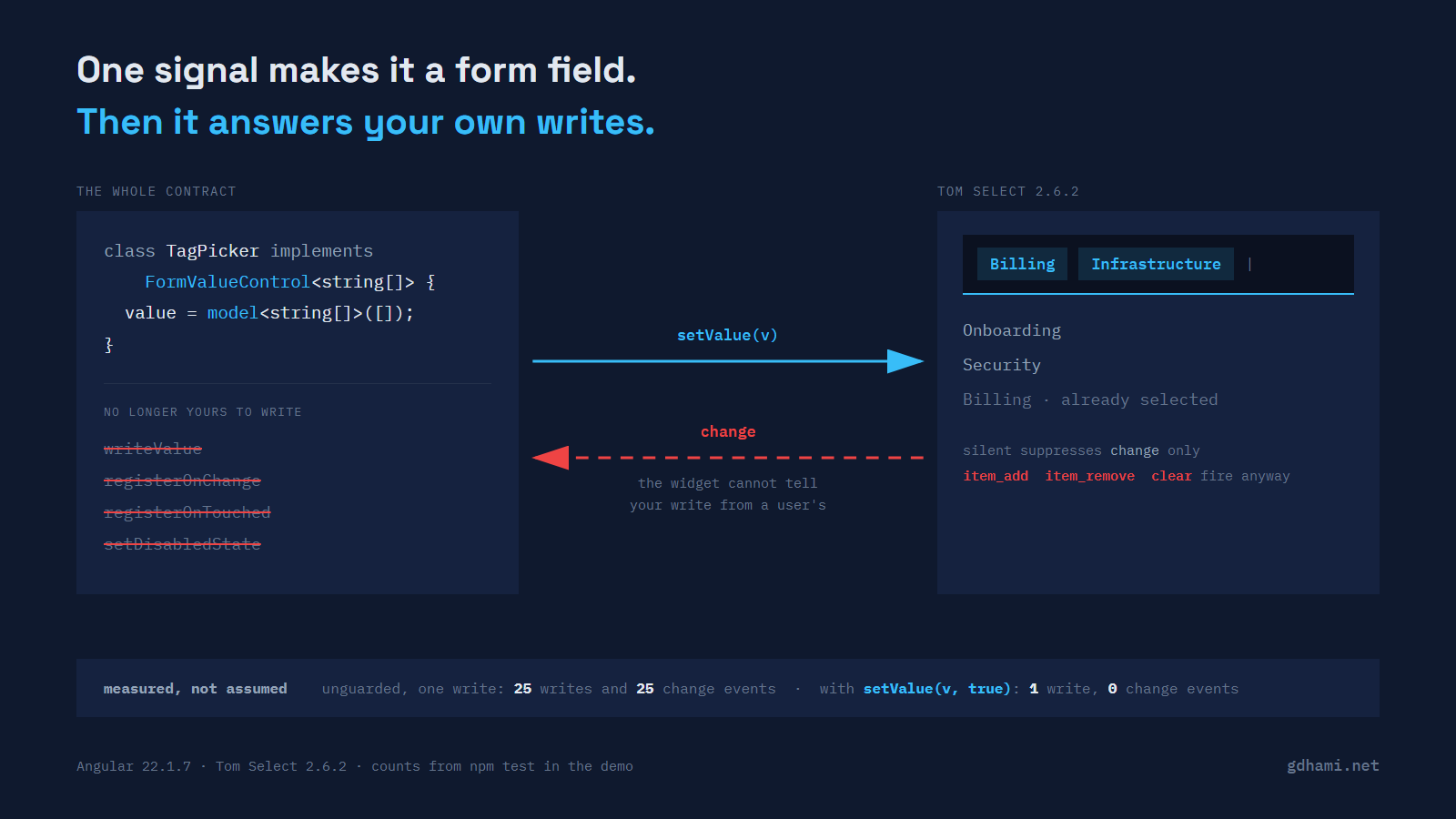
Tom Select is a searchable, tagging <select> control. It is a fork of selectize.js, and its own stated goals for the fork included decoupling from jQuery, which is what makes it the obvious thing to reach for if you want what select2 gave you without bringing jQuery along. Its README describes it as framework agnostic, which is accurate and also means there is no first-party Angular package for it. I did not find a community one on npm either, though there is a Stimulus wrapper, which tells you something about who has been reaching for it. I gzipped the minified builds in node_modules at level 9: 14,785 bytes for tom-select.base.min.js and 17,603 for the complete build with the plugins, on version 2.6.2.
Angular 22 makes the wrapping part much shorter than it used to be. A signal forms custom control implements FormValueControl<T>, and the only member that interface requires is a value model signal. Everything else on it is optional (it also reserves checked for checkbox controls, which a value control has to leave undefined), and the [formField] directive fills in whichever pieces you do declare:
export class TagPicker implements FormValueControl<string[]> {
  readonly value = model<string[]>([]);
  readonly disabled = input(false);
  readonly touch = output<void>();
}
That replaces writeValue, registerOnChange, registerOnTouched and setDisabledState for the signal-forms case. ControlValueAccessor is not deprecated in 22.1.7, and reactive and template-driven forms still go through it. The FormField directive's own API docs list a component providing a ControlValueAccessor as one of the three things it can bind to, with the note that it is there for backwards compatibility with reactive forms and that the other two are preferred.
So the control's own code has two jobs left. Push the form's value into the widget, and push the widget's value back into the form. Those two lines are where the trouble starts.
Tom Select does not distinguish the two directions
When a user picks an option from the dropdown, Tom Select's onOptionSelect ends in addItem(value), and addItem fires the change event. When your own code calls setValue(['infra']), that goes through the same internals and fires the same change event. From inside a listener the two are indistinguishable, because there is nothing on the event to tell them apart — change is emitted with the new value and nothing else.
Wire that up naively and you get the shape below, which is what I wrote first:
afterNextRender(() => {
  const select = new TomSelect(this.host().nativeElement, { /* … */ });
  select['on']('change', () => {
    this.value.set([...(select.getValue() as string[])]);
  });
  this.select = select;
});

effect(() => {
  const next = this.value();
  this.select?.setValue([...next]);
});
(The bracket access on on is not a typo. TomSelect picks up its emitter methods from a mixin base declared with an index signature, so under noPropertyAccessFromIndexSignature, which the Angular CLI writes into every new strict workspace, select.on(...) is TS4111 and select['on'](...) compiles.)
Worth saying plainly, because the guide I have been citing says the opposite: under Design considerations, Angular's custom-control page states that "controls should not register their own effects for state management" and points at transformedValue() instead. That advice is about transforming a value on its way through the form, and this is not that. Tom Select is not a value to be transformed; it is a live object that has to be told, by a method call, that the value changed. There is no declarative way to push a value into it, so something has to run on change, and an effect is what runs. If your control only needs to reshape a value, follow the guide and skip the effect entirely — this shape is for the case where the control is a piece of someone else's imperative code.
One write from the form now sets off a round trip that has no reason to stop. The effect writes into the widget, the widget emits change, the handler writes the new array into the model, the model is a different array than the one before it, so the effect runs again. An Angular signal compares with Object.is unless you give it your own equal, and a fresh array is a new reference, so that comparison is false every time.
I did not want to guess how far that goes, so the demo counts it. The naive control carries a write cap purely so the test process terminates, and the cap turns out to be the only thing that ends it. Every block of test output below is real npm test output with the runner's project prefix and its timing column removed:
✓ the unguarded wrapper, on an array value > answers its own change event once per write, and only the cap stops it
✓ the unguarded wrapper, on an array value > runs as many laps as the cap allows, so the cap is the only thing ending it
At a cap of 25 it makes 25 writes and hears 25 change events. At a cap of 1,000 it makes 1,000 and hears 1,000. Angular never complains, which surprised me; the effect re-running is legal work, so there is no infinite-change-detection error to catch. In a browser this is a locked tab rather than a stack trace. I measured it under jsdom through the Angular unit-test builder and have not repeated the browser case.
Why the array value is the bad case
Change the control to a single-value select and the same wiring settles down. getValue() on a non-multiple select returns a string, the string you write back is Object.is equal to the one already in the model, and the signal drops the second lap:
✓ the unguarded wrapper, on a single string value > stops after one lap because Object.is holds, but the event still firedThe change event still fired. Something downstream still believes the user just edited this field, and you are one refactor from multi-select away from the unbounded version. I would rather write the guard than depend on a value type staying primitive.
There is a second reason the multi case is worse. On a <select multiple>, getValue() returns Tom Select's own items array rather than a copy, so handing it straight to the form gives the form a reference the widget keeps mutating. The copy in the handler is not optional, and the copy is exactly what breaks reference equality.
The argument that fixes it
Tom Select's own methods take a silent flag as their last argument, and the API docs describe it as preventing the change event. In the source, setValue, addItem and removeItem thread it through to updateOriginalInput, which is where change is actually emitted, and clear skips that call outright when it is silent:
if (self.isSetup) {
    if (!opts.silent) {
        self.trigger('change', self.getValue() );
    }
}
So the form-to-widget direction becomes setValue(value, true) and the loop has nowhere to start. Tom Select's own sync() does the same thing, with a comment that says why:
self.setValue(settings.items||[],true); // silent prevents recursionI pair that with an equality check before writing, which costs one line and covers the other direction. After a user pick, the model changes, the effect runs, and the check sees that the widget already holds what the form is about to hand it:
private pushToWidget(next: readonly string[]): void {
  const select = this.select;
  if (!select) return;
  const current = select.getValue() as string[];
  if (current.length === next.length && current.every((v, i) => v === next[i])) return;
  this.writes++;
  select.setValue([...next], true);
}
Either guard on its own stops the runaway. Only the pair gives you a widget that is never written to redundantly and never emits an edit the user did not make. The demo asserts both halves:
✓ the guarded wrapper > writes into the widget once and hears nothing back
✓ the guarded wrapper > does not write back into the widget after a user pick
What silent actually covers
This is the part I got wrong the first time, and the docs do not spell it out. silent gates the change event in two places: updateOriginalInput guards the emit at line 2308, and clear skips calling updateOriginalInput at all at line 2401. So it suppresses change and nothing else. item_add, item_remove and clear are triggered unconditionally, on lines 2037, 2087 and 2402 of src/tom-select.ts in 2.6.2. A silent setValue that replaces one tag with another still fires item_remove, then clear, then item_add:
✓ the silent flag > suppresses change and the native events
✓ the silent flag > does not suppress item_add, item_remove or clear
✓ the guarded wrapper > still sees item_add on a silent write, because silent only covers change
item_add carries the value that was added, which makes it a tempting hook to write back from. If your write-back hangs off item_add, the silent argument buys you nothing and you are back to the loop with the equality check as your only guard. (I looked before claiming anyone does it: no official example page writes back from item_add. Most register no listeners at all, and the one page that does register item_add registers nine other callbacks beside it, because it is an event logger.)
The other thing change drags along is easy to miss. Tom Select subscribes to its own change event during setup, and its handler re-dispatches native input and change events onto the original <select> element:
onChange() {
  triggerEvent(this.input, 'input');
  triggerEvent(this.input, 'change');
}
Those events bubble. Anything bound further up the template that listens for a change on a form control will see a programmatic write as a user edit unless you pass silent. That includes analytics listeners and dirty-tracking wrappers, which is a fun class of bug to find later.
One more piece of Tom Select behaviour is worth knowing before you build anything clever on top of change: writing the value that is already selected still fires it. setValue clears and re-adds regardless, and the coalescing in debounce_events reduces a multi-item write to a single change rather than suppressing it:
✓ a programmatic write > fires change even when the value it writes is the value already there
✓ a programmatic write > coalesces a multi-item write into one change event
The rest of the field
Once the value is behaving, the other form state is short. disabled arrives as an input, and the widget has methods that match, so an effect is enough:
effect(() => {
  const off = this.disabled();
  const select = this.select;
  if (!select) return;
  if (off) select.disable();
  else select.enable();
});
Touched runs the other way. touched is an input the directive pushes into you, and the thing you emit is the touch output, which the docs are explicit about tying to blur rather than focus. Tom Select emits its own blur event from onBlur, so the wiring is one line:
select['on']('blur', () => this.touch.emit());With a disabled() rule in the form schema, the demo asserts that the state reaches all the way down to the original element:
✓ the control is a real field in the form > marks the field touched when the widget loses focus
✓ the control is a real field in the form > disables the widget when the schema disables the field
Worth saying plainly: none of this is Tom Select being badly behaved. A widget that fires change whenever its value changes is doing the honest thing, and it has no way to know whether this particular write came from the framework that owns it or from a person. The distinction lives in your wrapper, or it does not exist.
The demo is at github.com/gdhami-net/tom-select-angular-demo. npm test runs all 20 tests, the ones quoted above and the library-level ones that need no Angular at all, and npm start puts the guarded and unguarded controls on the same page with live lap counters, so you can press the button and watch one of them run twenty-five times.