What to do when .NET 10 warns about packages you never installed
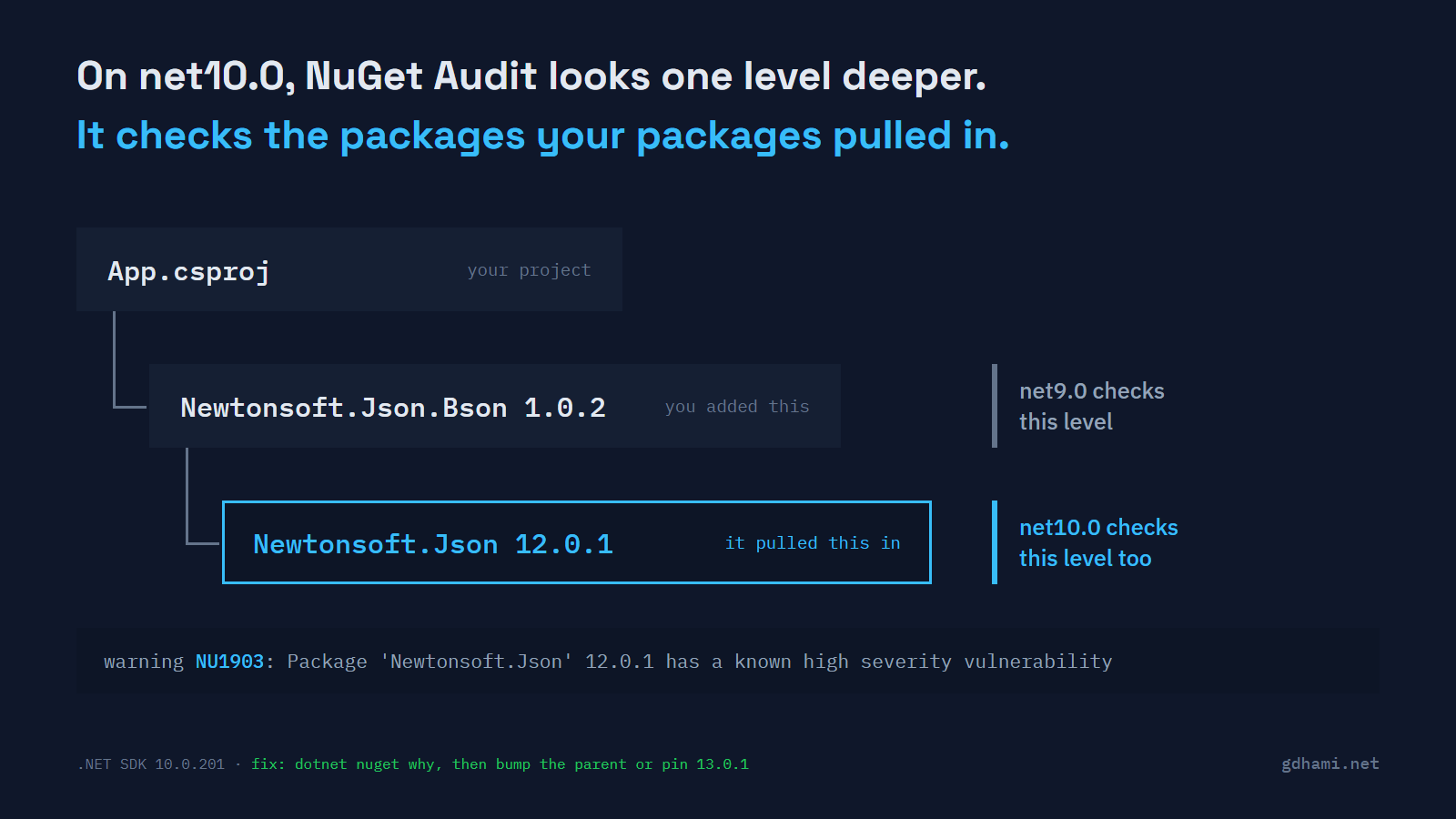
This is what dotnet build printed after I changed one line in a project file. The target framework went from net9.0 to net10.0:
App.csproj : warning NU1903: Package 'Newtonsoft.Json' 12.0.1 has a known high severity vulnerability, https://github.com/advisories/GHSA-5crp-9r3c-p9vrThe project doesn't reference Newtonsoft.Json. It references Newtonsoft.Json.Bson 1.0.2, which depends on Newtonsoft.Json 12.0.1 or later, so restore picks 12.0.1. On net9.0 the same build is clean. What changed is NuGet Audit, the check restore runs against known advisories. For projects that target .NET 10 or later, NuGetAuditMode now defaults to all, so it checks the packages your packages pulled in too. The breaking change notice says so in two lines.
I think that's the right default, and I wouldn't switch it back. The advisory is a real one: deeply nested JSON can crash the parser, and 13.0.1 fixes it. The old DLL ships with your app whether you typed its name or not. So the work after the upgrade is to find who pulled each package in, update that, and delete a few references the new SDK calls useless.
Finding the package that pulled it in
dotnet nuget why answers that. Give it the project and the package name, and it prints every path from your references down to it:
$ dotnet nuget why App.csproj Newtonsoft.Json
Project 'App' has the following dependency graph(s) for 'Newtonsoft.Json':

  [net10.0]
  └── Newtonsoft.Json.Bson (v1.0.2)
      └── Newtonsoft.Json (v12.0.1)
In a bigger app the tree has more branches, one for each parent. The line right under the framework is a package you actually control. The NuGet auditing docs say to try updating that one first, and only add the vulnerable package as a direct reference when no fixed parent exists.
What dotnet package update --vulnerable writes
.NET 10 also ships a command that fixes these for you, so I ran it next. I expected it to follow that advice and move Bson to 1.0.3, which depends on the fixed Newtonsoft.Json. It printed Updating Newtonsoft.Json 12.0.1 to 13.0.1. and added one line to the project file:
   <ItemGroup>
+    <PackageReference Include="Newtonsoft.Json" Version="13.0.1" />
     <PackageReference Include="Newtonsoft.Json.Bson" Version="1.0.2" />
   </ItemGroup>
The parent didn't move. The command made the transitive package a direct reference, at 13.0.1, even though 13.0.4 is out. That part is documented: --vulnerable picks the lowest higher version with no known advisory. The warning was gone, so it works.
I still wouldn't take it as the default fix. That new line is yours now, nothing in the file says why it's there, and sooner or later someone will be scared to delete it. Running dotnet package update Newtonsoft.Json.Bson moved the parent to 1.0.3 instead, and the warning went away with no extra line. So I'd bump the parent whenever a fixed one exists, and pin only when it doesn't, with a comment naming the package that needed it.
One more catch. With TreatWarningsAsErrors on in the project, --vulnerable fixed nothing. It stopped with error: Restore failed and Unhandled exception: Specified method is not supported., and the file stayed as it was. The command's docs know warnings as errors can block it, and they suggest a condition on that property while you run the update. It's a bit absurd that the fix is blocked by the warning it fixes, but the workaround is there.
The old System packages go quiet
Not every change on .NET 10 adds warnings. Package pruning is on by default for projects that target net10.0. It takes packages the framework already provides out of the graph before the audit looks. I checked it with NETStandard.Library 1.6.1, the old package that drags in dozens of System.* 4.3.0 packages. On net8.0 with the audit set to all, it warned about System.Net.Http and System.Text.RegularExpressions. On net10.0 there was no warning, and project.assets.json listed 2 libraries where net8.0 had 73.
Pruning has a second effect, and this one can break a build. If you reference such a package directly, say System.Text.Json 9.0.0 on net10.0, restore raises NU1510: "PackageReference System.Text.Json will not be pruned. Consider removing this package from your dependencies, as it is likely unnecessary." With TreatWarningsAsErrors that's a failed build. Delete the reference. The build already ignores that package's DLLs on .NET 10, and the NU1510 notice shows a conditional reference for projects that also target older frameworks.
Keeping the audit on in CI
The quick way to a green build is to set NuGetAuditMode back to direct. Adding NU1903 to NoWarn works too. Both switch off far more than one warning, including the next advisory nobody has seen yet. When a package really has no fixed version, I'd suppress that one advisory with a NuGetAuditSuppress item holding the advisory URL. Add a comment that says why and when to look again. That's the honest version: it names the risk you accepted, and every other advisory still shows up.
For CI I'd fail the build on high and critical advisories and keep low and moderate as warnings. In the demo this line turned the warning above into a failed build:
<WarningsAsErrors>$(WarningsAsErrors);NU1903;NU1904</WarningsAsErrors>A warning in a CI log is something nobody reads, and the fix is usually one line in a project file. The cost is that a new advisory can turn main red overnight with no commit, so someone has to own that on the day. I wouldn't use NuGetAuditLevel for this. Set to critical, it removed the high advisory from the output altogether.
Once a project is on net10.0, treat each new NU1903 or NU1904 like a bug report, because the package it names ships with your app. dotnet nuget why shows where it came from, and a bump on the parent is the fix I'd try first.