What decides whether SearchValues<string> beats a Contains loop
Checking a chunk of text for any of a few dozen keywords almost always starts out as a loop:
foreach (var keyword in _keywords)
{
    if (text.Contains(keyword, StringComparison.Ordinal)) return true;
}
return false;
Forty keywords, forty walks over the same text. .NET 9 added SearchValues<string>, which turns the keyword list into one prepared object and then scans the text a single time:
private static readonly SearchValues<string> Markers =
    SearchValues.Create(["password", "secret", "token", /* ... */], StringComparison.Ordinal);

public static bool ContainsAny(string text) => text.AsSpan().ContainsAny(Markers);
I moved a small filtering helper onto that in a service going to .NET 10 and expected a clean win with a number I could put in a commit message. The measurement gave me two numbers pointing in opposite directions, and the rest of this post is the reason.
What the benchmark says
The demo scans deterministic filler text for markers that suggest a request body is carrying a credential: password, secret, connectionstring, pwd=, mongodb://, thirty-five more of that kind. Two list sizes, the first eight and all forty. No keyword is present in the text, which is the case a filter spends nearly all of its time on, and the case where nothing gets to stop early.
BenchmarkDotNet v0.15.8, Windows 11 (10.0.26200.9457/25H2/2025Update/HudsonValley2)
Intel Core Ultra 9 285HX 2.80GHz, 1 CPU, 24 logical and 24 physical cores
.NET SDK 10.0.201
  [Host]     : .NET 10.0.5 (10.0.5, 10.0.526.15411), X64 RyuJIT x86-64-v3
  Job-YFEFPZ : .NET 10.0.5 (10.0.5, 10.0.526.15411), X64 RyuJIT x86-64-v3

IterationCount=10  WarmupCount=3

| Method         | Keywords | TextLength | Mean         | Error        | StdDev     | Ratio | RatioSD |
|--------------- |--------- |----------- |-------------:|-------------:|-----------:|------:|--------:|
| ContainsLoop   | 8        | 1000       |    230.91 ns |     6.092 ns |   4.030 ns |  1.00 |    0.02 |
| SearchValues   | 8        | 1000       |     42.73 ns |     0.046 ns |   0.030 ns |  0.19 |    0.00 |
| GeneratedRegex | 8        | 1000       |  1,940.62 ns |     1.235 ns |   0.817 ns |  8.41 |    0.14 |
|                |          |            |              |              |            |       |         |
| ContainsLoop   | 8        | 20000      |  4,186.54 ns |   117.795 ns |  77.914 ns |  1.00 |    0.03 |
| SearchValues   | 8        | 20000      |    845.98 ns |     0.955 ns |   0.632 ns |  0.20 |    0.00 |
| GeneratedRegex | 8        | 20000      | 38,576.19 ns |    26.553 ns |  15.801 ns |  9.22 |    0.16 |
|                |          |            |              |              |            |       |         |
| ContainsLoop   | 40       | 1000       |  1,185.33 ns |     3.400 ns |   1.778 ns |  1.00 |    0.00 |
| SearchValues   | 40       | 1000       |  1,397.34 ns |    34.768 ns |  22.997 ns |  1.18 |    0.02 |
| GeneratedRegex | 40       | 1000       |  4,172.16 ns |     5.883 ns |   3.501 ns |  3.52 |    0.01 |
|                |          |            |              |              |            |       |         |
| ContainsLoop   | 40       | 20000      | 21,787.35 ns |   248.867 ns | 164.610 ns |  1.00 |    0.01 |
| SearchValues   | 40       | 20000      | 26,788.34 ns | 1,388.863 ns | 918.647 ns |  1.23 |    0.04 |
| GeneratedRegex | 40       | 20000      | 90,613.00 ns |   388.961 ns | 231.465 ns |  4.16 |    0.03 |
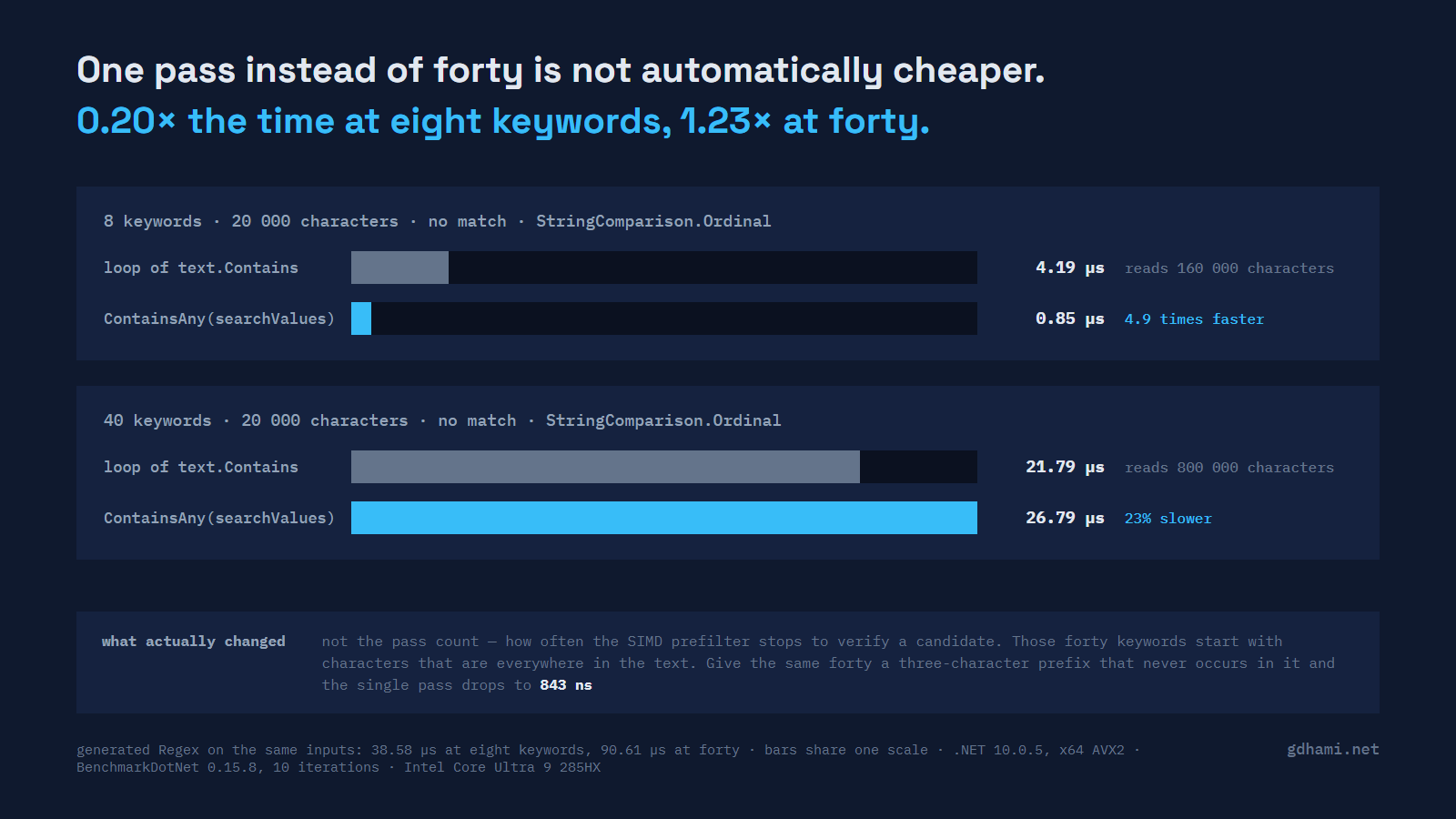
At eight keywords the single pass does what you'd hope: a fifth of the time, at both text sizes. At forty it loses. The margin is small, around a quarter on the longer text, and it came out that way on every run I made.
Absolute numbers on a laptop drift. That 40-keyword SearchValues figure reads 26.79, 27.08 and 26.36 microseconds across three of the tables in the demo's results/ folder, against loop figures of 21.79, 21.16 and 21.19, so read the Ratio column; the nanoseconds will be different on your machine.
Why forty keywords cost more than eight
The usual explanation for the loop being slow is that it reads 800 000 characters to answer a question about 20 000. That's true, but it assumes every character costs the same, and here it doesn't.
string.Contains under StringComparison.Ordinal is not a character-at-a-time walk. It searches for candidate positions a vector at a time and only compares a full keyword where a candidate shows up, so over this filler the loop gets through its 800 000 characters at roughly 0.027 ns each. The SearchValues pass gets through its 20 000 at roughly 1.3 ns each. One pass only wins while that per-character gap stays smaller than the pass-count gap.
Which puts the question on the single pass. SearchValues.Create doesn't return one general-purpose scanner; it picks an implementation from the keyword set you hand it. On .NET 10.0.5, x64 with AVX2, GetType().Name on what comes back reads AsciiStringSearchValuesTeddyNonBucketizedN3`2 for the eight keywords and AsciiStringSearchValuesTeddyBucketizedN3`2 for the forty. Those names are internal and I wouldn't build anything on them, but they say what is going on: a Teddy-style prefilter that looks for the keywords' first three characters with SIMD, then verifies every candidate the slow way. Forty English-looking keywords put their three-character fingerprints (thirty-four distinct ones) into that filter, and English-looking filler sets them off constantly.
So the keyword count is a proxy for the thing that actually costs. Same forty keywords, same text, same scanners, with the only change being a three-character prefix on every keyword that never occurs in the text:
| Method       | Prefixes | Mean        | Error       | StdDev      | Ratio | RatioSD |
|------------- |--------- |------------:|------------:|------------:|------:|--------:|
| ContainsLoop | absent   | 18,295.3 ns |    58.09 ns |    38.42 ns |  1.00 |    0.00 |
| SearchValues | absent   |    843.3 ns |     0.54 ns |     0.36 ns |  0.05 |    0.00 |
|              |          |             |             |             |       |         |
| ContainsLoop | common   | 21,158.2 ns |   392.36 ns |   259.52 ns |  1.00 |    0.02 |
| SearchValues | common   | 27,084.5 ns | 2,171.41 ns | 1,436.25 ns |  1.28 |    0.07 |
Same count, same code, and now twenty-two times faster instead of a quarter slower. What changed is how often the prefilter has to stop and check, and that is a property of the keywords against the text you happen to be scanning. The eight-versus-forty result reproduces every time, but the count isn't what's driving it.
Where the two cross over
Eight keywords and forty are the two ends. Stepping through the same list in eights, on the same 20 000 characters:
| Method       | Keywords | Mean        | Error     | StdDev    | Ratio | RatioSD |
|------------- |--------- |------------:|----------:|----------:|------:|--------:|
| ContainsLoop | 8        |  4,065.0 ns |  48.18 ns |  31.87 ns |  1.00 |    0.01 |
| SearchValues | 8        |    846.0 ns |   0.34 ns |   0.18 ns |  0.21 |    0.00 |
|              |          |             |           |           |       |         |
| ContainsLoop | 16       |  8,317.1 ns | 113.12 ns |  74.82 ns |  1.00 |    0.01 |
| SearchValues | 16       |  1,620.0 ns |   2.62 ns |   1.73 ns |  0.19 |    0.00 |
|              |          |             |           |           |       |         |
| ContainsLoop | 24       | 12,323.6 ns |  88.26 ns |  52.52 ns |  1.00 |    0.01 |
| SearchValues | 24       |  5,084.9 ns |  11.29 ns |   7.47 ns |  0.41 |    0.00 |
|              |          |             |           |           |       |         |
| ContainsLoop | 32       | 16,451.3 ns | 315.06 ns | 208.39 ns |  1.00 |    0.02 |
| SearchValues | 32       | 15,931.3 ns | 859.61 ns | 568.58 ns |  0.97 |    0.03 |
|              |          |             |           |           |       |         |
| ContainsLoop | 40       | 21,192.1 ns | 376.45 ns | 249.00 ns |  1.00 |    0.02 |
| SearchValues | 40       | 26,359.9 ns | 888.34 ns | 587.58 ns |  1.24 |    0.03 |
Sixteen keywords is still 0.19 of the loop. Twenty-four is 0.41. Thirty-two is level, and forty is behind. So on this text the two swap places somewhere between thirty-two and forty keywords, and that point belongs to this keyword list and this filler. A different list crosses somewhere else, or never.
The prefilter the Regex generator picks
A literal alternation is the other common way to write this, and since .NET 7 [GeneratedRegex] is the way to write that. The pattern has to be a compile-time constant, which is why the demo carries one method per keyword count:
[GeneratedRegex("password|secret|token|apikey|api_key|private key|credential|passwd",
    RegexOptions.CultureInvariant)]
public static partial Regex Ordinal8();
On the 20 000-character text that ordinal pattern took 38.58 µs, nine times the Contains loop. The same eight keywords with RegexOptions.IgnoreCase added took 1.86 µs. Twenty-one times faster with a looser match to satisfy, which makes no sense until you read the generated code. EmitCompilerGeneratedFiles in the csproj drops it under obj/, and the ignore-case version opens like this:
// The pattern has multiple strings that could begin the match. Search for any of them.
// If none can be found, there's no match.
int i = inputSpan.Slice(pos).IndexOfAny(Utilities.s_indexOfAnyStrings_OrdinalIgnoreCase_5C81…);
internal static readonly SearchValues<string> s_indexOfAnyStrings_OrdinalIgnoreCase_5C81… =
SearchValues.Create(["password", "secret", "to", "api", "private ", "credenti", "passwd"],
StringComparison.OrdinalIgnoreCase);Regex is using SearchValues<string> itself, which the .NET 9 what's-new page mentions in one line and which is more convincing sitting in your own obj folder. For the ordinal pattern the optimiser picked something weaker instead:
// The pattern matches a character in the set [aeknw] at index 4.And for the forty-keyword ordinal pattern, weaker again:
// The pattern begins with a character in the set [a-cei-kmpr-vx].That set matches most letters in English prose, so the prefilter only rejects the spaces and the rarer letters: about half of all positions on this filler still go through to full verification. 90.61 µs. I haven't found a documented reason why the ordinal patterns miss the multi-string prefilter that the eight-keyword ignore-case one gets (the forty-keyword ignore-case pattern falls back to a character set too), and I'd treat it as an optimiser detail that could change in a servicing release. So the generated matcher's speed depends mostly on which prefilter it picked for your pattern, and the pick is in a file you can open.
Scanning without case sensitivity
SearchValues.Create takes StringComparison.OrdinalIgnoreCase as well, and the full grid under it is in the demo's results/miss-ignorecase.md. The shape is the same on the 20 000-character text: 0.18 of the loop's time at eight keywords, 1.29 at forty. Both sides get slower under ignore-case, the loop by more at eight keywords and the single pass by more at forty.
One thing that does not carry over is the meaning of "ignore case". OrdinalIgnoreCase and RegexOptions.IgnoreCase are different relations, and U+212A KELVIN SIGN is where they part company on this keyword list: text containing api + U+212A + ey matches apikey for the regex and doesn't for SearchValues or for string.Contains. The forty-keyword ignore-case pattern's leading set even has the thing in it, written as the escape at the end: [A-CEI-KMPR-VXa-cei-kmpr-vx\u212A]. Whether that matters depends on where the text comes from.
Build cost and the static field
SearchValues.Create is meant to run once and live in a static field. Here is what happens when it doesn't:
| Method                         | Mean        | Error       | StdDev    | Ratio | RatioSD | Gen0   | Gen1   | Allocated | Alloc Ratio |
|------------------------------- |------------:|------------:|----------:|------:|--------:|-------:|-------:|----------:|------------:|
| Create_8_keywords              |    627.7 ns |     6.07 ns |   3.61 ns |  0.03 |    0.00 | 0.1440 |      - |    2712 B |          NA |
| Create_40_keywords             |  4,186.8 ns |    66.96 ns |  44.29 ns |  0.20 |    0.00 | 0.5341 | 0.0076 |   10144 B |          NA |
| New_Regex_Compiled_40_keywords | 38,555.3 ns | 1,301.05 ns | 680.48 ns |  1.85 |    0.03 | 7.3242 | 0.7324 |  140288 B |          NA |
| Create_then_scan_20k           | 29,473.4 ns |   430.02 ns | 284.43 ns |  1.42 |    0.02 | 0.5188 |      - |   10144 B |          NA |
| ContainsLoop_20k               | 20,786.0 ns |   272.18 ns | 180.03 ns |  1.00 |    0.01 |      - |      - |         - |          NA |
Building the forty-keyword set costs 4.19 µs and allocates 10 144 bytes, which is about a fifth of what a full loop scan of the same text costs. Move the build inside the call and the ratio goes from about 1.2 to 1.42, with that allocation landing on every request where the cached version allocates nothing at all. Compiling the same alternation at runtime with RegexOptions.Compiled costs 38.56 µs and 140 288 bytes, which is the work [GeneratedRegex] exists to move to build time.
Getting the matched keyword back
IndexOfAny returns a position, not a keyword. For a yes/no filter that's fine; the moment you want to log which marker tripped, you need a second look at the place it found:
public (int Index, string? Keyword) FirstMatch(string text)
{
    var at = text.AsSpan().IndexOfAny(_values);
    if (at < 0) return (-1, null);

    foreach (var keyword in _keywords)
    {
        if (text.AsSpan(at).StartsWith(keyword, _comparison)) return (at, keyword);
    }
    throw new InvalidOperationException($"IndexOfAny reported a match at {at} that no keyword claims.");
}
That walks the list once at one position instead of walking the text once per keyword, so it costs almost nothing next to the scan. It assumes no keyword in the list is a prefix of another, which holds for this list; with such a pair you'd keep the longest match.
There's a related trap in the loop version. The obvious foreach returns the first keyword in the list that is present, which is a different answer from the first keyword in the text. If a log line says which marker was found, those two give you different log lines for the same input.
Comparisons SearchValues accepts
Two, and passing anything else throws rather than falling back:
System.ArgumentException: SearchValues<string> supports only StringComparison.Ordinal
and StringComparison.OrdinalIgnoreCase. (Parameter 'comparisonType')
So a culture-sensitive keyword list is out, and that's the right call given what the SIMD paths do. One smaller edge: an empty string in the list is accepted without complaint, and then every text you hand it reports a match at position 0. That is easy to produce from a keyword file with a blank line in it.
Hits, near the front and near the back
Everything above is the miss case. When a keyword is present the loop gets to stop early, and where in the text it sits matters to one side only. With the last of the forty keywords planted at 2% and at 98% of the same 20 000 characters:
| Method         | Position | Mean        | Error       | StdDev      | Ratio | RatioSD |
|--------------- |--------- |------------:|------------:|------------:|------:|--------:|
| ContainsLoop   | 0.02     | 20,425.7 ns |   152.58 ns |   100.93 ns |  1.00 |    0.01 |
| SearchValues   | 0.02     |    599.5 ns |     8.38 ns |     5.54 ns |  0.03 |    0.00 |
| GeneratedRegex | 0.02     |  1,719.2 ns |     1.34 ns |     0.89 ns |  0.08 |    0.00 |
|                |          |             |             |             |       |         |
| ContainsLoop   | 0.98     | 20,797.6 ns |   266.84 ns |   176.50 ns |  1.00 |    0.01 |
| SearchValues   | 0.98     | 25,125.7 ns | 1,244.28 ns |   823.01 ns |  1.21 |    0.04 |
| GeneratedRegex | 0.98     | 88,899.3 ns | 1,667.79 ns | 1,103.14 ns |  4.27 |    0.06 |
The loop sits between 20.4 and 20.8 µs either way. The keyword that is present is the last of the forty, so the loop walks the whole text thirty-nine times before it reaches the one that matches, and where the match sits makes no difference to it. IndexOfAny stops at the first match in the text, so it pays for 2% of the characters in one case and 98% in the other. The early exit belongs to the single pass; the loop only gets one when the keyword it happens to try first is the one that is there.
Where I would use it
For eight or ten keywords over ordinary prose, SearchValues<string> is what I'd reach for: five times faster here, one line at the call site, and the keyword list stays a list instead of turning into a pattern you have to escape. Past that I'd measure on my own text before believing either version, because the crossover moved with the keyword set and not with the count.
Where the count stops mattering is a keyword set that looks nothing like the text: a URI scheme, an ssh-rsa prefix, a marker ordinary prose never produces. The demo's control for that is crude, the same forty keywords with three characters glued on the front that the filler never contains, and it went through the same 20 000 characters in 843 ns against the loop's 18.3 µs, twenty-two to one at forty keywords.
The demo is at github.com/gdhami-net/searchvalues-keyword-scan. dotnet test runs the suite that holds the three scanners to the same answers, and dotnet run -c Release --project KeywordScan.Benchmarks -- --filter '*MissOrdinalBenchmarks*' reproduces the first table. Every summary table quoted above is in results/ with the machine header BenchmarkDotNet printed.