TypeScript 6 stops loading @types globally: what breaks on upgrade
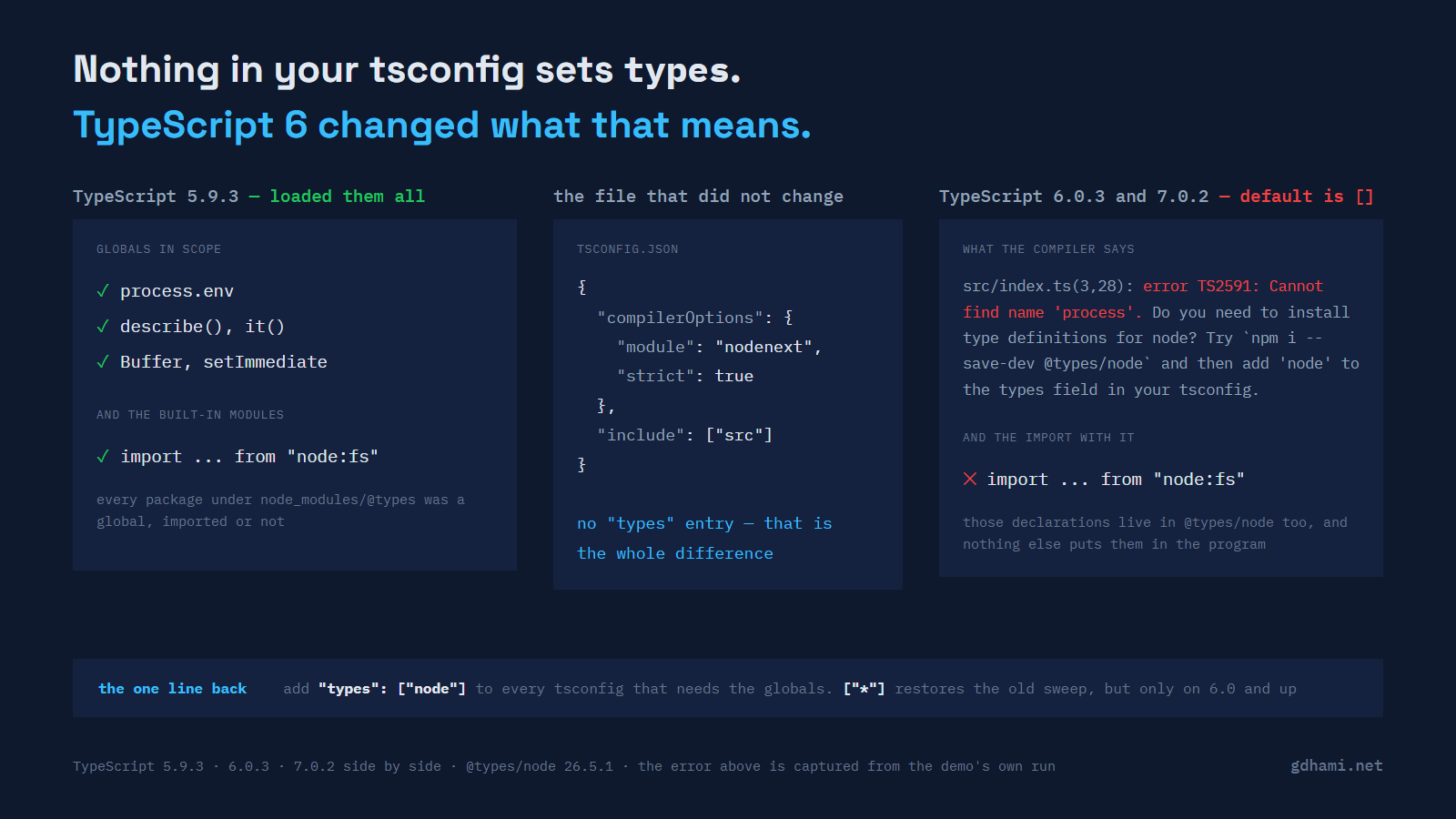
The upgrade was two lines: a version bump in one package.json and the lockfile that followed it. The build then failed in a file nobody had touched in months, on a line that reads process.env.PORT. Cut down to the smallest thing that still reproduces it, which is what every path below comes from:
fixtures/01-global-no-types/src/index.ts(3,28): error TS2591: Cannot find name 'process'. Do you need to install type definitions for node? Try `npm i --save-dev @types/node` and then add 'node' to the types field in your tsconfig.@types/node was installed. It was installed before the upgrade too, and the same line compiled fine. That tsconfig has no types entry and never had one, which used to be the reason it worked.
What the missing line used to mean
Up to TypeScript 5.9, leaving types out meant "include every package under node_modules/@types as a global declaration file". All of them, whether you import them or not, and the same for any enclosing node_modules/@types folder further up the tree. TypeScript 6.0 changed that default to [].
Nothing about how globals resolve has changed. What changed is the value you get when the option is absent, and you can watch that directly: write "types": [] into a tsconfig by hand, compile it with 5.9.3, and you get the identical diagnostic, same code and same column, that 6.0.3 gives you for saying nothing at all. The demo does exactly this, because a claim about a default is worth nothing without the control.
What the option does not control
This is the part I had wrong in my head for years. types controls automatic inclusion (and, in editors, which packages' exports are offered as auto-import suggestions). A package you actually import is unaffected, and the TSConfig reference says so plainly: excluding a package from types does not stop you importing it.
That holds up. With "types": [], this compiles clean on 5.9.3, 6.0.3 and 7.0.2 alike:
import semver from "semver";

export const ok: boolean = semver.gte("22.1.6", "22.0.0");
semver ships no types of its own, so resolution walks to node_modules/@types/semver on the way past. That path never goes through the types option.
Which is why I assumed the Node built-ins would be fine as well, since I import those rather than lean on globals. They are not:
fixtures/02-node-import/src/index.ts(3,30): error TS2591: Cannot find name 'node:fs'. Do you need to install type definitions for node? Try `npm i --save-dev @types/node` and then add 'node' to the types field in your tsconfig.There is no node_modules/node:fs for the resolver to walk to. The declarations for node:fs are ambient module declarations sitting inside @types/node, and an ambient declaration is only visible if its file is in the program. Nothing in that file puts it there. So import { readFileSync } from "node:fs" and process.env fail together, for the same reason, even though one of them looks like an ordinary import. (On 5.9.3 with "types": [] you get TS2307: Cannot find module 'node:fs' or its corresponding type declarations. instead — same cause, blunter message. The 6.0 wording is a real improvement here.)
The dependency that puts the globals back
The case that took me longest to work out is this one: two projects on the same compiler, both with a tsconfig that has no types entry, and only one of them compiles. The difference is a dependency. Plenty of packages start their declaration file with a triple-slash reference:
/// <reference types="node" />

export declare function sdkVersion(): string;
This is more common than it sounds. In the node_modules of one Angular workspace on this laptop, 13 packages carry that line, vite and undici among them, and none of them is something you would have gone looking for.
Import one of those and @types/node is pulled into your program by the reference, so its globals are back. Not just in the file that imported it, either: globals are program-wide, so a sibling file that imports nothing at all can go on using process.uptime() quite happily. The demo has both packages side by side, identical in everything the compiler sees apart from that one line, and the pair of them is the clearest thing in the repo. Same compiler, same config, one compiles and one reports TS2591.
The practical shape of this is that the upgrade breaks unevenly. A project with the right dependency in it is fine. Its neighbour, or the same repo's tsconfig.spec.json, which pulls in a different set of packages, is not. I spent a while assuming I had two different compiler versions installed before I went looking at what each program actually contained.
The two fixes, and one of them has a version floor
The recommended one is to name what you want:
"compilerOptions": {
  "types": ["node"]
}
The compatibility one is ["*"], which restores the 5.9 enumeration. The release notes recommend the explicit array over it, for build performance and predictability, and I would add a smaller reason: an explicit list is a list someone can read. ["*"] tells the next person nothing about what this project needs.
It also has a floor that caught me out. * is a 6.0 feature, so on 5.9.3 it is not a wildcard, it is a package name that does not exist:
error TS2688: Cannot find type definition file for '*'.If you have a repo that still has to build on both (a library with a wide peerDependencies range, say), ["*"] is not the safe choice it sounds like. The explicit list works on every version I tested.
Each tsconfig carries its own list
The other thing an explicit list changes is that you have to write one per config, and they are rarely the same list. A spec file using describe and it from @types/mocha gets this on 6.0.3 and 7.0.2 with no types entry:
fixtures/08-test-globals/src/reading.spec.ts(3,1): error TS2593: Cannot find name 'describe'. Do you need to install type definitions for a test runner? Try `npm i --save-dev @types/jest` or `npm i --save-dev @types/mocha` and then add 'jest' or 'mocha' to the types field in your tsconfig.Add "types": ["node"] to fix your app config and that spec file still fails, on all three compilers, because a list is a list. The test config needs ["mocha"] or ["node", "mocha"] of its own. That is the correct behaviour and it is also the reason a "fix the build" pass tends to take two or three passes.
Another default that moved in the same release
rootDir used to be inferred from the common directory of your input files. As of 6.0 it defaults to the directory holding the tsconfig, and it is only inferred when you run tsc from the command line with no tsconfig at all.
An ordinary layout, with sources in src/, "outDir": "dist" and no rootDir, emitted dist/index.js under 5.9.3. Under 6.0.3 and 7.0.2 the same project emits dist/src/index.js, and says so first:
fixtures/06-rootdir/tsconfig.json(10,5): error TS5011: The common source directory of 'tsconfig.json' is './src'. The 'rootDir' setting must be explicitly set to this or another path to adjust your output's file layout.
  Visit https://aka.ms/ts6 for migration information.
It anchors on the outDir line, which is the right place to point. Worth noticing that the emit happened anyway, alongside the error and a failing exit code, so a script that ignores exit codes gets a build that "worked" into a directory nothing else is looking at. Turning on noEmitOnError stops that: with it set I get the same TS5011 and no output at all; the output directory never appears. Setting "rootDir": "src" restores the old layout and silences the error, on all three compilers. One line, and it is a line I would rather have written years ago than debug on a deploy.
Angular 22 gets there first, mostly
@angular/compiler-cli@22.1.6 declares a TypeScript peer range of >=6.0 <6.1, so an Angular 22 workspace is on the new defaults whether or not anyone read the release notes.
Then I went and read what the CLI actually generates, expecting to find a minefield, and found the opposite. In @schematics/angular 22.1.8 every generated tsconfig that compiles anything pins its types, directly or through the config it extends: tsconfig.app.json sets "types": [], tsconfig.spec.json sets ["jasmine"] or ["vitest/globals"] depending on the test runner you pick, the web-worker config and a library's tsconfig.lib.json set [], and the server config sets ["node"] (plus @angular/localize when that package is present). The only one that says nothing is the workspace root tsconfig.json, and it carries "files": [], so it compiles nothing by itself.
An Angular app generated by the CLI has therefore been living under the 6.0 default for a while already. What is exposed is everything around it: a hand-written tsconfig for a tools folder, a library that predates the current schematics, a scripts/ directory compiled by a config someone wrote once in 2019. Those are the ones where process disappears, and in my experience they are also the ones with no CI job watching them.
What I would actually do
Set types explicitly in every tsconfig you own, before you upgrade rather than during. It is a small enough change to land on its own, it is reviewable, and running 5.9 with the explicit lists in place tells you the upgrade will be quiet. Then pin rootDir in anything that emits.
I tested 7.0.2 alongside the whole time, and both defaults behave identically to 6.0.3 across every fixture I have: same error codes, same message text, same emitted paths. If you were hoping the next major would soften either of them, it has not. All of this was measured on Windows with Node v26.1.0, and I have not run the fixtures on Linux or macOS.
The demo is at github.com/gdhami-net/ts-types-default-demo. npm install pulls the three compilers side by side as npm aliases, and npm run check runs each of them against each fixture, and asserts the diagnostics and the emitted file paths against the exact strings quoted above, so a later release that rewords any of them fails the check instead of quietly dating this post.