Server-side paging with Tabulator and ASP.NET Core MVC
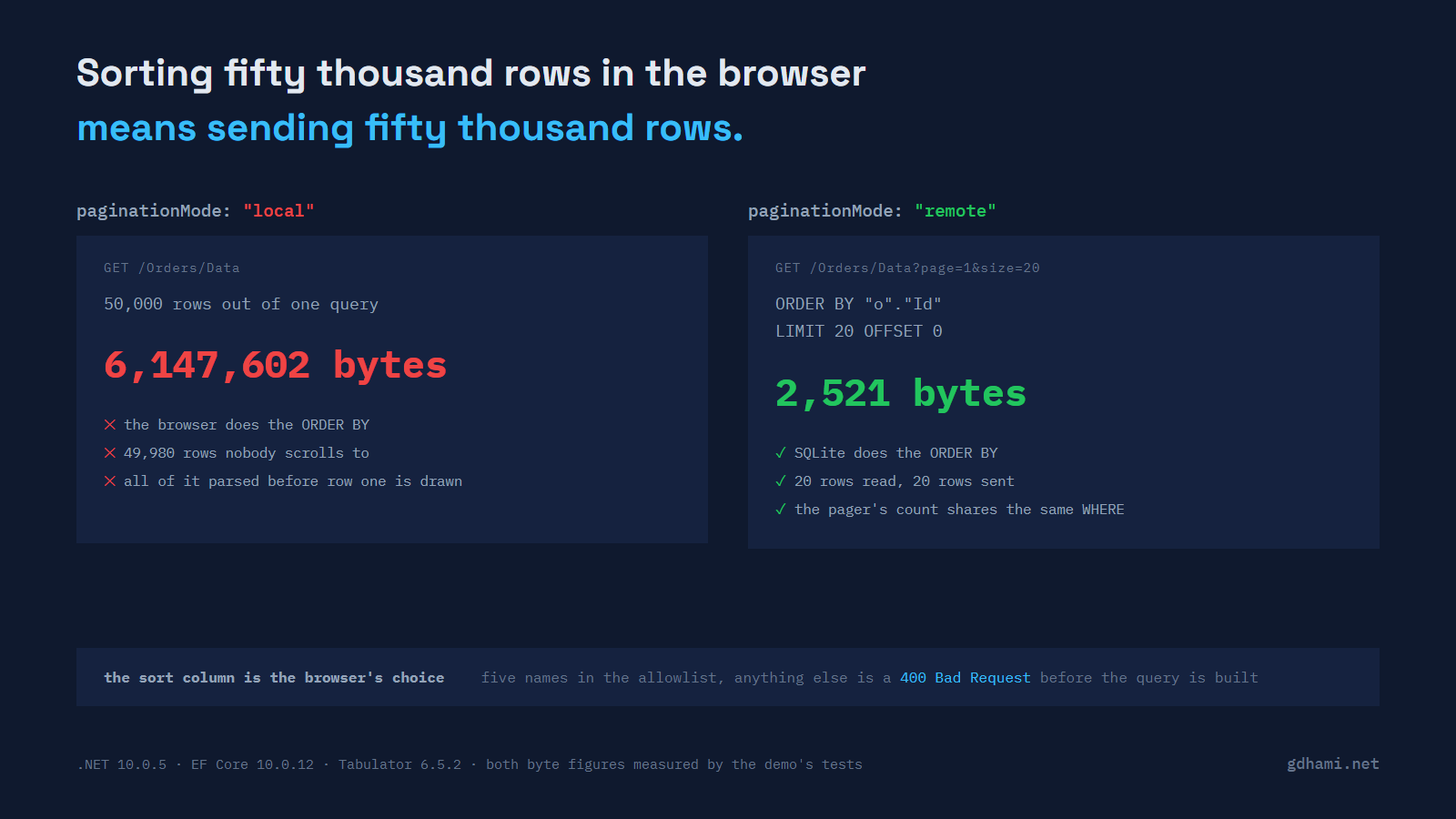
Pointing a data grid at a controller that returns the whole table is fine until the table grows, and it grows quietly. The demo behind this post seeds 50,000 orders. Serialising all of them with the same projection the grid uses comes to 6,147,602 bytes, and the grid shows twenty rows. Everything else is queried, serialised, transferred and parsed so that the browser can sort rows nobody will scroll to.
Tabulator has a remote mode that fixes this, and the JavaScript side of it is four mode switches: pagination, paginationMode, sortMode and filterMode. The server side is where the work is, and most of what I could find written about it is either for Tabulator 4 or for a grid that is not Tabulator.
What switches it on
new Tabulator("#grid", {
  ajaxURL: "/Orders/Data",
  pagination: true,
  paginationMode: "remote",
  paginationSize: 20,
  sortMode: "remote",
  filterMode: "remote",
  columns: [
    { title: "Reference", field: "reference", headerFilter: "input" },
    { title: "Customer", field: "customer", headerFilter: "input" },
    // ...
  ],
});
Those names are from 6.5.2, which is what the demo loads. In version 4 the same thing was pagination: "remote" with ajaxSorting and ajaxFiltering beside it, and a lot of the tutorials still online are written that way. Neither of those two options exists anywhere in the 6.5.2 bundle, and pagination is now a boolean whose default is false, so setting it to the string "remote" gets you pagination with paginationMode left on its default of "local". Nothing warns about it; you get a grid that still downloads everything.
What the server sends back
The Page module reads three names out of the response. data is the array of rows for this page. last_page is the number of pages, and it is the one the pager buttons are drawn from; if the property is missing, Tabulator writes Remote Pagination Error - Server response missing 'last_page' property to the console and draws one page. last_row is optional, and when it is there it is what the page counter reports as the total — though the counter itself is opt-in, so you only see that number if you also set paginationCounter, which the snippet above does not.
{
  "data": [
    {
      "reference": "ORD-000021",
      "customer": "Lucerne Publishing",
      "status": "shipped",
      "placed": "2024-11-10T22:21:00",
      "total": 237041
    }
  ],
  "last_page": 2500,
  "last_row": 50000
}
The snake_case is Tabulator's, so I spell those two out rather than leaving them to the serializer's naming policy:
public sealed record TabulatorPage<T>(
    [property: JsonPropertyName("data")] IReadOnlyList<T> Data,
    [property: JsonPropertyName("last_page")] int LastPage,
    [property: JsonPropertyName("last_row")] int LastRow);
You can rename them on the client instead: dataReceiveParams maps the response's property names and dataSendParams maps the ones that go out. I would rather match the library's defaults on the server and keep the grid configuration short.
What the browser sends
This is the part that cost me an afternoon. Tabulator's default URL generator walks the params object and produces nested keys, so a sorted, filtered page two arrives as:
GET /Orders/Data?page=2&size=20
    &sort%5B0%5D%5Bfield%5D=customer&sort%5B0%5D%5Bdir%5D=asc
    &filter%5B0%5D%5Bfield%5D=status&filter%5B0%5D%5Btype%5D=like
    &filter%5B0%5D%5Bvalue%5D=shipped
Decoded, that is sort[0][field], sort[0][dir], and the three filter keys. The obvious model binds page and size and nothing else:
public sealed class GridQuery
{
    public int Page { get; set; } = 1;
    public int Size { get; set; } = 20;
    public List<SortTerm> Sort { get; set; } = [];
    public List<FilterTerm> Filter { get; set; } = [];
}
MVC's default query-string value provider reads keys literally. The collection binder looks for sort[0].field, the request carries sort[0][field], they do not match, and Sort binds to an empty list. There is no exception and no model-state error, because an empty collection is a perfectly valid bound value. The grid keeps working and quietly ignores every sort you click.
JQueryQueryStringValueProviderFactory is the piece that rewrites jQuery-style bracket keys into the dotted form the binder expects. It has been in the framework since ASP.NET Core 2.1, going by the versions its API page lists, and it is not in the default set; MvcCoreMvcOptionsSetup registers FormValueProviderFactory, RouteValueProviderFactory, QueryStringValueProviderFactory, JQueryFormValueProviderFactory and FormFileValueProviderFactory, so the form-body cousin is there and the query-string one is not. Its API page is one sentence long, which is why the demo measures the difference rather than quoting anyone:
builder.Services.AddControllersWithViews(options =>
    options.ValueProviderFactories.Add(new JQueryQueryStringValueProviderFactory()));
ValueProviderTests in the demo is the same application with that line taken back out. It asserts that the bracketed request comes back 200 with the rows in Id order, which is what a silently dropped sort looks like from the outside.
The column name is a string the browser chose
sort[0][field] is whatever the grid's column definition called that column, and model binding hands it to your action as a string. Nothing about it is trustworthy on arrival. A name that is never checked can end up shaping the query you build, which is the ordinary input-validation mistake wearing a different hat.
The column name is the interesting one, but it is not the only field the browser chose. size arrives the same way, and nothing in the snippet above stops it asking for a million rows at once — the whole point of remote mode, undone by a query string. The demo clamps it to 200 before the query is built, in the same place it resolves the column.
The fix for the column is a dictionary. One entry per column the browser is allowed to name, and the property each name stands for:
public sealed record GridColumn(
    Expression<Func<Order, object?>> Sort,
    Func<string, Expression<Func<Order, bool>>>? Contains);

public static readonly IReadOnlyDictionary<string, GridColumn> All =
    new Dictionary<string, GridColumn>(StringComparer.Ordinal)
    {
        ["reference"] = new(o => o.Reference, v => o => o.Reference.Contains(v)),
        ["customer"]  = new(o => o.Customer,  v => o => o.Customer.Contains(v)),
        ["status"]    = new(o => o.Status,    v => o => o.Status.Contains(v)),
        ["placed"]    = new(o => o.PlacedUtc, null),
        ["total"]     = new(o => o.TotalCents, null),
    };
The mapping is doing two jobs at once, which is why I like it more than a HashSet<string> of legal names. The keys are the grid's vocabulary and the values are the entity's, so placed can mean PlacedUtc and total can mean TotalCents without the browser ever learning either name. The Contains member is null for the columns with no text filter, so total sorts but cannot be filtered as text, and that is enforced by the same lookup rather than by a second list somewhere else.
A miss is a 400 before any query exists:
if (!OrderColumns.TryGet(term.Field, out var column))
{
    error = $"Unknown sort column '{term.Field}'.";
    return false;
}
400 application/problem+json; charset=utf-8
{"type":"https://tools.ietf.org/html/rfc9110#section-15.5.1","title":"Unknown column",
"status":400,"detail":"Unknown sort column 'notacolumn'."}That body is the demo's own output with the traceId property trimmed off the end.
The demo proves the "before any query exists" half with a DbCommandInterceptor that records every command the provider sends. The rejected requests leave it empty. StringComparer.Ordinal on the dictionary is deliberate, and the tests cover it: Reference with a capital R is a 400, the same as notacolumn. A case-insensitive comparer would be friendlier, and I would rather the allowlist be boring than friendly.
What the query looks like
With the terms checked, building the query is unremarkable. Order by the mapped expression, add Id last, then Skip and Take:
ordered = sorted
    ? descending ? ordered!.ThenByDescending(column.Sort) : ordered!.ThenBy(column.Sort)
    : descending ? shaped.OrderByDescending(column.Sort) : shaped.OrderBy(column.Sort);

// after the loop over the sort terms
ordered = sorted ? ordered!.ThenBy(o => o.Id) : shaped.OrderBy(o => o.Id);
ToQueryString() on page three of a grid sorted by customer and filtered to shipped orders, taken from the demo's own output:
.param set @v 'shipped'
.param set @p2 20
.param set @p 40

SELECT "o"."Reference", "o"."Customer", "o"."Status", "o"."PlacedUtc", "o"."TotalCents"
FROM "Orders" AS "o"
WHERE instr("o"."Status", @v) > 0
ORDER BY "o"."Customer", "o"."Id"
LIMIT @p2 OFFSET @p
That is SQLite, which is what the demo runs on. The .param set lines are ToQueryString() being helpful so you can paste the statement into a client; the filter value is a parameter in the statement itself, not text pasted into it. Another provider will translate Contains differently (SQL Server emits a LIKE with escaping). Case sensitivity is decided by the database and not by the C# either way, but not in the same manner: SQLite's instr is always case-sensitive and ignores the column's collation, while SQL Server's LIKE follows it. I have not run this against SQL Server or PostgreSQL.
The ThenBy(o => o.Id) is the line I would most expect a reviewer to delete. status holds five distinct values across 50,000 rows, so ordering by it alone leaves the database free to return tied rows in any order it likes, and OFFSET 20 on one request need not line up with OFFSET 0 on the last one. Rows go missing, rows appear twice, and it happens rarely enough to be reported as "sometimes the grid is wrong". One test in the demo pulls pages one and two and asserts they share no reference.
What it costs
Two round trips per page: a COUNT(*) over the filtered query for the pager, then the page itself. The demo asserts exactly two commands per request and that both carry the same WHERE, which is what stops the pager from claiming a total the rows disagree with. Dropping last_row does not buy you a round trip: last_page comes out of the same count.
OFFSET is linear. Page 2,500 of this table makes SQLite walk past 49,980 rows before it returns twenty, and EF Core's own pagination guidance says so plainly and points at keyset pagination for deep pages. For a grid with a pager on it, where people go to page two and then give up, offset paging is usually the right trade. Every sortable column in the demo is indexed, which is the part that is easy to forget and that turns each page into a full sort of the table when it is missing.
And the measurement that started this. The demo reads both figures from the same projection and the same serializer options:
rows in the table       50,000
one page of 20 rows     2,521 bytes
the same 50,000 rows    6,147,602 bytes
ratio                   2,439x
The demo is at github.com/gdhami-net/tabulator-aspnetcore-demo. dotnet test runs all 39 tests; dotnet test --filter "FullyQualifiedName~ReportTests" --logger "console;verbosity=detailed" prints the sizes, the SQL and the 400 body quoted above, so you can diff them against your own run instead of taking mine as read.