Name your HasQueryFilter calls, or the second silently replaces the first
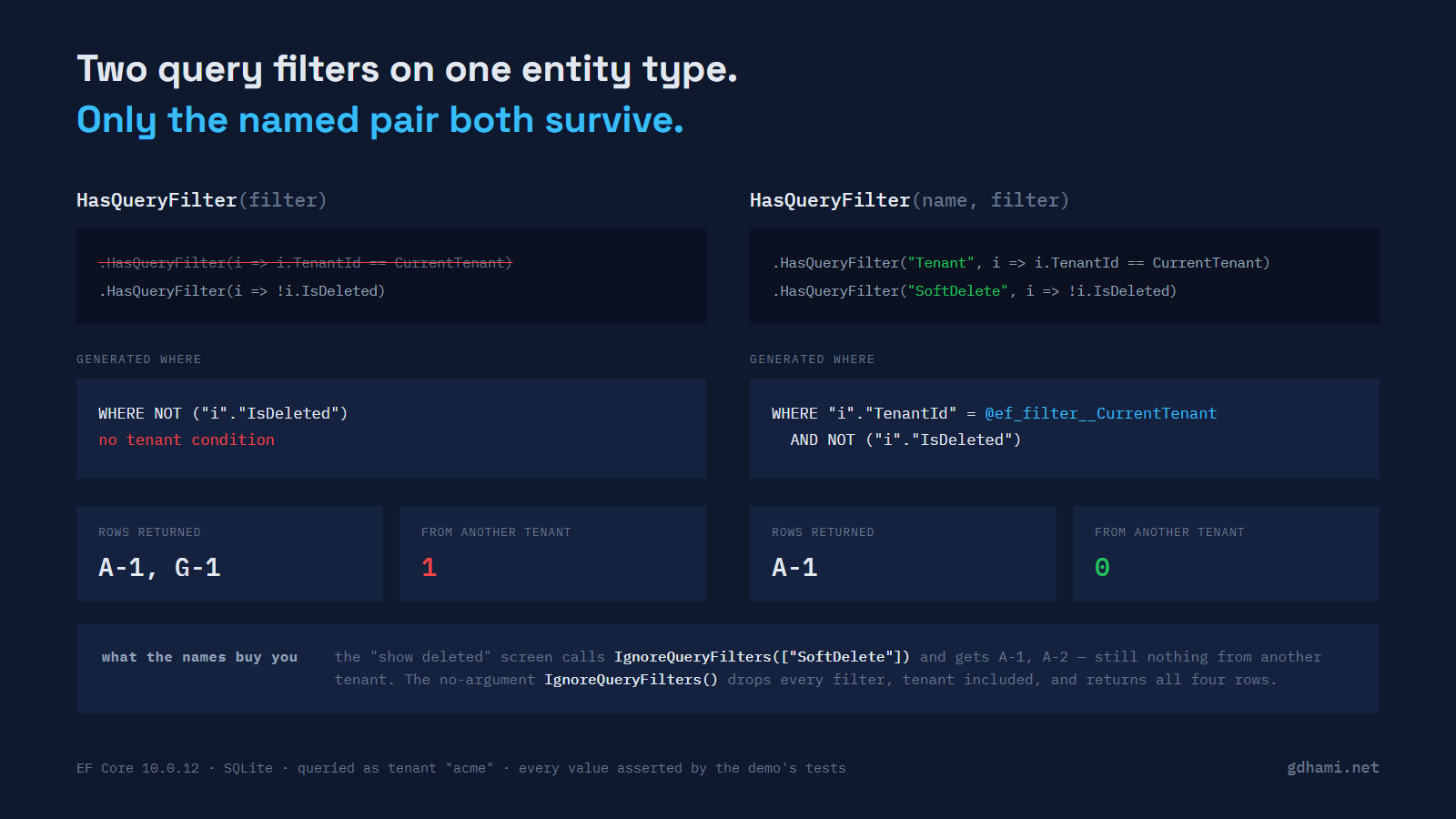
A global query filter is a condition EF Core adds to every LINQ query for an entity type, unless that query opts out. Two of them turn up together often: one that keeps a tenant inside its own rows, and one that hides soft-deleted rows. They get written months apart, usually by different people, and they end up in different places — the tenant filter in OnModelCreating, the soft-delete filter in a loop over everything implementing ISoftDelete, or in an IEntityTypeConfiguration that nobody reads again.
Write them as two plain HasQueryFilter calls on the same entity type and only one of them exists.
public sealed class BillingContext(DbContextOptions options, string currentTenant)
    : DbContext(options)
{
    public string CurrentTenant { get; } = currentTenant;

    public DbSet<Invoice> Invoices => Set<Invoice>();

    protected override void OnModelCreating(ModelBuilder modelBuilder)
    {
        modelBuilder.Entity<Invoice>().HasQueryFilter(i => i.TenantId == CurrentTenant);

        // six months later, further down the same method
        modelBuilder.Entity<Invoice>().HasQueryFilter(i => !i.IsDeleted);
    }
}
The demo seeds four invoices: two for acme and two for globex, one live and one deleted in each pair. Querying context.Invoices as acme should give you one row. On EF Core 10.0.12 with the SQLite provider it gives you this:
SELECT "i"."Id", "i"."CustomerId", "i"."IsDeleted", "i"."Number", "i"."TenantId"
FROM "Invoices" AS "i"
WHERE NOT ("i"."IsDeleted")
ORDER BY "i"."Id"

rows: A-1, G-1
G-1 belongs to the other tenant. There is no tenant condition in that statement at all, and no parameter carrying the tenant id, because the second call did not add a condition to the first one. It replaced it. Microsoft's documentation is direct about this:
HasQueryFilter with a simple filter overwrites any previous filter, so multiple filters cannot be defined on the same entity type in this way.The word that matters there is overwrites. HasQueryFilter is a setter, in the same way HasMaxLength is a setter, and nothing in the name suggests it. The model afterwards holds exactly one filter for Invoice, and the demo reads that off the metadata rather than inferring it from the SQL:
var filters = context.Model.FindEntityType(typeof(Invoice))!.GetDeclaredQueryFilters();

var filter = Assert.Single(filters);
Assert.Null(filter.Key);                       // an unnamed filter has no name
Assert.Contains("IsDeleted", filter.Expression!.ToString());
Assert.DoesNotContain("TenantId", filter.Expression.ToString());
Which call survives is just which one ran last. Swap the two lines and the tenant condition is the one in the SQL and the soft-delete condition is the one that vanished. That ordering is the whole difference between a leak and a screen showing some deleted invoices, and it depends on where in a file somebody put a foreach.
Nothing tells you
This is the part I find hard to forgive. I turned LogTo up to Trace, the most verbose level EF's logging has, ran the query, and read every message. No warning, no error, and nothing at any level containing the words "query filter". Model validation does not object either, since a model with one filter on an entity type is a perfectly valid model. The test asserts the absence:
Assert.NotEmpty(context.Log);
Assert.DoesNotContain(context.Log, m => m.StartsWith("warn") || m.StartsWith("fail"));
Assert.DoesNotContain(context.Log, m => m.Contains("query filter", StringComparison.OrdinalIgnoreCase));
EF Core 9 behaves the same way. I ran the same two filters on the same entity type against 9.0.20, the newest 9.0.x on 2026-09-13, and got the same WHERE clause, the same two rows and the same silence. On 9.0.20 there is nothing else available: the release notes for EF 10 put it as "up to now EF has only supported a single query filter per entity type", and reflection over EntityTypeBuilder<T> on the 9.0.20 assembly finds no HasQueryFilter overload that takes a name.
no WHERE clause
Names make them separate things
EF Core 10 adds an overload that takes a name first. The API calls that argument filterKey; the docs and the release notes call the feature named query filters. Same two calls, same two places, one string added to each:
modelBuilder.Entity<Invoice>().HasQueryFilter("Tenant", i => i.TenantId == CurrentTenant);
modelBuilder.Entity<Invoice>().HasQueryFilter("SoftDelete", i => !i.IsDeleted);
.param set @ef_filter__CurrentTenant 'acme'
SELECT "i"."Id", "i"."CustomerId", "i"."IsDeleted", "i"."Number", "i"."TenantId"
FROM "Invoices" AS "i"
WHERE "i"."TenantId" = @ef_filter__CurrentTenant AND NOT ("i"."IsDeleted")
ORDER BY "i"."Id"
rows: A-1Both conditions, joined with AND, and the tenant arrives as a parameter. The order of the two conditions in the SQL follows the order the filters were configured in, at least on this provider, which is worth knowing only if you are diffing generated SQL in a test.
The non-generic builder has the named overload too, so the soft-delete loop can keep being a loop:
foreach (var entityType in modelBuilder.Model.GetEntityTypes()
             .Where(e => typeof(ISoftDelete).IsAssignableFrom(e.ClrType)))
{
    var entity = Expression.Parameter(entityType.ClrType, "e");
    var notDeleted = Expression.Lambda(
        Expression.Not(Expression.Property(entity, nameof(ISoftDelete.IsDeleted))),
        entity);

    modelBuilder.Entity(entityType.ClrType).HasQueryFilter("SoftDelete", notDeleted);
}
A name scopes the replacement rather than preventing it. Two calls under the same name on the same entity type still overwrite each other, exactly like two unnamed ones, and the demo asserts that so nobody reads "named" as "additive". Which is fine, and arguably useful: a loop that sets "SoftDelete" on every entity type and a configuration class that sets "SoftDelete" on one of them agree instead of fighting.
The admin screen, without the hole in it
The reason to bother with names is the query that wants one filter off. Someone always asks for a "show deleted" toggle. With a single combined filter written the usual way, the only tool at query time is IgnoreQueryFilters(), which takes everything off, tenant included, and now a support screen is one forgotten Where away from showing another customer's invoices.
IgnoreQueryFilters in EF Core 10 has a second overload taking a collection of names:
context.Invoices.IgnoreQueryFilters(["SoftDelete"]).param set @ef_filter__CurrentTenant 'acme'
SELECT "i"."Id", "i"."CustomerId", "i"."IsDeleted", "i"."Number", "i"."TenantId"
FROM "Invoices" AS "i"
WHERE "i"."TenantId" = @ef_filter__CurrentTenant
ORDER BY "i"."Id"
rows: A-1, A-2Two rows, both acme, one of them deleted. The no-argument call is unchanged and still drops every filter on the entity type:
SELECT "i"."Id", "i"."CustomerId", "i"."IsDeleted", "i"."Number", "i"."TenantId"
FROM "Invoices" AS "i"
ORDER BY "i"."Id"

rows: A-1, A-2, G-1, G-2
Names also reach into Include. Asking for customers with their invoices under IgnoreQueryFilters(["SoftDelete"]) drops the soft-delete condition from the navigation's subquery and leaves the tenant condition on both sides, which is what you want and not obviously what you would get.
One rough edge. A name that matches no filter is accepted without complaint:
context.Invoices.IgnoreQueryFilters(["SoftDeleted"]) // the filter is "SoftDelete"That query throws nothing, logs nothing about the name that matched nothing, and returns [A-1] with both filters still applied. A typo here fails in the safe direction, so it is not a security problem, but it will cost you twenty minutes wondering why the toggle does nothing. I put the names on const string fields in the context for exactly that reason.
Mixing the two forms is an error, later than you would like
A named filter and an unnamed one on the same entity type do not coexist:
System.InvalidOperationException: Both anonymous and named query filters cannot
be applied simultaneously. Specify either an anonymous filter or one or more
named filters.
Order does not matter; either way round produces that message. What is worth knowing is when. Constructing the DbContext is fine, because OnModelCreating has not run yet. The exception is thrown by the second HasQueryFilter call itself, inside OnModelCreating, and OnModelCreating runs when the model is first built. That means the first thing that touches context.Model, which in practice is the first query the process runs against that context type, not startup. A migration during a half-finished conversion is the obvious way to meet it in production rather than in a test.
The restriction is per entity type, not per model, so a named filter on Invoice and an unnamed one on Customer build and run happily. That makes a gradual conversion possible. It also means a half-converted model will not tell you it is half-converted.
Where the tenant id comes from matters more than the names do
The filter expression has to read the tenant off the context instance. EF rewrites that into a parameter it evaluates per context, which is why one cached model can serve every tenant:
public string CurrentTenant { get; } = currentTenant;
// ...
modelBuilder.Entity<Invoice>().HasQueryFilter("Tenant", i => i.TenantId == CurrentTenant);
Two contexts, two tenants, identical SQL text, different parameter values, [A-1] and [G-1]. The parameter is named after the member the expression reads, not after the filter: the filter above is called Tenant and the parameter is @ef_filter__CurrentTenant. Capturing a primary-constructor parameter directly, the way the multi-tenancy example on the EF Core global query filters page does, works the same way, because the compiler turns it into a field on the context.
Copy it into a local first and the whole thing quietly stops being per-tenant:
protected override void OnModelCreating(ModelBuilder modelBuilder)
{
    var tenant = CurrentTenant;     // the mistake

    modelBuilder.Entity<Invoice>().HasQueryFilter("Tenant", i => i.TenantId == tenant);
    // ...
}
Now the expression closes over a string instead of over the context, EF has nothing to re-evaluate, and the value is inlined:
SELECT "i"."Id", "i"."CustomerId", "i"."IsDeleted", "i"."Number", "i"."TenantId"
FROM "Invoices" AS "i"
WHERE "i"."TenantId" = 'acme' AND NOT ("i"."IsDeleted")
ORDER BY "i"."Id"
EF caches the model per context type, so that SQL is what the next context gets too. In the demo, a second context constructed for globex produces byte-for-byte the same statement and returns acme's invoice. This one has nothing to do with names. The same model cache should freeze a captured local on EF 9 with a single combined filter, but the demo asserts it only on EF 10. It is in the same blast radius as the rest, which is why it is here.
If the filter lives in an IEntityTypeConfiguration<T>, there is no context instance to read from. Microsoft's documented workaround is an unassigned field of the context type, used only for its shape inside the expression tree:
public sealed class InvoiceTenantConfiguration : IEntityTypeConfiguration<Invoice>
{
    private readonly BillingContext _context = null!;

    public void Configure(EntityTypeBuilder<Invoice> builder)
        => builder.HasQueryFilter("Tenant", i => i.TenantId == _context.CurrentTenant);
}
That field is never assigned and never dereferenced, which looks wrong until you see what EF does with it: the member access is pulled out of the expression tree and bound to the real context at query time. The demo runs it for two tenants and gets the right rows for each.
What filters do not cover
Query filters are one layer of tenant isolation. Saying "raw SQL bypasses them" is too broad, so here is what I measured, each one as its own test on 10.0.12:
FromSql on a DbSet is filtered. EF treats your statement as a subquery and puts the filters outside it:
SELECT "n"."Id", "n"."CustomerId", "n"."IsDeleted", "n"."Number", "n"."TenantId"
FROM (
    SELECT * FROM Invoices
) AS "n"
WHERE "n"."TenantId" = @ef_filter__CurrentTenant AND NOT ("n"."IsDeleted")
ORDER BY "n"."Id"
ExecuteUpdate and ExecuteDelete are filtered too. ExecuteUpdate over context.Invoices as acme reports one row affected, and the UPDATE statement in the log carries both conditions in its WHERE.
Database.SqlQuery<T> is not filtered, and neither is ExecuteSql. Neither one is an entity query, so there is no entity type whose filters could apply. In the demo SqlQuery<string> returns all four invoice numbers and ExecuteSql reports four rows affected. Anything reached through Database.GetDbConnection() is outside EF entirely.
There is one more way to lose rows that is not about bypassing anything. The documentation cautions that "using required navigation to access entity which has global query filter defined may lead to unexpected results", and the mechanism is the join type. Put a filter on Customer, leave Invoice unfiltered, and Include the required navigation:
FROM "Invoices" AS "i"
INNER JOIN (
    SELECT ... FROM "Customers" AS "c"
    WHERE "c"."TenantId" = @ef_filter__CurrentTenant
) AS "c0" ON "i"."CustomerId" = "c0"."Id"
Without the Include that query returns four invoices. With it, two, because the inner join drops every invoice whose customer the filter removed. Filtering both ends consistently is the fix I would reach for, and it is also what makes the model comprehensible.
What I settled on
Names on every filter, including the ones that are alone today, because the second one arrives eventually and the failure is silent when it does. The names as const string on the context so IgnoreQueryFilters cannot be misspelled. And a test that reads GetDeclaredQueryFilters() for each entity type and asserts the set of names it finds, which is short enough that there is no excuse, and turns the whole class of mistake into a red build instead of a support ticket.
And the tenant filter is not the isolation boundary by itself. It is the thing that stops an ordinary LINQ query from being a mistake; a connection-per-tenant, row-level security in the database, or separate schemas are what stop the statement you wrote by hand at 2am. I would rather have both than argue about which one is enough.
Versions, because this is a moving target: measured on .NET SDK 10.0.201 against Microsoft.EntityFrameworkCore.Sqlite 10.0.12 on runtime 10.0.5, and 9.0.20 on runtime 9.0.14. The two EF packages were the newest patch of their major on 2026-09-13; the runtimes were not (10.0.12 and 9.0.20 had shipped). EF Core 11 is at release candidate 1 and I have not run any of this against it. The SQL above is SQLite's, so another provider will quote identifiers differently; the row counts should not move.
The demo is at github.com/gdhami-net/ef-named-query-filters-demo. dotnet test runs all 43 tests across both projects, or ./check.sh and ./check.ps1 run the same suite and print what each group covers. Every WHERE clause quoted here is asserted, and every row count with it, so a red test means the post is wrong about something.