Make “same time tomorrow” survive a daylight-saving change with Temporal
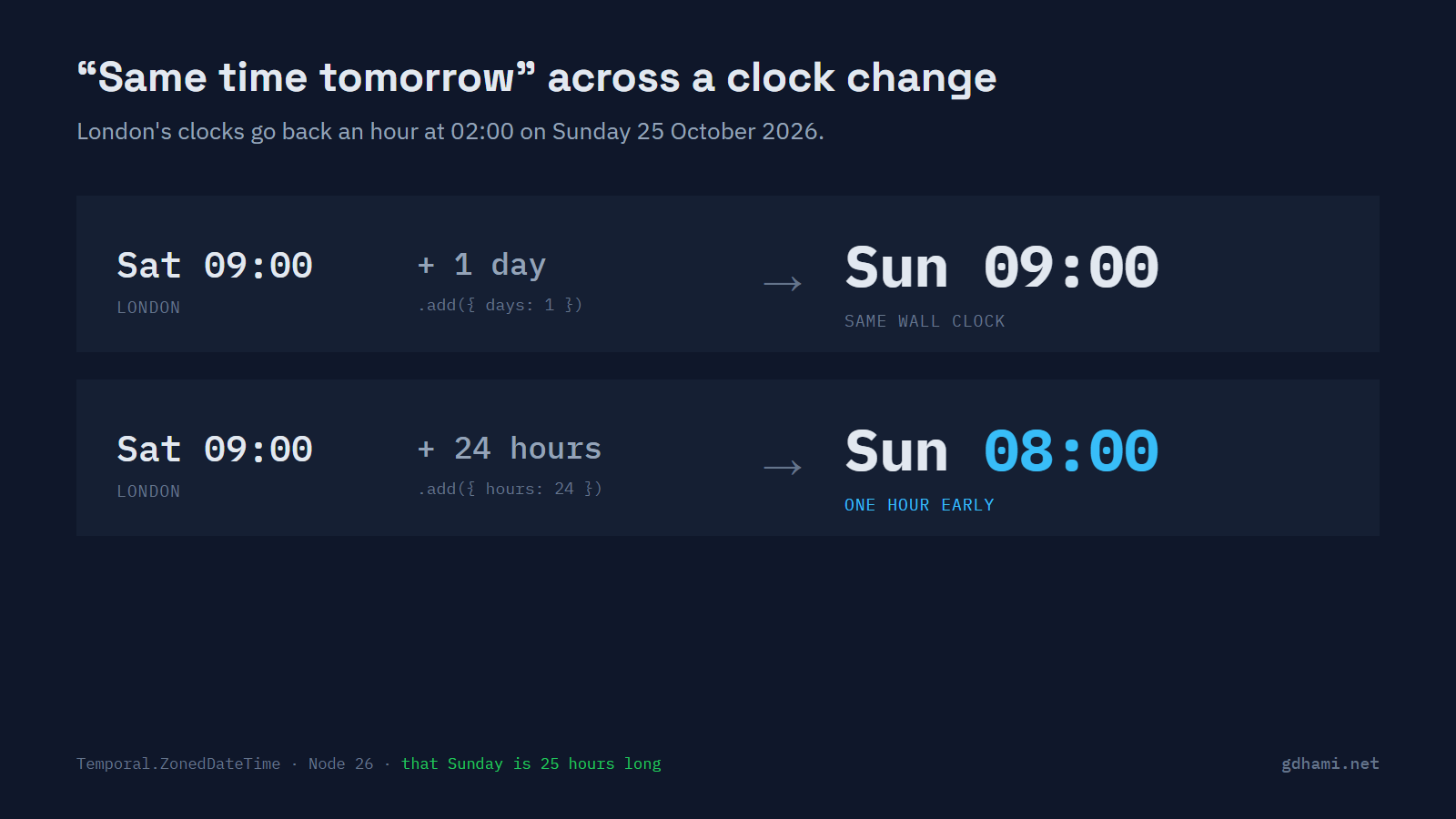
On Sunday 25 October 2026 the UK and most of Europe put their clocks back an hour. In London it happens at 02:00, which turns back into 01:00, so that Sunday lasts 25 hours. A reminder set for 9:00 every day should still go off at 09:00 that morning. If the code gets "tomorrow" by adding 24 hours, or runs Date on a server set to UTC, it goes off at 08:00.
The fix is to carry the person's time zone with the value and to say which "tomorrow" you mean. One calendar day keeps the wall clock at 09:00. Twenty-four exact hours ends at 08:00 on that Sunday. Temporal, the new date API built into Node 26 and current Chrome, Edge and Firefox, does both correctly and makes you pick one. Date can add calendar days only in UTC or in the machine's own zone.
Adding a day in London from any machine
The demo starts from what an API would send: Saturday 24 October, 09:00 in London, as the UTC string 2026-10-24T08:00:00Z. Temporal.Instant holds that exact moment, and toZonedDateTimeISO attaches the London zone to it. Look at the two add calls:
import { FROM_API, ZONE } from "./start.ts";

const start = Temporal.Instant.from(FROM_API).toZonedDateTimeISO(ZONE);
const oneDay = start.add({ days: 1 });
const hours24 = start.add({ hours: 24 });

console.log("start     ", start.toString());
console.log("+ 1 day   ", oneDay.toString());
console.log("+ 24 hours", hours24.toString());
console.log("1 day is  ", start.until(oneDay).toString());
console.log("Sunday has", oneDay.hoursInDay, "hours");
I ran it with the process set to UTC, to London and to Dubai. All three printed the same lines:
start      2026-10-24T09:00:00+01:00[Europe/London]
+ 1 day    2026-10-25T09:00:00+00:00[Europe/London]
+ 24 hours 2026-10-25T08:00:00+00:00[Europe/London]
1 day is   PT25H
Sunday has 25 hours
One day keeps 09:00. Twenty-four hours gives 08:00, because the hour from 01:00 to 02:00 happens twice that night. The fourth line was my favourite: until measures that "one day" as PT25H, which is 25 hours. MDN's page for ZonedDateTime.add() describes the same split, with the days part done on the calendar and the hours part on exact time.
What Date does with the same morning
A Date is one number, the milliseconds since the start of 1970 in UTC. It can show that moment in any zone through Intl.DateTimeFormat, and the demo uses that to print London times. Its arithmetic is another story. There are UTC methods and local methods, and local means the zone of the process. You can't ask it to add a day in London.
I tried the two usual tricks. Adding 86,400,000 ms is 24 hours by definition, so I expected 08:00, and got it in all three zones. setDate(getDate() + 1) is the interesting one, because it works on the calendar. These are the check script's lines for both:
PASS  Date + 86400000 ms, TZ=UTC: Sun 08:00 in London
PASS  setDate + 1, TZ=UTC: Sun 08:00 in London
PASS  setDate + 1, TZ=Europe/London: Sun 09:00 in London
PASS  setDate + 1, TZ=Asia/Dubai: Sun 08:00 in London
So setDate is right when the process runs in the user's own zone. That covers a London user's browser, and a server that happens to be set to London. It's wrong on a UTC server, and in a browser in Dubai that books something for a colleague in London. Dubai doesn't change its clocks, so on this night it behaves just like UTC. I set the process to Asia/Dubai to stand in for that browser.
Getting the types and the browsers to agree
TypeScript 6.0 added the Temporal types, under lib: ["esnext"] or the narrower esnext.temporal, and 7.0.2 has them too. A project on lib: ["es2024"] gets error TS2304: Cannot find name 'Temporal' on every use. One small trap: date.toTemporalInstant() is declared in a separate lib file, so esnext.temporal on its own still fails on it. Plain esnext covers both. Temporal reached Stage 4 in March 2026 and is expected in ES2027, so for now it lives under esnext.
Browsers are the real limit. MDN's compatibility data lists Chrome 144, Edge 144 and Firefox 139, and Safari only in Technology Preview, on macOS and iOS alike. For Safari I'd use temporal-polyfill, from the FullCalendar project. Its global entry leaves a native Temporal alone, and on TypeScript 6 or later it uses the compiler's own types. In the demo, its objects fit a variable typed as the built-in Temporal.ZonedDateTime, and it gave the same 09:00 and 08:00. The older @js-temporal/polyfill ships its own types, and the same assignment failed with TS2322.
In Node 26 and other server code, I'd use Temporal now. In the browser it comes down to your Safari share. For a public site, where Safari is usually a real slice of the traffic, I'd ship the polyfill. For an internal app that only runs on Chrome and Edge, I wouldn't bother.
What to store, and where to start
Coming in, the API's string becomes a Temporal.Instant, and the zone ID comes from the user's profile. Going out, I keep the two apart:
const instant = Temporal.Instant.from(FROM_API);
const start = instant.toZonedDateTimeISO(ZONE);
const next = start.add({ days: 1 });

const row = { at: next.toInstant().toString(), zone: next.timeZoneId };
console.log("store     ", JSON.stringify(row));
That prints {"at":"2026-10-25T09:00:00Z","zone":"Europe/London"}. I'd store those as two columns. The instant alone loses the zone, so the next "tomorrow" can't be worked out, and a local string like 2026-10-25 09:00 doesn't say which moment it is. A ZonedDateTime turns into 2026-10-25T09:00:00+00:00[Europe/London] in JSON, and most databases won't parse the part in brackets. Temporal is strict about this too: ZonedDateTime.from() throws a RangeError for a string with an offset and no zone name.
Old code isn't a reason to wait. new Date(next.epochMilliseconds) turns the Temporal value back into a plain date object. Going the other way, date.toTemporalInstant() gives you an instant. So I wouldn't convert a codebase in one go. A Date that only records when something happened is fine as it is. I'd start with the code that adds days for people in another zone: reminders, repeating bookings, "same time tomorrow". Searching for 86400000 and 86_400_000 is a quick way to find it.