Make a dead BackgroundService show up in your health check
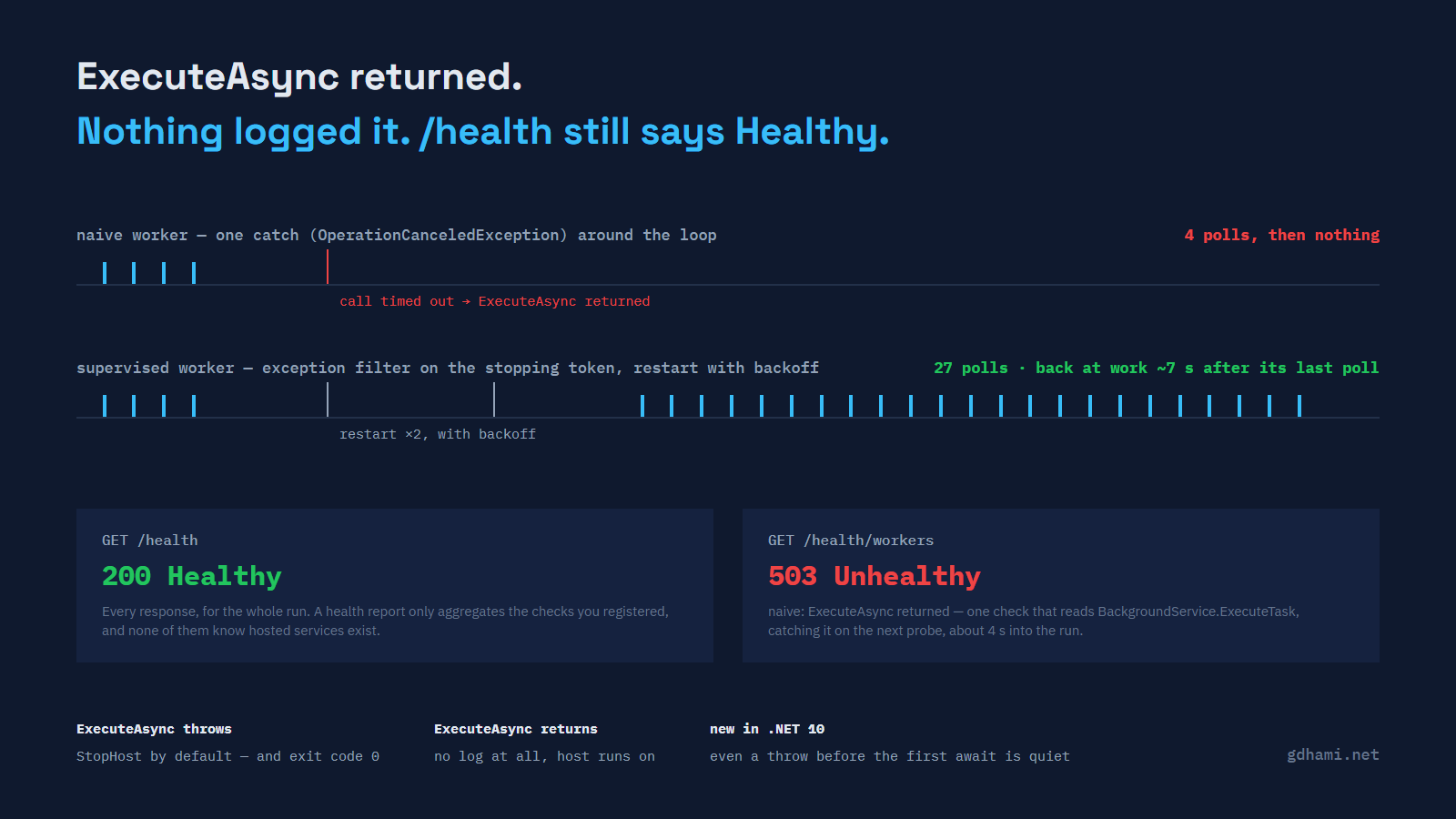
Most .NET services I write end up with at least one BackgroundService in them: a poller, a queue consumer, an outbox drainer. They are easy to write, which is most of the problem. The loop reads fine and the tests pass. The failure nobody writes a test for is the one where the loop simply ends and the process carries on as though everything is normal.
Here is the shape, near enough, that I keep running into:
protected override async Task ExecuteAsync(CancellationToken stoppingToken)
{
    try
    {
        while (!stoppingToken.IsCancellationRequested)
        {
            using var cts = CancellationTokenSource.CreateLinkedTokenSource(stoppingToken);
            cts.CancelAfter(TimeSpan.FromSeconds(2));

            await _dependency.CallAsync(cts.Token);
            await Task.Delay(_interval, stoppingToken);
        }
    }
    catch (OperationCanceledException)
    {
        // the host is shutting down
    }
}
Two sensible decisions, and a bug sitting between them. The per-call timeout is right, because a poller that can hang forever on one call is worse than one that gives up. The catch is defensible too: a stopping token that fires during an await really does throw OperationCanceledException, and that really is not an error worth logging. The trouble is that the timeout throws the same type. When the dependency takes longer than two seconds, that catch reads it as shutdown, ExecuteAsync returns, and the worker is done for the lifetime of the process.
I built a two-worker demo to watch it happen rather than argue about it; its naive worker is that loop with a heartbeat and a log line added. The dependency answers normally for a while, hangs on two consecutive calls, then recovers — a blip, not an outage. The naive worker logs naive: poll 4 ok and never says anything again. No exception, no warning, no shutdown message. The last line it ever writes is a success.
Nothing is watching for a clean ending
The host does watch the task, but only for faults. The method name shows up in the stack traces from my own demo runs: Microsoft.Extensions.Hosting.Internal.Host.TryExecuteBackgroundServiceAsync. It awaits the task your ExecuteAsync returned. If that task faults, it logs BackgroundService failed and then applies whatever HostOptions.BackgroundServiceExceptionBehavior says. If the task completes successfully, there is nothing to log and nothing to decide, so nothing happens.
That is the whole mechanism. A BackgroundService that returns is indistinguishable, from the host's point of view, from a BackgroundService that finished its work on purpose — a one-shot migration, a warm-up job, a service that genuinely has nothing left to do. The host cannot tell the difference because there is no difference to see.
The default is louder than most people expect
Since .NET 6, BackgroundServiceExceptionBehavior defaults to StopHost. An unhandled exception out of ExecuteAsync takes the whole host down. My demo has a mode for it, and the log is unambiguous — an error with the exception, a critical line naming the setting, then Application is shutting down....
The part worth checking yourself is the exit code. I ran the compiled binary directly rather than through dotnet run, so nothing could be masking it: the process exits 0. StopHost calls the same graceful stop that Ctrl+C does, so as far as the operating system is concerned the service completed successfully. If whatever supervises your process only restarts on a non-zero exit — a systemd unit with Restart=on-failure, a shell wrapper that checks $? — it will not restart. Kubernetes with the default Always restart policy will, because it restarts a container whatever the exit code.
This is being fixed. In .NET 11 Preview 3 the tasks returned by RunAsync, StopAsync, WaitForShutdownAsync, and their synchronous equivalents fail when a background service brought the host down, so the process typically exits non-zero. The reasoning in the breaking-change note matches the complaint above: an application that stops because of a failure should not report success.
.NET 10 quietened the one loud failure
There used to be a version of this bug that failed at the top of its voice. If ExecuteAsync threw before its first await — a missing connection string read on the first line, a configuration section that binds to null — the exception came straight back out of StartAsync and took host startup with it. You found out on the first run.
.NET 10 changed that. All of ExecuteAsync now runs on a background thread, and no part of it blocks other services from starting. It is a good change made for a good reason: hardly anyone realised that the code before their first await was running on the startup path, holding up everything registered behind it. The side effect is that the loud failure became a quiet one.
I ran the same synchronously-throwing worker against all three:
net8.0    ExecuteAsync entered on the main thread    StartAsync THREW -> startup failed
net9.0    ExecuteAsync entered on the main thread    StartAsync THREW -> startup failed
net10.0   ExecuteAsync entered on another thread     StartAsync returned normally
On .NET 10 the app starts, reports itself up, and only then does the exception go down the StopHost path like any other. If you are moving to .NET 10, the methods worth re-reading are the ones you assumed were doing something during startup — that assumption is no longer true, and the failure that used to warn you about it now arrives after the fact.
If you genuinely need something to run before other services start, .NET still gives you three ways to do it: put the code in the constructor, override StartAsync and call base.StartAsync after your own work, or implement IHostedLifecycleService for a specific point in the startup sequence.
The health endpoint agrees with you
Meanwhile, the endpoint everything points its probes at keeps saying yes.
A health report is the aggregate of the checks you registered. Register none — or register only the liveness stub that means "the pipeline answered" — and the report is Healthy as long as the request reached the endpoint. Nothing in AddHealthChecks knows that hosted services exist, and nothing in the hosting stack volunteers the information.
In the demo run I polled /health continuously through a twenty-two second window. The naive worker was dead for eighteen of those seconds. Every single response was 200 Healthy. The worker checks I had registered on a separate endpoint were already returning 503 with naive: ExecuteAsync returned in the description, which is the whole difference between the two: one of them was asked to look.
Ask the worker directly
BackgroundService exposes the task it is running as a public property, ExecuteTask. That is enough for a health check that cannot be fooled the way /health was: if the task is completed, the worker has ended, whatever the reason.
Getting hold of the instance takes one line more than people expect. AddHostedService<T>() registers T as an IHostedService and nothing else, so GetRequiredService<PollingWorker>() throws. The obvious repair — adding AddSingleton<PollingWorker>() beside it — is worse. With both registrations the constructor runs twice: the host starts one instance and your health check inspects a different one, whose ExecuteTask stays null forever, so the check reports a service that never started. Resolving the singleton inside the factory gives you one object wearing two hats:
builder.Services.AddSingleton<PollingWorker>();
builder.Services.AddHostedService(sp => sp.GetRequiredService<PollingWorker>());
The check itself is short:
var task = worker.ExecuteTask;

var ended = task is null    ? "not started"
          : task.IsFaulted  ? "faulted"
          : task.IsCanceled ? "canceled"
          : task.IsCompleted ? "returned"
          : null;

if (ended is not null)
    faults.Add($"{name}: ExecuteAsync {ended}");
That catches the worker that ended. It does not catch the worker that is still looping and achieving nothing — the reconnect that never succeeds, the read that times out every time. For that the worker has to report progress itself, which is a timestamp written after each completed unit of work and a check that complains when the timestamp gets old.
Both are worth having, and in the demo they fire at very different speeds. ExecuteTask reached RanToCompletion about four seconds in and the check turned 503 on the next probe. The staleness threshold was ten seconds of silence, so on its own it would have taken more than twice as long to reach the same conclusion. One detects a worker that left; the other detects a worker that stayed and stopped being useful.
Restart the loop, not the process
The fix for the original bug is an exception filter. Shutdown is not a type of exception, it is a state of the stopping token, so ask about the token:
protected override async Task ExecuteAsync(CancellationToken stoppingToken)
{
    var backoff = FirstBackoff;

    while (!stoppingToken.IsCancellationRequested)
    {
        try
        {
            await PollLoopAsync(stoppingToken);
            return;                                   // clean shutdown
        }
        catch (OperationCanceledException) when (stoppingToken.IsCancellationRequested)
        {
            return;                                   // clean shutdown, the other way
        }
        catch (Exception ex)                          // including a timed-out call
        {
            log.LogWarning(ex, "run failed, restarting in {Backoff}", backoff);

            try { await Task.Delay(backoff, stoppingToken); }
            catch (OperationCanceledException) { return; }

            backoff = NextBackoff(backoff);
        }
    }
}
catch (OperationCanceledException) when (stoppingToken.IsCancellationRequested) only matches when the host really is stopping. A call timeout leaves the stopping token alone, so it falls through to the general catch and costs a backoff instead of the worker's life. The general catch swallowing an OperationCanceledException is deliberate here, and only safe because the filter above it has already taken the shutdown case away.
Same dependency, same blip, in the same process as the naive worker: the supervised one logged two warnings with the real TaskCanceledException attached, waited one second and then two, and was polling again seven to eight seconds after its last successful call — two two-second timeouts and the two backoffs between them. By the end of a twenty-two second run it had completed twenty-seven polls. The naive worker was still on four.
What I would actually ship
Leave BackgroundServiceExceptionBehavior on StopHost. Switching to Ignore trades a visible restart for an invisible hole, and the log line it leaves behind is one Error in a stream nobody reads.
Think about which endpoint gets the worker check before you wire it up. Putting it on the liveness probe your orchestrator uses to kill containers turns "a worker stopped" into "restart the process", which is sometimes exactly right and sometimes a crash loop during a dependency's bad afternoon. A readiness or diagnostics endpoint, plus an alert on the report, is the safer default until you have decided which one you mean.
Register both signals. ExecuteTask for the worker that ended, a heartbeat for the worker that is stuck. They fail differently and they catch different bugs.
And restart the loop before you reach for restarting the process. Cycling a container is a heavy answer to a dependency that was unavailable for four seconds, and it takes every other worker in that process down with it.
The demo is at github.com/gdhami-net/background-service-death-demo: two workers, four modes, and a README with the commands that produced every number above. If you have a BackgroundService in production right now, the fastest useful thing you can do is add the ExecuteTask check and find out whether it is still running.