How to load parent and child route data at the same time with Angular's router resources
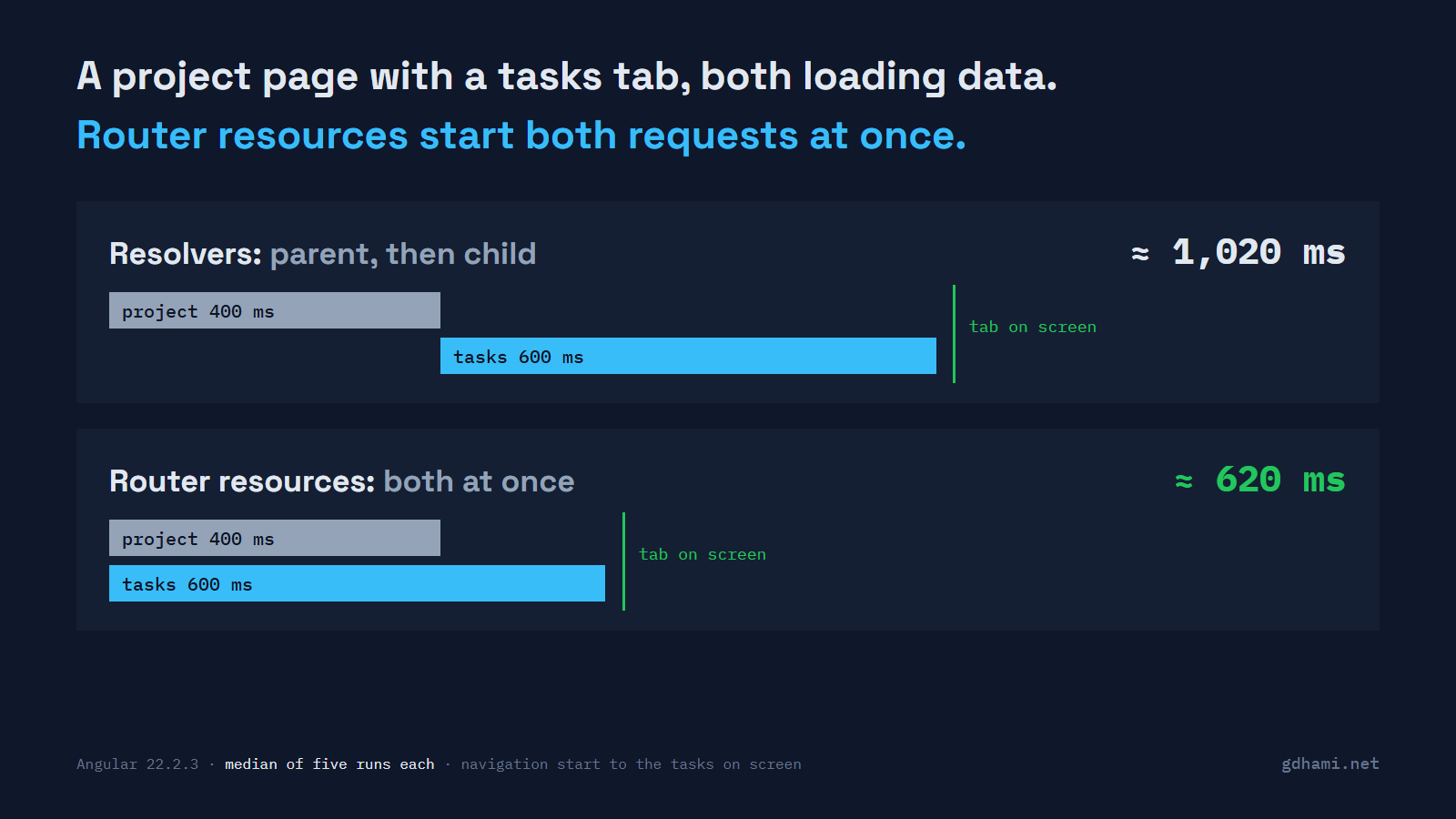
A project page with a tasks tab under it is about as ordinary as Angular routing gets. The project comes from one endpoint, the tasks from another, and each route has its own resolver. Open the tab and it feels slower than either request should be. I built that page this week, with a project request that takes 400 ms and a tasks request that takes 600 ms. With resolvers, the tasks showed up after about 1,020 ms. With the router resources that came in Angular 22.2, after about 620 ms.
That gap is the parent's whole request. It goes away because the two requests stop waiting for each other. If you have a nested route where both levels fetch data, that's the route to convert. Block the navigation only on the data the page can't draw without, and let the rest load inside the page with a loading state.
Why the tab waits for the parent
I wanted the cause as well as the number, so the demo logs when each request starts and ends. With resolvers, the tasks request left at 430 ms, the moment the project response came back, and never earlier.
The router source explains it. resolveData goes through the matched routes with RxJS concatMap, so one route's resolvers finish before the next route's start. Several resolvers on the same route do run in parallel. It's the step from parent to child that runs in sequence, and the docs page on route resources says so too.
That order makes sense when the child needs something from the parent's result. Here it doesn't. Both requests only need the id in the URL.
What router resources change
Router resources are a developer preview in 22.2. You turn them on with withRouterResources() in provideRouter. Each route then gets a resources function in place of resolve. It receives the route's params and query params as signals and returns a record of resources. These are the two routes from the demo, with httpResource doing the fetching:
{
  path: 'resources/projects/:id',
  component: ProjectPage,
  resources: ({ params }) => ({
    project: httpResource<Project>(() => `/api/projects/${params()['id']}`),
  }),
  children: [
    {
      path: 'tasks',
      component: TasksTab,
      resources: ({ params }) => ({
        tasks: httpResource<Task[]>(() => `/api/projects/${params()['id']}/tasks`),
      }),
    },
  ],
},
The router calls the function of every matched route, then waits for all of them together. In the log, both requests left within a few milliseconds of each other. Over five runs each, the median was 1,017 ms with resolvers and 623 ms with resources. That's a saving of 394 ms, the parent's 400 ms near enough. So it really is the sum of the two against the larger one.
The components didn't change. With withComponentInputBinding(), a blocking resource reaches the component input as its plain value, the same way a resolver's result does. ProjectPage still declares a Project input.
Which data should block
By default every resource blocks. The router waits for it before it shows the new page. When I switched from project 1 to project 2 on the tab, project 1 stayed on screen, URL included, for the whole 600 ms. Then project 2 swapped in, heading and tasks together.
Wrapping a resource in nonBlocking() tells the router not to wait for it. I did that for the tasks and kept the project blocking. The navigation then ended at about 435 ms, as soon as the project arrived. The page showed its heading and a loading line for about 200 ms, then the list.
The odd part is the component. A non-blocking resource doesn't arrive as a value: the input gets the Resource object itself. So the tab's input type changes, and its template has to deal with loading and errors:
@Component({
  selector: 'app-tasks-tab-live',
  template: `
    @if (tasks().isLoading()) {
      <p class="loading">Loading tasks…</p>
    } @else if (tasks().error()) {
      <p class="error">Couldn't load the tasks.</p>
    } @else {
      <ul class="tasks">…</ul>
    }
  `,
})
export class TasksTabLive {
  readonly tasks = input.required<Resource<Task[] | undefined>>();
}
That's why marking a resource non-blocking is more than a one-word change. I'd block on the project, because the heading and the "not found" case depend on it. The task list is the part a user can wait for inside the page, so it gets the loading state. A blocking resource that fails cancels the navigation with a NavigationError and leaves the old page up; a non-blocking one just sets its error() signal.
Where I'd switch, and where I wouldn't
It's a developer preview, so the API can still change in any release, even a patch. On a new route or an internal app I'd use it now. On a big existing app I'd convert the one nested route where the wait is easy to measure, and leave the other resolvers alone. In the source, resources start only after the resolve phase. A resolver left on the parent would still hold up a resource on the child, so convert both levels of that route together.
A single route with one resolver has no waterfall to remove. The request takes as long as it takes, with or without resources. I also wouldn't convert every resolver in the app in one change.
Start with the nested routes. Log when the child's request leaves. If it leaves right when the parent's response lands, that's the wait router resources delete.