Live updates from .NET 10 to Angular with Server-Sent Events
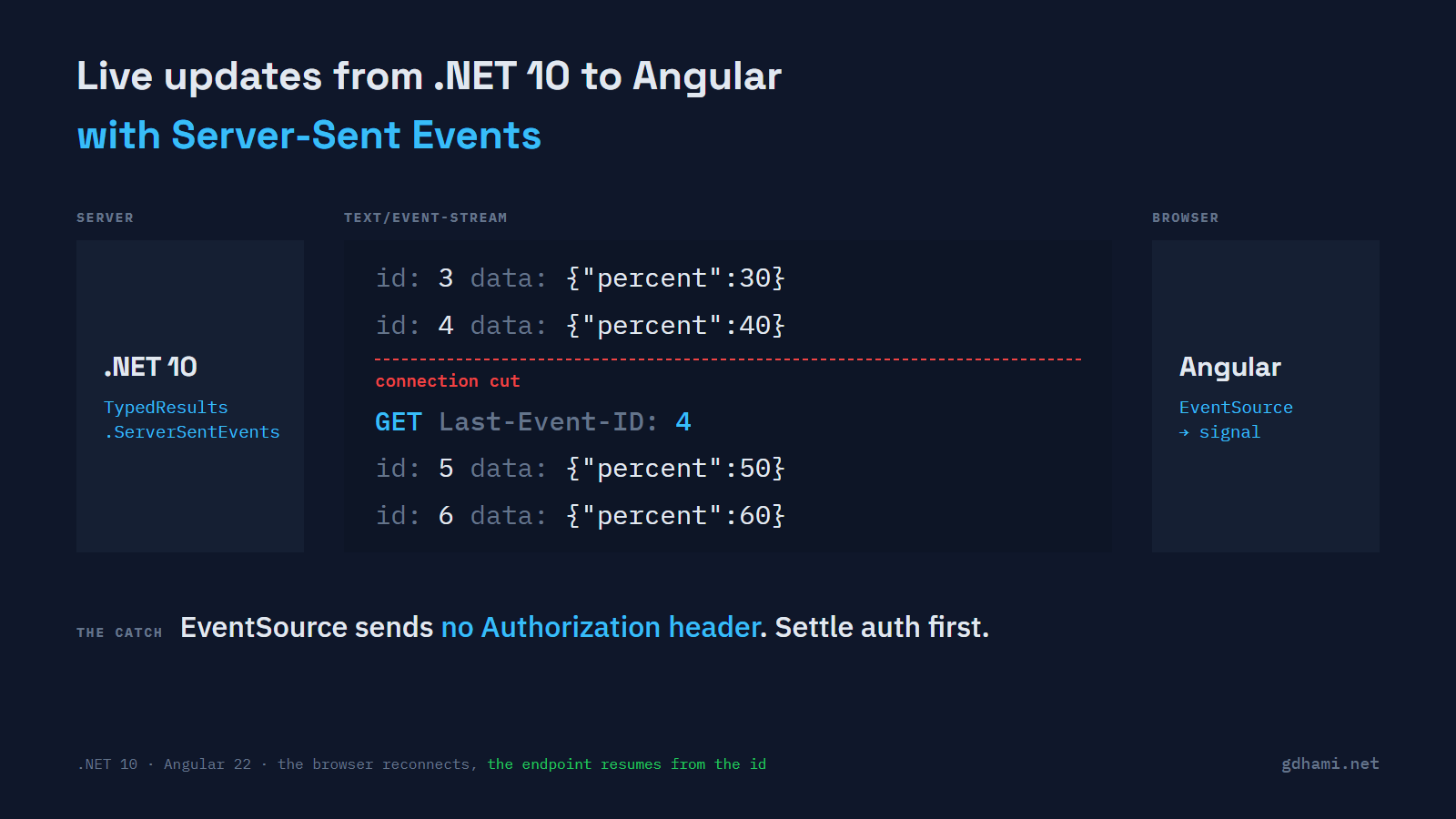
A long job on the server needed a progress bar in an Angular app, and my first thought was SignalR. It felt like a lot: a hub, a client package and a two-way connection, for messages that only ever go from the server to the browser. .NET 10 has a smaller option. A minimal API endpoint can return a Server-Sent Events stream straight from an IAsyncEnumerable, and the browser's built-in EventSource reads it with no library at all.
So I built a small demo to see how far that gets you. For one-way updates like job progress, I'd use it. Give every event an id, and sort out authentication before you write anything else. With cookie auth it just works. With bearer tokens it doesn't, because EventSource can't send an Authorization header, and that one gap decides the design.
The endpoint and what it sends
The result is TypedResults.ServerSentEvents. You hand it an async stream of SseItem<T> values, and each item can carry an event type, an id and a retry time. Here's the fake job, ten steps of ten percent each. Look at the two properties set on each item:
static async IAsyncEnumerable<SseItem<JobProgress>> Steps(
    int after, [EnumeratorCancellation] CancellationToken cancellationToken)
{
    for (var step = after + 1; step <= 10; step++)
    {
        await Task.Delay(300, cancellationToken); // the "work"
        yield return new SseItem<JobProgress>(new JobProgress(step * 10), "progress")
        {
            EventId = step.ToString(),
            ReconnectionInterval = TimeSpan.FromSeconds(1),
        };
    }
}
I curled it to see the bytes. Each event is a few field: value lines and a blank line. The JobProgress record came out as camelCase JSON without me asking:
$ curl -sN -i http://localhost:5100/jobs/7/progress
HTTP/1.1 200 OK
Content-Type: text/event-stream
Date: Sun, 11 Oct 2026 18:31:08 GMT
Server: Kestrel
Cache-Control: no-cache,no-store
Content-Encoding: identity
Pragma: no-cache
Transfer-Encoding: chunked

event: progress
data: {"percent":10}
id: 1
retry: 1000
The Content-Encoding: identity line was a nice surprise. The result sets it itself, and the compression middleware skips a response that already has that header. It also turns off buffering, which is why each event goes out right away. I added text/event-stream to the compression list to try to break it, and the events still went out one at a time, uncompressed. The demo has no reverse proxy in front, so that's the part I'd still test before production.
Closing the tab fired the request's cancellation token on the server. That token reaches the loop through [EnumeratorCancellation], so the Task.Delay gives up and nothing keeps streaming to a page that's gone.
When the connection drops
EventSource reconnects by itself when the connection breaks. When it does, it sends the last id it saw in a Last-Event-ID header. The framework doesn't read that header for you, so the handler takes it and starts after it:
static ServerSentEventsResult<JobProgress> Progress(
    [FromHeader(Name = "Last-Event-ID")] string? lastEventId,
    CancellationToken cancellationToken)
{
    var after = int.TryParse(lastEventId, out var id) ? id : 0;
    return TypedResults.ServerSentEvents(Steps(after, cancellationToken));
}
To test it, I made the server cut the first connection right after event 4. The browser reconnected on its own, and the page ended with ids 1 to 10, each once.
The header on that reconnect wasn't what I'd assumed. I ran it eight times in Chromium through Playwright. Four times it sent Last-Event-ID: 4. The other four it sent 3, because event 4 had been written on the server and never reached the page. curl lost it once in ten runs too, so I can't tell you where it goes missing. The id made it harmless, since event 4 simply came again on the new connection.
For a progress bar you could live without ids, because the next event fixes the number. For anything where a missed event changes the outcome, like status changes or a log, I'd treat the id as required. I'd also check how the endpoint finds its place again: mine recomputes the steps, while a real job would need to keep them somewhere it can read back.
The end of the job had its own catch. When the response finishes normally, EventSource treats that as a drop too, and reconnects with Last-Event-ID: 10. The protocol has no "done" message, so the Angular service closes the source on the last event. Note the addEventListener call as well. Because the server names its events, onmessage never fires:
const source = new EventSource(url, init);

// The server names its events "progress", so onmessage would never fire.
source.addEventListener('progress', (e: MessageEvent<string>) => {
  const { percent } = JSON.parse(e.data) as { percent: number };
  state.update((s) => ({
    percent,
    lastEventId: e.lastEventId,
    status: percent === 100 ? 'done' : 'open',
    ids: [...s.ids, e.lastEventId],
  }));
  // When the response ends, EventSource reconnects. Stop it once the job is done.
  if (percent === 100) source.close();
});
The service hands the component a read-only signal, so the template just reads state().percent.
The header EventSource can't send
The EventSource constructor takes a URL and one option, withCredentials. There's nowhere to put a header. I pointed it at a copy of the endpoint behind JWT bearer auth. It made one request with no Authorization header, got a 401, and closed. It didn't retry, which matches the spec: a status other than 200 fails the connection for good. The error event doesn't carry the status either, so the page only knows the stream is closed.
Cookies were the easy case. With the page and the API on the same origin, the auth cookie went along and nothing else was needed. Cross-origin, the cookie only went when I set withCredentials: true and the API's CORS policy allowed credentials for the page's origin.
With bearer tokens there are two ways out. One is a fetch-based reader, since fetch can send the header. Mine came to about 60 lines, and it does by hand the parsing, the reconnect and the Last-Event-ID that EventSource gives you for free. The other is the token in the query string. I wouldn't do that with a normal access token. URLs end up in proxy and access logs, and in the demo ASP.NET Core's own request log printed the token in full once I turned that log on.
Where SignalR fits
I expected SignalR to be the way out of the bearer problem, and the SignalR docs say otherwise. Browsers can't set headers on WebSockets or Server-Sent Events, so its browser client sends the token in the query string for those transports. It does the same thing I just said I wouldn't, only quietly.
So I'd pick between them on the shape of the traffic. SignalR pays for itself when messages go both ways, when you need groups, or when you scale out across servers with a backplane. A job reporting progress to one page needs none of that.
If your Angular app already signs in with a cookie, go ahead with the SSE result and EventSource. If it sends bearer tokens, decide first who owns that fetch-based reader, and whether a cookie for this one endpoint would be less work than writing it.