Keep an Excel export library out of Angular's first download with injectAsync
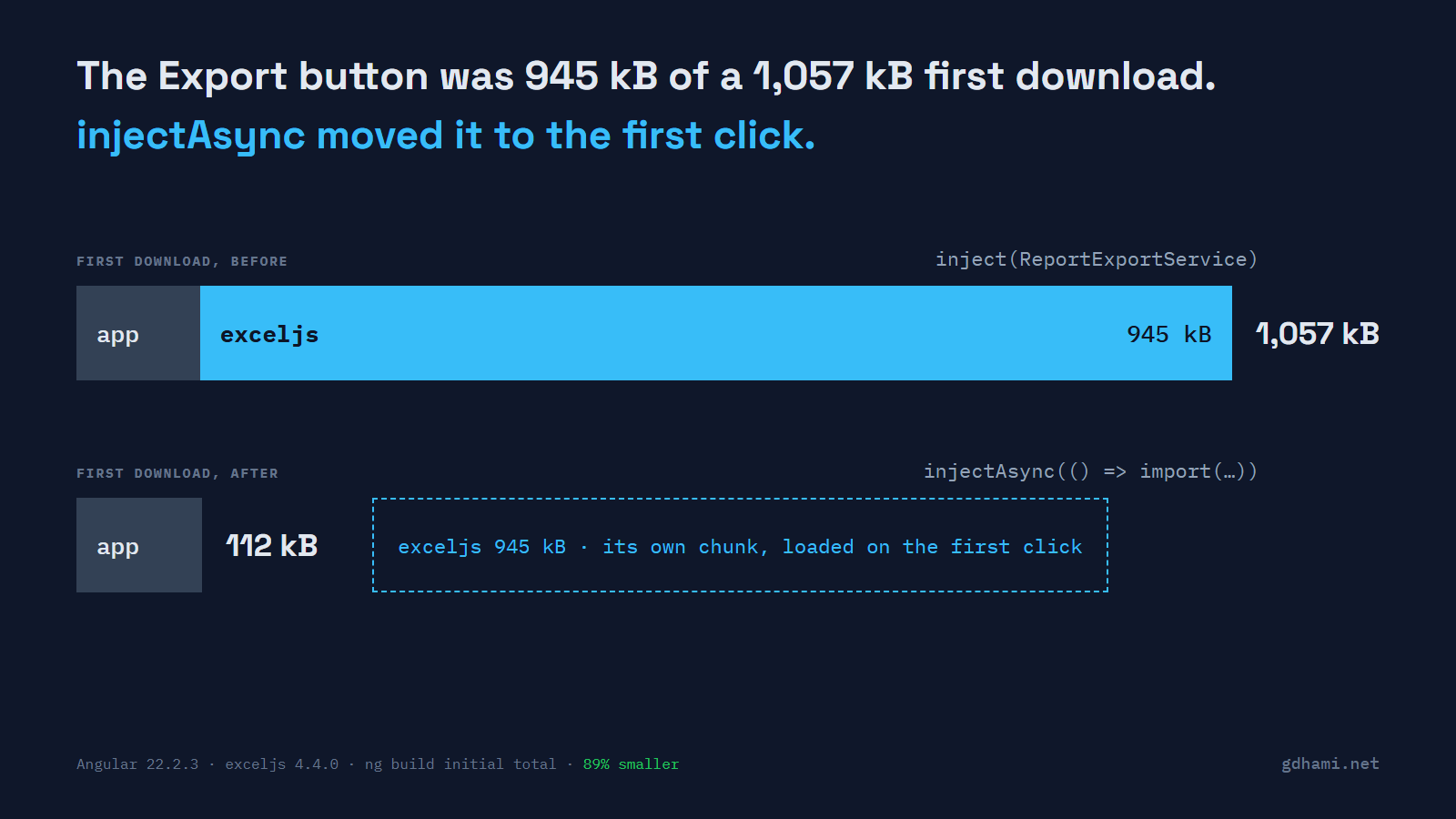
My demo app's first download was 1,057 kB, and 945 kB of it was exceljs, a library that only the Export to Excel button uses. That's almost 90% of the JavaScript every visitor waits for, spent on a button most of them will never click. A fresh Angular 22 workspace won't even build it: the default budget stops at 1 MB, and ng build fails with an error.
Angular 22 added injectAsync, which gets a service through a dynamic import. With it, the first download dropped to 112 kB, and exceljs moved into a chunk of its own that loads on the first click. If one action needs a heavy library, I'd put that service behind injectAsync, keep every other import of the library type-only, and compare ng build's initial total before and after. That last step matters, because one stray import puts the whole library back.
Why routes don't help here
Most apps already lazy-load their routes. The export library still ships in the first download, because a service imports it and a component on the first screen injects that service. Splitting routes doesn't change that.
injectAsync is stable since Angular 22.0. Instead of the service, it gives you a function that returns a promise of the service. The service has to be provided in root (@Injectable({ providedIn: 'root' }) or @Service()). A providers array would need the class itself, which is a normal import again.
Here's the button. Look at the loader, and at the await in the click handler:
export class ExportButton {
  private readonly exporter = injectAsync(() =>
    import('./report-export.service').then((m) => m.ReportExportService),
  );

  async exportOrders() {
    this.busy.set(true);
    this.status.set('Preparing the file…');
    const exporter = await this.exporter();
    const file = await exporter.toXlsx(ORDERS);
    saveFile(file, 'orders.xlsx');
    this.status.set(`Saved ${ORDERS.length} rows.`);
    this.busy.set(false);
  }
}
I first wrote the loader as () => import('./report-export.service'), the way the short example on the API page reads. It didn't compile. The loader has to resolve to the class, so you either add the .then() or make the service the file's default export. The error says Property 'default' is missing, which is clear once you know that, and not before.
The instance is the normal root one. Two calls, a second injectAsync elsewhere, or a plain inject() all got the same object in my tests. The code behind it is a cached promise and an ordinary injector.get().
What the first click costs
I served the builds locally and clicked Export in headless Chromium, logging every request with its time. The exceljs chunk wasn't requested at load, nor in the three seconds after. It went out 40 ms after the click, and the file arrived 187 ms after the click. A second click requested nothing new.
On localhost that's nothing, so I throttled the connection to 4 Mbit/s with 100 ms latency and ran each case three times. Times are in milliseconds:
variant                  button ready   first click   second click
eager                             964            67             38
lazy, click at once               349           797             44
idle, click at once               357           768             45
idle, click after 3 s             359            58             42
So the wait moves from the page load to the first click. The button appeared 615 ms sooner, and the first export took about 730 ms longer. For an export button I think that's the right trade. Exporting is something people choose to do, and they expect a report to take a moment. I disable the button and show "Preparing the file…" during the await, so nobody clicks twice on a slow link.
One thing surprised me in the source. If the chunk fails to load, injectAsync keeps that failed promise, and every later call fails the same way without trying again. Catch it and ask the user to reload.
Prefetch on idle, or wait for the click
injectAsync takes a second argument, { prefetch: onIdle }, which starts the download when the browser is idle. I expected idle to mean some time later. On a quiet page it's almost immediate: the chunk went out about 45 ms after the page's own files.
That changes what prefetch buys you. Every visitor downloads exceljs (about 218 kB compressed), clicked or not. You keep the faster first render, but you don't save any bytes. And it only helps once it has finished: clicking straight away with prefetch on still waited 768 ms.
For an export button I'd leave prefetch off. Most visitors never export, and the ones who do wait under a second. I'd turn it on for something most users reach soon after the page loads, like an editor behind a tab, where the wait would otherwise land on nearly everyone.
The import that undoes it
This is what I'd push back on hardest in a code review. The split only holds while nothing in the first download imports the library, or the service file, as a value. I built two variants with one extra import each, and both went straight back to 1,058 kB:
// Safe: TypeScript erases it when it compiles.
import type { Column } from 'exceljs';

// Undoes the split: a string constant, but it loads the whole service file.
import { XLSX_TYPE } from './report-export.service';

// Undoes it too: ValueType is an enum, a real object at run time.
import { ValueType } from 'exceljs';
The constant is the one I'd expect to slip through review. It looks harmless, and it sits in the same file as the service, so exceljs comes along with it.
A plain import { Column } used only as a type was safe as well. TypeScript dropped it, and the build produced the same files, down to the hashed names. That depends on verbatimModuleSyntax being off, so I'd still write import type and not count on it.
Where it's worth it
I wouldn't do this for every service. The await spreads into the calling code, and for a service that adds 5 kB you won't see the difference in the ng build table. My line is a library that shows up clearly in that table and is used by one action. exceljs, at 945 kB, is far past it.
If your app has an export or a report button, run ng build and note the initial total. Move that one service behind injectAsync, search the code for the library's name so every other import says import type, and build again. In this demo, the difference was 945 kB, from a change to one component.