Give a Leaflet map its height before you create it
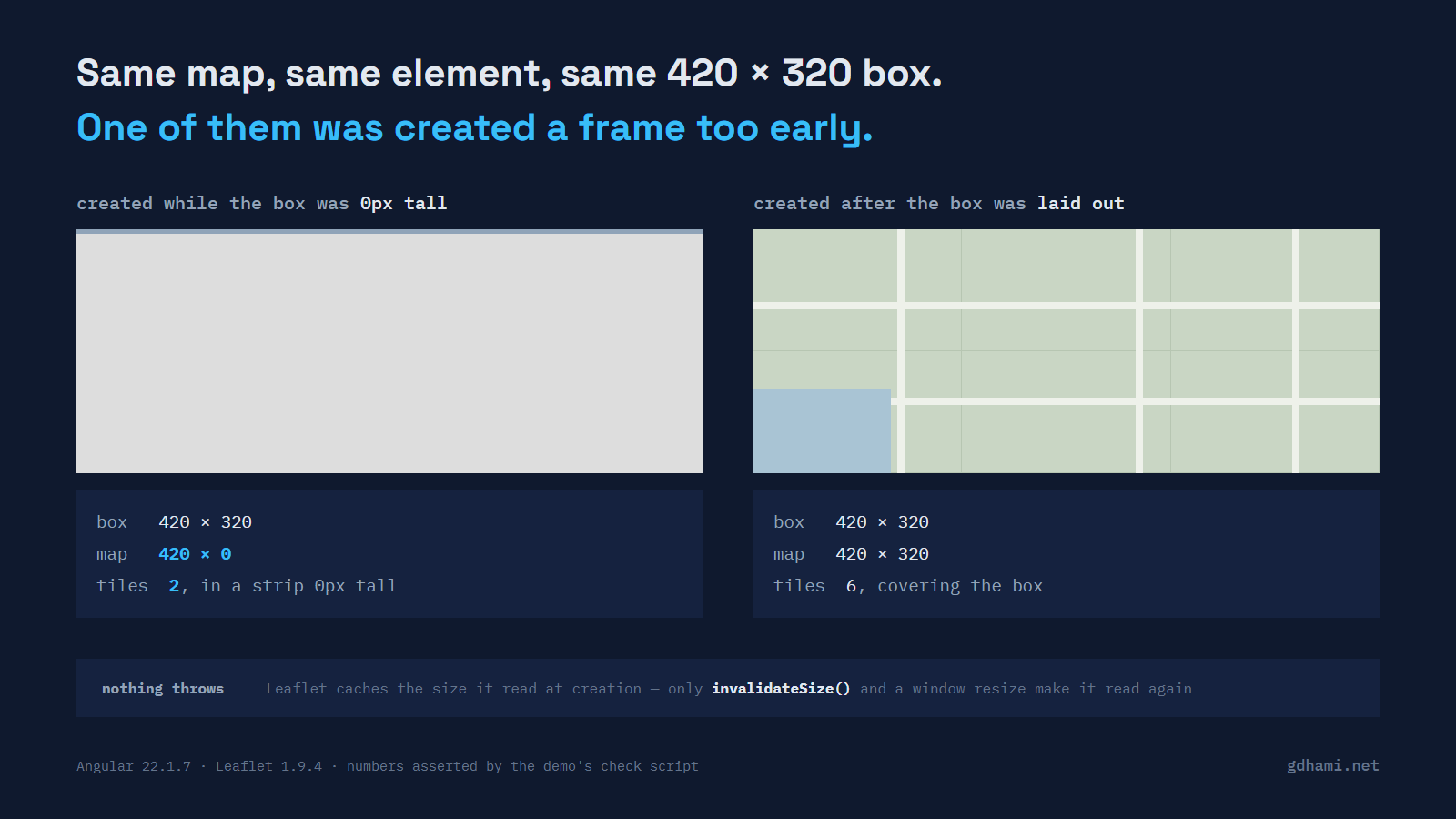
A Leaflet map asks the browser how big its container is once, while you are creating it, and then works from that number until something makes it ask again. If the element has no height at that moment, the map is zero pixels tall, and what you get on screen is a flat grey rectangle where the map should be. The grey is leaflet.css painting .leaflet-container with background: #ddd and nothing covering it. Nothing throws and the console stays clean, which is the annoying part.
I ran into this on a panel that starts collapsed. The map is built when the component initialises, the user opens the panel later, and the panel is grey. My first guess was the tile URL.
What the map thinks it is
The demo puts two maps on one page. Same Leaflet version, same tile layer, same centre and zoom. The left one is created into a box that is zero pixels tall at that moment; the right one is created into a box that already has its 320 pixels. Then three things happen to them, in order: the collapsed box is opened, invalidateSize() is called on the left map only, and finally both boxes lose 160 pixels of width. The right-hand map is wired to a ResizeObserver; the left one is not.
box is what the browser reports for clientWidth/clientHeight. map is what Map.getSize() returns. tiles counts the <img class="leaflet-tile"> elements Leaflet has put inside each container.
         step                                box       map      tiles
    left   created                             420x  0   420x  0      2
    right                                      420x320   420x320      6
    left   box opened, nothing else done       420x320   420x  0      2
    right                                      420x320   420x320      6
    left   invalidateSize() on the left map    420x320   420x320      6
    right                                      420x320   420x320      6
    left   both boxes narrowed by 160px        260x320   420x320      6
    right                                      260x320   260x320      6
The left column after the box was opened, and the left column after the width changed, are the whole problem. In both the browser and the map disagree about the element, so Leaflet is laying out tiles for a viewport that does not exist any more. Two tiles in a strip zero pixels tall, inside an element that is 320 pixels tall, is what people mean when they say grey tiles.
Why opening the box does not help
Map.getSize() in Leaflet 1.9.4, which is the current stable release (a 2.0 alpha has been on npm since May 2025, and I have not tested any of this against it):
getSize: function () {
    if (!this._size || this._sizeChanged) {
        this._size = new Point(
            this._container.clientWidth || 0,
            this._container.clientHeight || 0);

        this._sizeChanged = false;
    }
    return this._size.clone();
},
So the measurement is cached, and _sizeChanged is the only thing that reopens it. Two places set it: Map.initialize, and invalidateSize. The reference says what invalidateSize is for in one line: "Checks if the map container size changed and updates the map if so — call it after you've changed the map size dynamically, also animating pan by default."
That leaves the question of who calls it for you, and the answer is almost nobody. The trackResize option is documented as "whether the map automatically handles browser window resize to update itself", defaults to true, and binds its listener to window rather than to your element:
if (this.options.trackResize) {
    onOff(window, 'resize', this._onResize, this);
}
A collapsed panel opening, a sidebar sliding in, a flex row rewrapping, a tab becoming visible: none of those set out to resize the window, so you cannot count on _onResize. (One of them sometimes does, by accident: with classic scrollbars, opening a tall panel can bring up a scrollbar, narrow the viewport and fire a window resize. That is not a mechanism to rely on, and it does nothing for a width change that leaves the scrollbar alone.) That is why the last pair of rows in the table has the left-hand map still insisting it is 420 wide after its box became 260. The map is not ignoring the change. It was never told to look.
The fix is one observer, watching the element instead of the window:
this.observer = new ResizeObserver(() => this.map?.invalidateSize());
this.observer.observe(el);
ResizeObserver fires once when you start observing, which is convenient here, because it covers the case where the element already had the wrong size before you attached it. That first callback arrives even for an element that is genuinely zero by zero: the spec starts every observation from a sentinel size of (-1, -1) that no real element can have, so the first measurement always counts as a change. The demo's own suite observes three elements in the browser it pins and asserts one callback each: one with a size, one at width:0;height:0, and one at display:none.
The half that server rendering broke
Most of the Angular-plus-Leaflet guides I can find put the map creation in ngAfterViewInit. That hook is where you first have a real element, so as advice it was right for a long time. It is wrong in an app with server rendering, for two separate reasons.
The first is that ngAfterViewInit runs on the server. The demo's component prints a line from it and a line from afterNextRender, and asking Node for the page prints exactly one of them:
Node Express server listening on http://localhost:4173
[measure-box] ngAfterViewInit ran on the server
Angular's own reference is explicit about the other half: "Callbacks run on browser platforms only, they will not run on the server." The SSR guide names afterEveryRender and afterNextRender together and then says, in the sentence after, that they run only in the browser and are skipped on the server. Measured on Angular 22.1.7; the API page marks afterNextRender stable since v20.
The second reason bites earlier than any hook. Write the advice out literally, with a static import at the top of the file. This is the demo's naive-ssr.ts, with three things taken out: its doc comment, the explanatory paragraph, and the style rule that only the paragraph used.
import { AfterViewInit, Component, ElementRef, viewChild } from '@angular/core';
import * as L from 'leaflet';

@Component({
  selector: 'app-naive-ssr',
  template: `<div #host class="map"></div>`,
  styles: `.map { width: 420px; height: 320px; }`,
})
export class NaiveSsr implements AfterViewInit {
  private readonly host = viewChild.required<ElementRef<HTMLElement>>('host');

  ngAfterViewInit(): void {
    L.map(this.host().nativeElement).setView([25.2048, 55.2708], 12);
  }
}
Ask the server for that route and it never gets as far as the hook. The local paths are trimmed here, and the chunk name is whatever your build produced:
ERROR ReferenceError: window is not defined
    at .../server/chunk-6KHY3EWW.mjs:2:2299
    at ...
    at ModuleJob.run (node:internal/modules/esm/module_job:439:25)
Leaflet touches browser globals as its module body executes. The first one it reads is at line 230 of leaflet-src.js, window.requestAnimationFrame, some seventeen hundred lines above the browser-detection section that people usually blame for this. That runs when the chunk is loaded, before any component is constructed, so no runtime check inside the component can help. In the demo the route resolution fails and Express answers 404 for that path; other routes keep rendering normally.
What I write instead
import {
  afterNextRender,
  Component,
  ElementRef,
  OnDestroy,
  viewChild,
} from '@angular/core';
import type { Map as LeafletMap } from 'leaflet';

@Component({
  selector: 'app-map-panel',
  template: `<div #host class="map"></div>`,
  styles: `.map { width: 420px; height: 320px; }`,
})
export class MapPanel implements OnDestroy {
  private readonly host = viewChild.required<ElementRef<HTMLElement>>('host');
  private map?: LeafletMap;
  private observer?: ResizeObserver;

  constructor() {
    afterNextRender(() => void this.build());
  }

  private async build(): Promise<void> {
    const el = this.host().nativeElement;
    const L = await import('leaflet/dist/leaflet-src.esm.js');

    this.map = L.map(el).setView([25.2048, 55.2708], 12);
    L.tileLayer('https://tile.openstreetmap.org/{z}/{x}/{y}.png', {
      maxZoom: 19,
      attribution: '© OpenStreetMap contributors',
    }).addTo(this.map);

    this.observer = new ResizeObserver(() => this.map?.invalidateSize());
    this.observer.observe(el);
  }

  ngOnDestroy(): void {
    this.observer?.disconnect();
    this.map?.remove();
  }
}
afterNextRender does two jobs at once here. It keeps the whole thing off the server, which is what makes the dynamic import safe, and it runs after the render, so the element has been laid out by the time L.map measures it. The second import is an import type, erased at compile time, so it costs the server nothing.
The import specifier is uglier than it should be and it is worth one sentence. Leaflet 1.9.4's package.json sets main to the UMD build and declares no module or exports entry, so import('leaflet') resolves to the CommonJS file; under @angular/build 22.1.8 the lazy chunk that comes back had no map function on it at runtime in my build. Pointing at leaflet/dist/leaflet-src.esm.js gets the ESM build that ships in the same package, and a three-line .d.ts re-exporting leaflet's types keeps TypeScript happy. I would rather write that file than debug an undefined map at 2am.
One thing that is not optional: leaflet.css has to be loaded. Its first block is headed "required styles" and it is what makes the panes and tiles position: absolute. The quick start guide asks for the stylesheet and for a container with a defined height, and both of those are still true here; this post is about the case where you have done both and still get grey.
The wrapper question
There is no Angular package from the Leaflet project itself. The community one is ngx-leaflet, and it moved: npm marks @asymmetrik/ngx-leaflet as deprecated with the message "Packaged moved to @bluehalo/ngx-leaflet for all future versions, including minor and patch releases", its last release being 18.0.1 from June 2024. The package that is actually maintained is @bluehalo/ngx-leaflet. Its 22.0.0 went out on 15 June 2026, twelve days after Angular 22.0.0, which is a better record than I expected before I looked it up. It is not abandoned and I would not tell anyone to avoid it.
It does not remove either of the problems above, though. Its directive creates the map in ngOnInit, which runs on the server like the other ng-prefixed hooks, and it imports Leaflet at module scope, so the crash is the same crash. Its own docs say so plainly, and recommend marking the route RenderMode.Client. That works. It also means the page stops being server-rendered, which for a map sitting under a heading and a paragraph of real content is a lot to give up. The component above keeps the route on the server and just declines to build a map there.
The re-measuring is the same story. The directive listens for window:resize and debounces a call to invalidateSize by 200ms, which is Leaflet's own behaviour with a delay on it, so a container that changes size on its own still goes stale. You would be adding the ResizeObserver anyway.
So for a single map in a single panel I write the forty-two lines. For an app with layer controls, a layers panel, marker clusters and bindings for all of it, the wrapper is doing real work that I would not want to reimplement, and the calculation changes.
Running it
The demo is at github.com/gdhami-net/leaflet-angular-demo. npm run verify builds the app, renders it in Node with no browser present, then drives the page in headless Chrome and asserts every number in the table above, along with the 404 and the ReferenceError. npm start gives you the page with the three buttons on it, which is the version I would look at first: press them in order and watch one box stay grey while the other keeps up.