Contain a failing Angular component with @boundary so the rest of the page still works
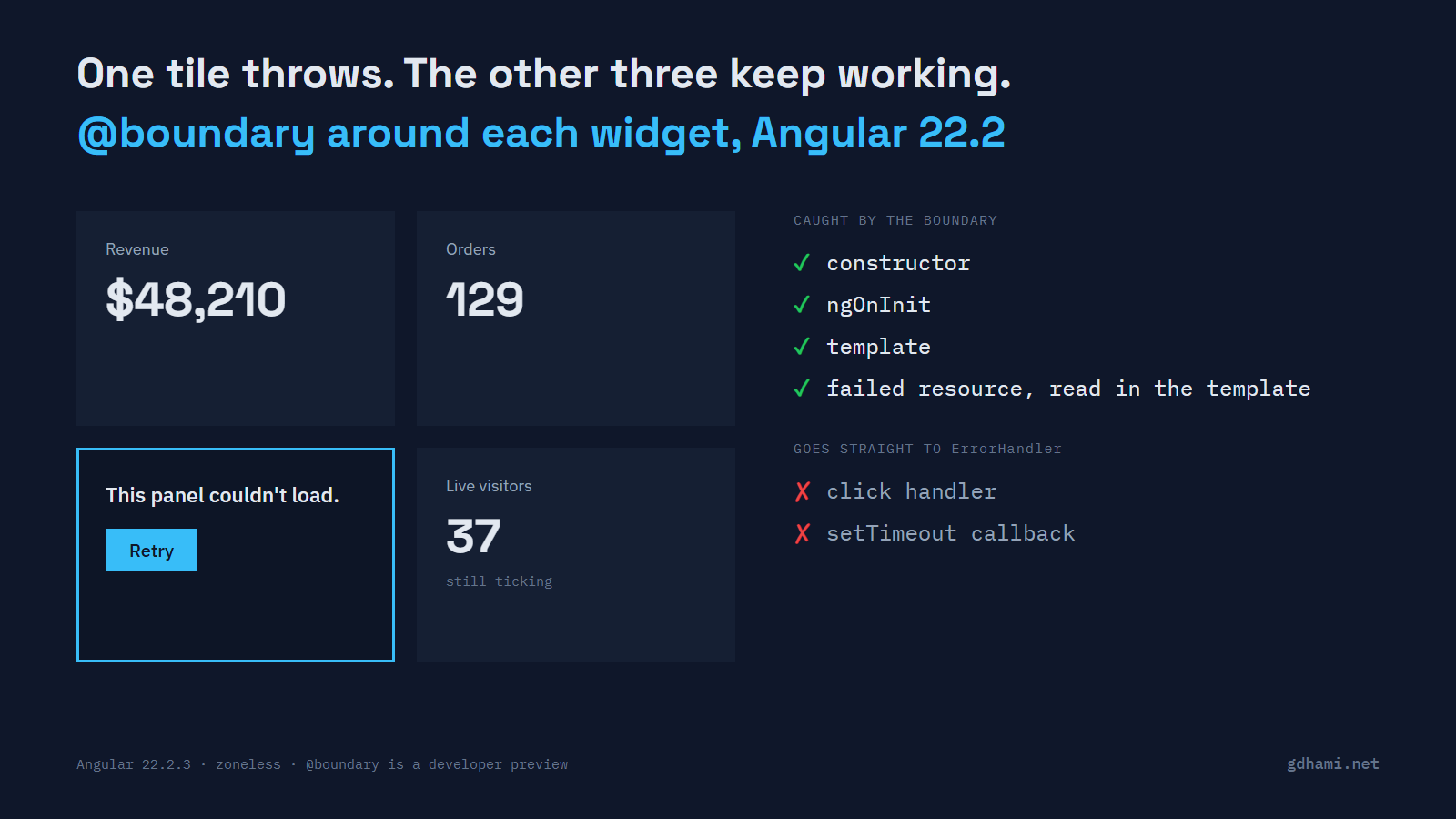
Angular 22.2 added @boundary, a template block that shows a fallback when a component inside it throws. Before trying it, I looked at what an Angular page does today when one component throws and there's no boundary at all. My test was a four-tile dashboard on Angular 22.2.3, zoneless as the CLI sets it up now, with one tile broken six different ways.
Two of those cases were worse than I expected, and the boundary contained both. I'd put one boundary around each widget that can stand on its own, give its fallback a Retry button, and keep the ErrorHandler in place. A click handler or a timer that throws goes straight past the boundary.
One broken tile, no boundary
The tiles are Revenue, Orders with an "Add order" button, Top products (the one I break), and a Live visitors counter that ticks five times a second. Top products sits third, so I can watch the tiles on both sides of it.
When its constructor threw, the whole grid disappeared. All four tiles went, the healthy ones too, and only the root component's own text was left.
When its ngOnInit threw, the result was stranger. This is what the page showed a few seconds after loading, with nobody touching it:
=== layout=plain fail=init
tiles: ["Revenue | $48,210","Orders | Add order","Top products | Refresh","Live visitors"]
visitors  -> ; orders  ->  (no click)
errorLog: [{"via":"handleError","message":"Top products: ngOnInit failed"}]
console:
  error: ERROR Error: Top products: ngOnInit failed
Every tile is on the page, but none of their bindings got filled in. Revenue only shows a number because it's plain text. Orders sits before the broken tile and it's empty too, and the visitor counter never starts because its own ngOnInit never ran. As far as I can tell from the source, a parent runs its children's ngOnInit hooks while it works through its own template, and refreshes the child views after that. The throw ends that pass before any tile gets its numbers.
Then I clicked "Add order", and the whole page filled in. The broken tile came back too, showing its products as if nothing had happened. So the user's way out is to click one of the buttons, which they'd have no reason to do.
The other four cases were milder. A template error left only that tile half drawn, with its heading and button but no data. A resource() whose loader failed kept showing the list it had while loading, and nothing on screen said it was stale. A click handler or a setTimeout callback that threw only printed ERROR to the console. A production build behaved the same way in every case.
Adding the boundary
The block wraps part of a template, and the @error block after it is the fallback. Inside it, $error holds what was thrown and $reset() tries the content again. Here's the broken tile from the demo, minus its test attributes:
<section class="tile">
  @boundary {
    <app-products-tile />
  } @error {
    <div class="fallback">
      <p>This panel couldn't load.</p>
      <button (click)="$reset()">Retry</button>
    </div>
  }
</section>
With one of these around each tile, the constructor, ngOnInit, template and resource errors all ended the same way. The broken tile showed its fallback and the other three kept updating.
The click handler and the setTimeout callback weren't caught. The tile stayed as it was and the error went to the ErrorHandler, same as before. That fits the docs page, which says a boundary catches errors "during initialization or change detection". An event handler runs in neither.
The resource case shows where the line sits. That tile rendered fine at first, and the error came later, when the loader failed. The boundary still caught it, because the template reads .value() and that read throws once the resource has failed. So async code inside a boundary is fine, as long as its failure shows up while Angular draws the view.
Retry, and who still hears about the error
$reset() throws the failed content away and builds it again with a new component instance. The constructor, ngOnInit and the resource loader all run again. A tile set to fail once came back on the first Retry. One that kept failing went back to its fallback and reported the error a second time.
The ErrorHandler still gets told. With the default handler, the boundary calls handleError, so you see ERROR in the console once. If your handler has the new optional onViewError method, the boundary calls that instead and skips handleError. The demo's version records which path each error took:
@Injectable()
export class ViewAwareErrorHandler extends RecordingErrorHandler {
  override onViewError(error: Error, details: ErrorDetails): void {
    window.errorLog.push({
      via: 'onViewError',
      message: error.message,
      boundary: details.boundary?.type.name,
    });
    console.error('Caught by a boundary:', error.message);
  }
}
That split is worth having in your error tracking, since a caught error means the user saw a fallback and the rest of the page kept working. One annoyance: details.boundary.type is the component that holds the boundary, and my production build minified its name to a single letter. It won't tell you much in production logs.
Where I'd use it, and where I'd wait
I also tried one boundary around the whole grid. One broken tile replaced the entire dashboard with the fallback, which is the constructor result from earlier with a friendlier message. Everything inside a boundary goes when it trips, so I'd wrap each tile or panel separately. A lone boundary around the router outlet or the app root is the one I'd question.
@boundary is a developer preview. So is ErrorDetails, the extra argument the new hook receives. On a dashboard or an internal tool I'd use it now. The template syntax is small, and if it changes before it's stable, that's a search and replace. I'd wait before building a shared library's API on ErrorDetails, since that's the part I'd expect to move.
Keep the ErrorHandler either way. It's still the only thing that sees a failing click handler or timer, and the boundary reports through it too. On an existing app, the widget that reads from the least reliable API is the one to wrap first. Give it a Retry, and check that your error tracking still hears about it.