AsSplitQuery: why a second Include returns 6,000 rows instead of 510
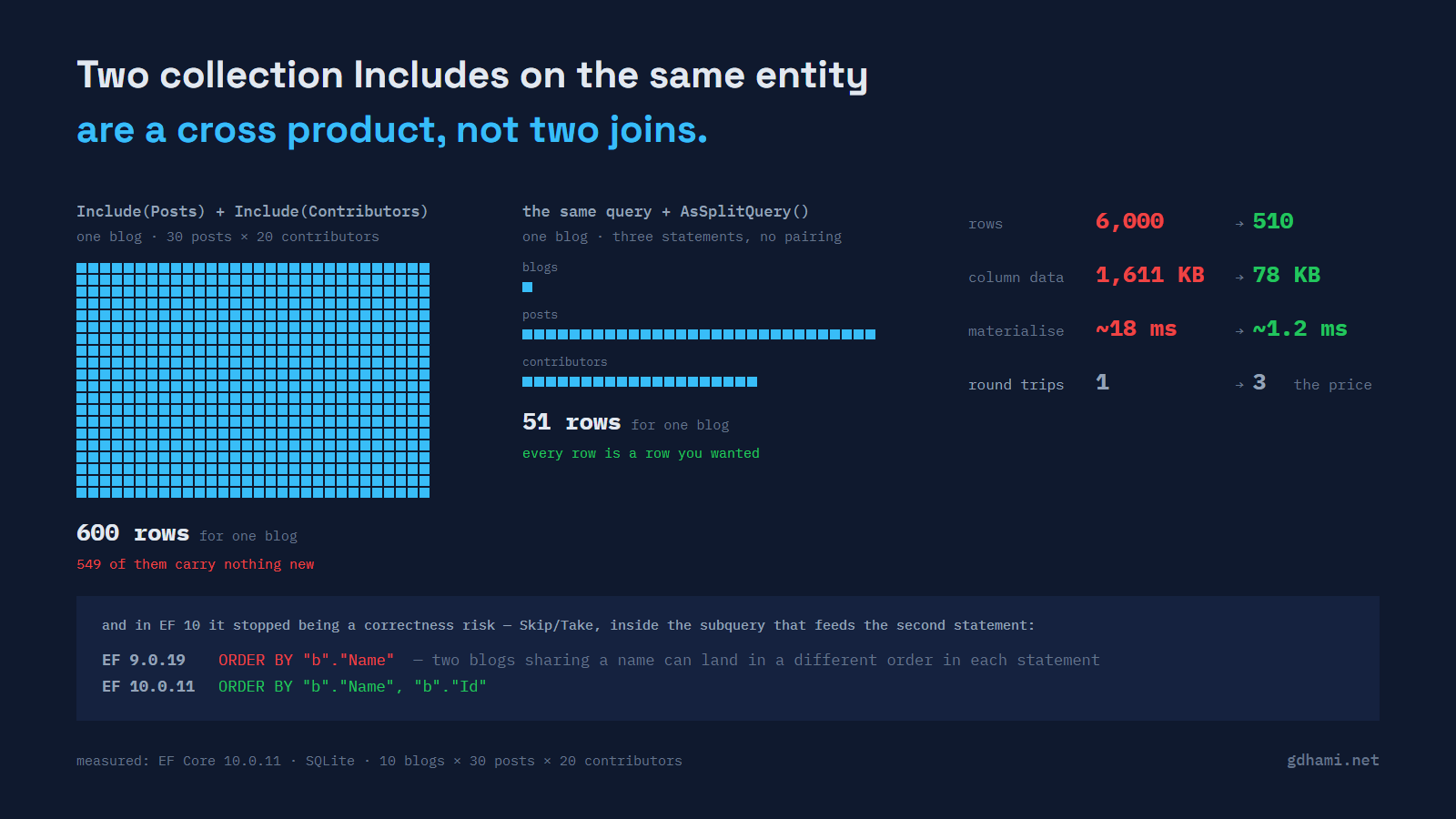
One Include of a collection is a LEFT JOIN, and the blog row repeats once per post. That is normal and usually not worth a thought. Add a second collection on the same entity and the arithmetic changes shape, because now the database is being asked for every pairing of the two.
I put numbers on it. Ten blogs, thirty posts each, twenty contributors each, on SQLite with EF Core 10:
Include(Posts) + Include(Contributors)      1 query    6,000 rows   1,611.3 KB
the same query + AsSplitQuery()             3 queries    510 rows      77.7 KB
Six thousand rows to deliver five hundred and ten rows of actual data. The byte figures are the ones I find persuasive: 1.6 MB of column data to carry 78 KB of information, because the post body is repeated on every row it appears in.
It is a cross product, and it is doing what you asked
Here is what EF sends for the first version:
SELECT "b"."Id", "b"."Name", "p"."Id", "p"."BlogId", "p"."Body", "p"."Title",
       "c"."Id", "c"."BlogId", "c"."FirstName", "c"."LastName"
FROM "Blogs" AS "b"
LEFT JOIN "Posts" AS "p" ON "b"."Id" = "p"."BlogId"
LEFT JOIN "Contributor" AS "c" ON "b"."Id" = "c"."BlogId"
ORDER BY "b"."Id", "p"."Id"
Nothing has gone wrong. Both joins hang off Blogs, so every post row for a blog gets paired with every contributor row for that blog. Thirty posts and twenty contributors is six hundred rows for one blog, and ten blogs make six thousand. The name for it is cartesian explosion, and the important property is that it multiplies: a third sibling collection does not add, it multiplies again.
Notice also what each of those rows carries. Every one repeats the blog columns and, worse here, the post body — that is where the 1.6 MB comes from. That duplication exists even with a single Include; it just does not usually matter until something multiplies it, or until the parent table has a genuinely big column in it.
Depth is not the problem. Comments hang off Post, not off Blog, and each post in the demo carries five comments, so joining them in produces one row per comment rather than a cross product:
ctx.Blogs.Include(b => b.Posts).ThenInclude(p => p.Comments)Same database, same shape of query: 1,500 rows (10 blogs times 30 posts times 5 comments), one per comment. What protects you here is that Comments is a descendant of Blog through Post, not a second branch off Blog the way Contributors is. Bring Contributors back in alongside that chain and the cross product returns, because Contributors is still a sibling of Posts, sitting at the same level off Blog:
ctx.Blogs
   .Include(b => b.Posts).ThenInclude(p => p.Comments)
   .Include(b => b.Contributors)
Same ten blogs, and this is 30,000 rows (10 times 30 times 5 times 20), not 1,500. What decides whether two included collections multiply is whether one sits on the other's ancestor-descendant chain, not how deep either one sits — and Comments and Contributors do not.
What AsSplitQuery does
AsSplitQuery() tells EF to issue one extra SQL statement per included collection instead of joining them. The same LINQ query becomes three statements: one for the blogs, one for the posts, one for the contributors.
ctx.Blogs
   .Include(b => b.Posts)
   .Include(b => b.Contributors)
   .AsSplitQuery()
No pairing happens, so the row count collapses to 10 + 300 + 200. In the demo that is 510 rows and 77.7 KB, and EF spends about 1.2 ms running and materialising the query instead of about 18. The ratio has moved between 12 and 17 across runs; the rows and bytes are identical every time, so treat "roughly fifteen times" as the finding and the milliseconds as SQLite on one desktop.
You can make it the default for a context and opt individual queries back out with AsSingleQuery():
options.UseSqlite(connectionString,
    o => o.UseQuerySplittingBehavior(QuerySplittingBehavior.SplitQuery));
One-to-one navigations are not affected either way. EF always loads those with a join in the same query, because a reference navigation cannot multiply anything.
The part that is not about speed
This is the bit I did not know until I went looking, and it is the reason this post exists rather than being one more page about cartesian products.
When a split query has Skip or Take on it, EF cannot just run the second statement against the whole table — it has to restrict it to the same page of parents. It does that by embedding the first query as a subquery inside the second. That subquery has to sort exactly the way the first statement did, or the two statements disagree about which parents are in the page.
Before EF 10, it did not. I ran the same code against both versions:
EF 9.0.19     ORDER BY "b"."Name"
EF 10.0.11    ORDER BY "b"."Name", "b"."Id"
That is the whole diff, inside the subquery. Order by a column that is not unique, and on EF 9 nothing forces the two statements to agree on which rows belong in the page. Statement one can select blogs A and B; the subquery in statement two, ordering only by name, can select A and C.
The damage is quieter than a wrong parent. Each post row carries its blog key, so EF still matches posts to the right blog — a post belonging to C has nowhere to go and is discarded. What you are left with is blog B in your results with an empty Posts collection, looking for all the world like a blog with no posts. No exception, no log line, and a collection that is empty for a reason that has nothing to do with your data.
I reproduced the SQL difference above on both versions, not a run where the two statements actually disagreed. Forcing that divergence means getting the database to order tied rows differently in two statements, which is exactly the thing you cannot rely on either way — and that is the point. Microsoft's own note on the change describes the old behaviour as "possible incorrect data being returned".
EF 10 makes the subquery's ordering match. If you are on EF 8 or 9 with split queries and paging, the mitigation is the one the documentation gives: order by something unique, or add the key as a tie-breaker yourself.
What splitting costs
It is a trade, not an upgrade, and the drawbacks are real:
- Most databases give a single query one consistent snapshot. Several queries get no such guarantee. If something writes between your statements you can materialise a graph that never existed as a whole. Wrapping the query in a serializable or snapshot transaction (where the database offers one) fixes it and costs what those transactions cost. SQLite, which the demo runs on, only offers serializable.
- Each statement is another round trip. On a local database that is nothing. Across a cloud network with real latency, three round trips can undo the saving, which is precisely why this is a decision and not a default.
- Most databases only allow one query to be active at a time, so earlier results are buffered in memory before the next statement runs. SQL Server with MARS and SQLite are the exceptions.
- Reference navigations get joined into each split query. Include a handful of one-to-one relationships alongside two collections and you pay for those joins three times instead of once.
EF already told you
The thing that stopped me short is that EF Core does not let this happen quietly. Load more than one collection without saying how, and it logs this:
warn: RelationalEventId.MultipleCollectionIncludeWarning[20504]
      Compiling a query which loads related collections for more than one
      collection navigation, either via 'Include' or through projection, but
      no 'QuerySplittingBehavior' has been configured.
A warning in a log nobody reads is not a control. If your team has decided this matters, promote it to an exception in development and test, which is what the warning itself suggests at the end:
options.ConfigureWarnings(w =>
    w.Throw(RelationalEventId.MultipleCollectionIncludeWarning));
Now the second sibling Include cannot reach production without somebody choosing single or split on purpose. The warning is not scoped to siblings, though — it fires for any query loading more than one collection, including the harmless Posts.ThenInclude(Comments) chain above. Turning it into an exception means that query needs an explicit AsSingleQuery() too, or it throws along with the ones you actually meant to catch.
What I would actually do
Reach for a projection first. Most endpoints that pull two collections do not need tracked entity graphs at all — they need a shape to serialise, and a Select gives you that while letting you leave the big columns behind. Neither join strategy can save you from fetching columns you were never going to use.
When you do need the graph, decide per query rather than globally, because the right answer depends on how much the collections multiply and how far away the database is. Two collections of twenty each, on a database in the same rack: splitting is almost certainly right. One collection and a chatty cloud connection: probably not.
And measure the thing rather than the milliseconds. Rows and bytes are deterministic and travel from one machine to another; my 18 ms will not. The demo prints rows, bytes, statement count and time for all three shapes, and running it against your own model takes longer to describe than to do.
The code is at github.com/gdhami-net/ef-query-splitting-demo. It multi-targets EF 9 and EF 10 on purpose, so the ordering diff above is two commands rather than a claim you have to take on trust.