Angular's HttpClient only sends the XSRF header to its own origin
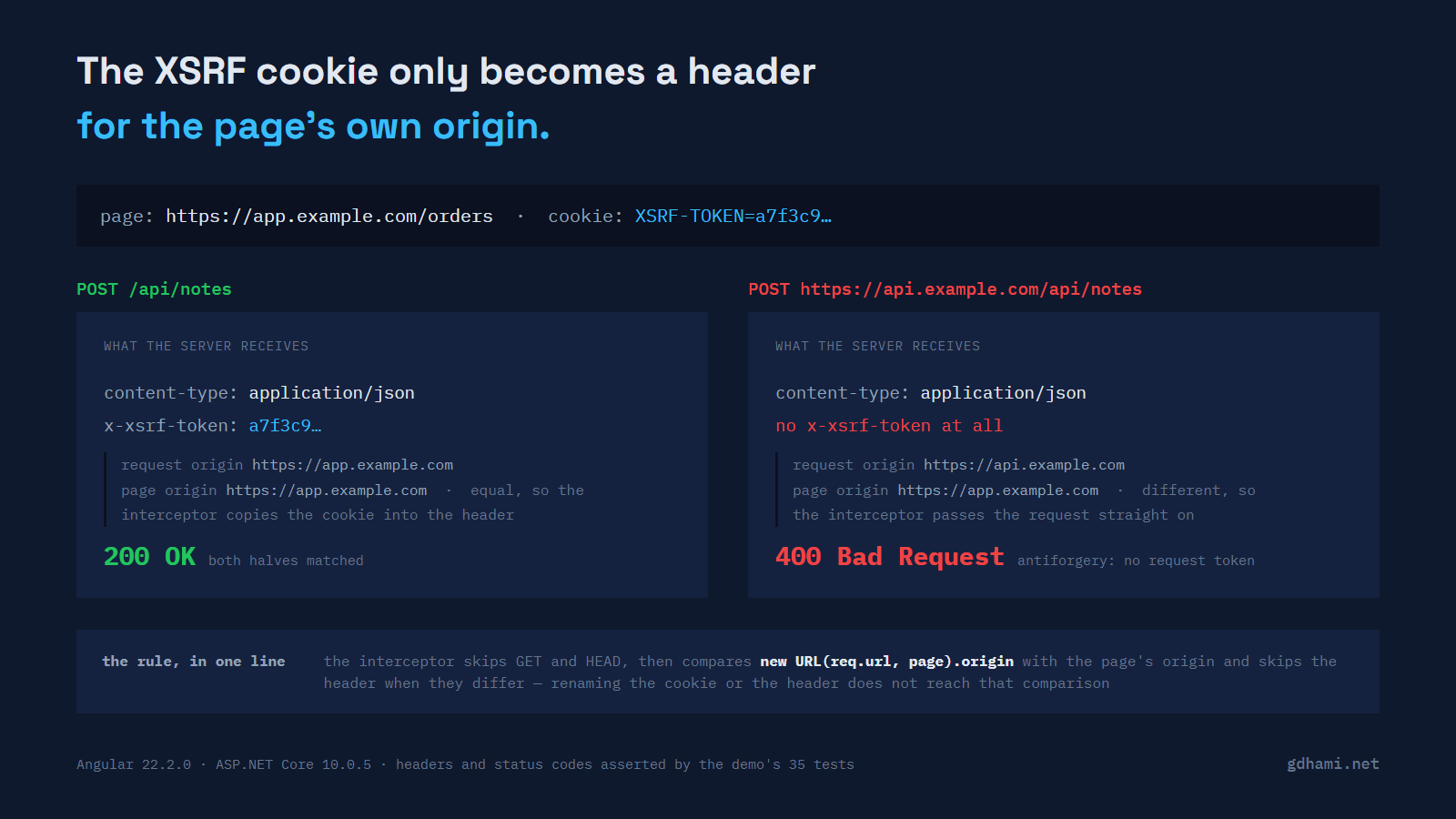
The API answers 400 and the cookie is right there in the browser. That combination cost me an afternoon the first time I met it. XSRF-TOKEN was in the cookie list, the ASP.NET Core side was configured to look for X-XSRF-TOKEN, and the request in the network tab carried no such header. I checked the cookie name twice before I looked at the address bar. The app was served from app.example.com and the API lived on api.example.com.
Angular's built-in interceptor compares the request's origin with the page's and skips the header when they differ. It also skips GET and HEAD. The cookie name never enters into that decision, which is why renaming things is the one fix that can't work.
What the interceptor checks
The whole rule is one function, xsrfInterceptorFn in packages/common/http/src/xsrf.ts. This is Angular 22.2.0, with the comments and the try/catch trimmed out:
if (!inject(XSRF_ENABLED) || req.method === 'GET' || req.method === 'HEAD') {
  return next(req);
}

const locationHref = inject(PlatformLocation).href;
const {origin: locationOrigin} = new URL(locationHref);
const {origin: requestOrigin} = new URL(req.url, locationOrigin);

if (locationOrigin !== requestOrigin) {
  return next(req);
}

const token = inject(HttpXsrfTokenExtractor).getToken();
const headerName = inject(XSRF_HEADER_NAME);

if (token != null && !req.headers.has(headerName)) {
  req = req.clone({headers: req.headers.set(headerName, token)});
}
return next(req);
PlatformLocation.href is the page's URL. Resolving req.url against it turns /api/notes into something on the page's own origin, and leaves https://api.example.com/api/notes where it is. When the two origins differ the request goes on untouched, without the header.
That's the right default, and worth keeping in mind before you go around it. A token attached to every outgoing request would hand your antiforgery token to whatever host the app happens to call, including the analytics endpoint somebody wired in last quarter.
The absolute-URL rule changed in Angular 21.0.3
If you're on an older version, the check isn't the one above. It used to be a regex over the URL text:
const ABSOLUTE_URL_REGEX = /^(?:https?:)?\/\//i;

if (
  !inject(XSRF_ENABLED) ||
  req.method === 'GET' ||
  req.method === 'HEAD' ||
  ABSOLUTE_URL_REGEX.test(req.url)
) {
  return next(req);
}
Any absolute URL was skipped, including one pointing back at the page's own host. A page on app.example.com posting to https://app.example.com/api/notes sent no header either, and switching that call to a relative URL fixed it. The commit that replaced the regex with the origin comparison shipped in 21.0.3 on 2025-12-03. The v20 line still carries the old behaviour; 20.3.32, the newest v20 release as I write this, has the regex too.
Renaming the cookie and the header changes nothing
withXsrfConfiguration is usually the first thing people try, because the symptom looks like a naming mismatch:
provideHttpClient(
  withXsrfConfiguration({ cookieName: 'CUSTOM-XSRF', headerName: 'X-Custom-Xsrf' }),
)
Both names are read further down, after the origin comparison has already sent the request on its way. With that configuration in place, a POST to api.example.com carries no X-Custom-Xsrf, and the same POST to the page's own origin carries it fine. withNoXsrfProtection() is the other one worth naming here: it turns the interceptor off completely, which solves the wrong problem.
What the server makes of the missing header
On the ASP.NET Core side the header name is a one-liner, and a small endpoint hands the SPA its token:
builder.Services.AddAntiforgery(options =>
{
    options.HeaderName = "X-XSRF-TOKEN";
});

// ...

app.MapGet("/antiforgery/token", (HttpContext http, IAntiforgery antiforgery) =>
{
    var tokens = antiforgery.GetAndStoreTokens(http);
    http.Response.Cookies.Append("XSRF-TOKEN", tokens.RequestToken!, new CookieOptions
    {
        HttpOnly = false,
        Secure = http.Request.IsHttps,
        SameSite = SameSiteMode.Lax,
        Path = "/",
    });
    return Results.NoContent();
});
GetAndStoreTokens sets the cookie token in its own HttpOnly cookie and returns the request token, which goes into the script-readable XSRF-TOKEN cookie Angular reads. Both halves have to arrive, and they have to match.
The part that catches people out on .NET 8 through 10 is which endpoints get checked at all. UseAntiforgery() validates a POST, PUT or PATCH to an endpoint whose antiforgery metadata requires validation, and a minimal API picks that metadata up from a form binding. A JSON endpoint has none, so the middleware waves it straight through with no token whatsoever. Controllers need [ValidateAntiForgeryToken] or [AutoValidateAntiforgeryToken]. A JSON minimal API needs somebody to run the check and act on it; in the demo that is an endpoint filter calling ValidateRequestAsync:
public sealed class AntiforgeryEndpointFilter(IAntiforgery antiforgery) : IEndpointFilter
{
    public async ValueTask<object?> InvokeAsync(
        EndpointFilterInvocationContext context,
        EndpointFilterDelegate next)
    {
        try
        {
            await antiforgery.ValidateRequestAsync(context.HttpContext);
        }
        catch (AntiforgeryValidationException ex)
        {
            return Results.BadRequest(new { error = ex.Message });
        }

        return await next(context);
    }
}
Three lines from the API suite, on .NET 10.0.5:
  Passed XsrfApiTests.AntiforgeryTests.Json_post_without_the_header_is_rejected(url: "/api/notes") [1 ms]
  Passed XsrfApiTests.AntiforgeryTests.Json_post_with_the_header_succeeds(url: "/api/notes") [1 ms]
  Passed XsrfApiTests.WhichEndpointsValidateTests.A_json_minimal_api_is_not_checked_by_the_middleware [6 ms]
One more trap while you're in Program.cs. The filter behind [AutoValidateAntiforgeryToken] is registered by the MVC view services, so AddControllers() alone isn't enough. The attribute compiles, the app starts, and the first request to a marked controller dies at 500 with No service for type 'Microsoft.AspNetCore.Mvc.ViewFeatures.Filters.AutoValidateAntiforgeryTokenAuthorizationFilter' has been registered. AddControllersWithViews() fixes it.
Putting the API back on the app's origin
The boring fix is the one I reach for first, because afterwards there is no cross-origin request left to protect. In development that means the dev server's proxy, which makes the browser see a single origin:
{
  "/api": {
    "target": "https://localhost:7213",
    "secure": false,
    "changeOrigin": false
  },
  "/antiforgery": {
    "target": "https://localhost:7213",
    "secure": false,
    "changeOrigin": false
  }
}
In production it is the same shape one layer up: a reverse proxy in front of both, the SPA at / and the API under /api on one hostname. No Angular code changes, the built-in interceptor does its job, and the CORS configuration disappears along with the cross-origin request. If you have any say over the deployment, do this one.
An interceptor for one trusted origin
Sometimes the hostname split isn't yours to undo. Then you write the interceptor Angular deliberately didn't write for you, and you match exactly one origin:
export function trustedOriginXsrfInterceptor(
  trustedOrigin: string,
  headerName = 'X-XSRF-TOKEN',
): HttpInterceptorFn {
  const trusted = new URL(trustedOrigin).origin;

  return (req, next) => {
    if (req.method === 'GET' || req.method === 'HEAD') {
      return next(req);
    }

    let requestOrigin: string;
    try {
      requestOrigin = new URL(req.url, inject(PlatformLocation).href).origin;
    } catch {
      return next(req);
    }

    if (requestOrigin !== trusted) {
      return next(req);
    }

    const token = inject(HttpXsrfTokenExtractor).getToken();
    if (token === null || req.headers.has(headerName)) {
      return next(req);
    }

    return next(
      req.clone({
        headers: req.headers.set(headerName, token),
        withCredentials: true,
      }),
    );
  };
}
HttpXsrfTokenExtractor is public API and is the same service Angular's own interceptor uses, so a cookie renamed through withXsrfConfiguration is picked up here too. Register it with withInterceptors([...]) and leave the built-in one enabled; it still covers everything served from the page's origin.
Do that comparison on the origin. A startsWith check on the URL text would accept https://api.example.com.attacker.test, and a hostname check that forgets the port would accept https://api.example.com:8443. Neither gets the header.
Three things outside Angular have to line up before any of this works, and the whole approach assumes the two hosts share a domain, as app.example.com and api.example.com do. The XSRF-TOKEN cookie has to be readable by script on the SPA's host, so its Domain has to cover both names; a cookie set for api.example.com alone is invisible to code running on app.example.com. The request needs withCredentials: true, which is why the interceptor above sets it, or the browser sends no cookies and the server sees half a pair. The GET that fetches the token needs it too, and the interceptor above skips GET, so set it on that call yourself; without credentials the browser drops the response's Set-Cookie and the cookie never arrives. And the API's CORS policy needs AllowCredentials() with X-XSRF-TOKEN in the allowed headers, because the preflight runs first and a header missing from that list ends the attempt before the POST is ever sent.
That last one is easy to misread from the server side. ASP.NET Core answers a preflight with the policy's own header list whatever the browser asked for, so an unlisted header doesn't produce an error response. The preflight still comes back 204, just without that header in the list, and the browser is what gives up.
The demo is at github.com/gdhami-net/angular-xsrf-origin-demo. ./check.sh (or ./check.ps1) runs both halves: 16 Angular tests that read the header off each outgoing request through HttpTestingController with the page origin pinned, and 19 API tests that drive the real antiforgery middleware in memory. Both have to be green.