Angular 22 made OnPush the default, and the migration wrote Eager
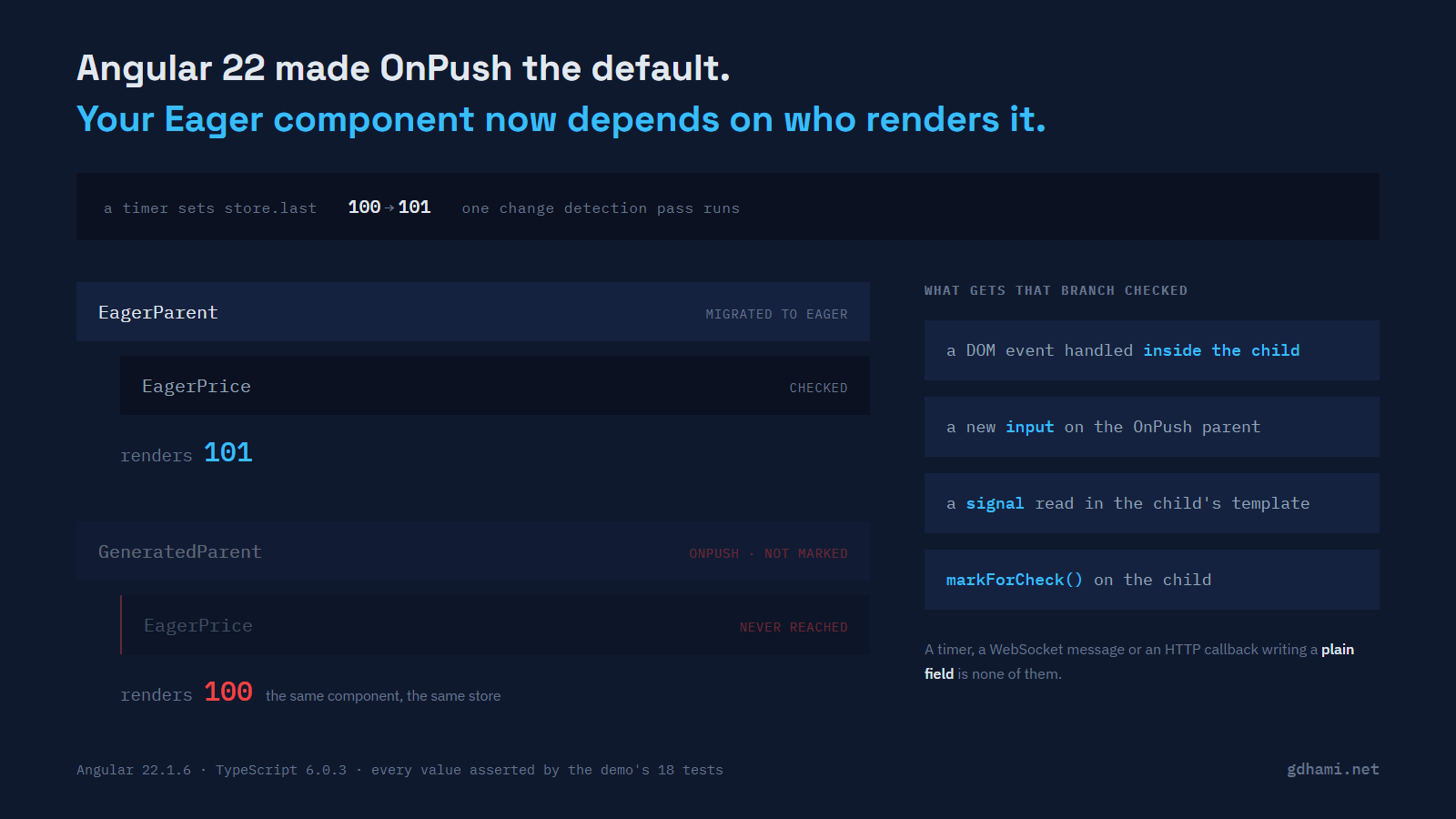
Angular 22 flipped the default change detection strategy. A component whose @Component metadata has no changeDetection key is OnPush now, and the strategy that used to be called Default is called Eager. The changelog says it in one line, under breaking changes:
Component with undefined `changeDetection` property are now `OnPush` by default.
Specify `changeDetection: ChangeDetectionStrategy.Eager` to keep the previous
behavior.
That does not change how the components you already have behave, because ng update runs a migration that writes the old strategy back in (for the components it can see, and what it cannot see is at the end of this post). The migration is called change-detection-eager, it is registered against version 22.0.0, and its description is "Adds ChangeDetectionStrategy.Eager to all components." I ran it on a scratch project to see exactly what it touches:
-import { Component, inject } from '@angular/core';
+import { Component, inject, ChangeDetectionStrategy } from '@angular/core';
 import { PriceStore } from './price-store';

 @Component({
   selector: 'price-ticker',
+  changeDetection: ChangeDetectionStrategy.Eager,
   template: `<span>{{ store.last }}</span>`,
 })
and, for a component that named the old strategy explicitly:
 @Component({
   selector: 'price-panel',
-  changeDetection: ChangeDetectionStrategy.Default,
+  changeDetection: ChangeDetectionStrategy.Eager,
   imports: [PriceTicker],
   template: `<price-ticker />`,
 })
So every component the migration rewrites keeps checking on every pass, and the app behaves the same on the morning after the upgrade. Default still exists as a deprecated alias for Eager (both are 1; OnPush is 0), and the alias has been there since 21.2, so you can do the rename before you upgrade if you like.
The change lands later, the first time you generate a component. That one has no changeDetection key, so it is OnPush, and sooner or later an Eager component ends up inside it.
under Eager 100
under OnPush 100
What the strategy actually decides
Eager does not mean the component checks itself. It means the component is checked when the change detection traversal reaches it. OnPush means Angular can stop at that component and skip it along with everything below it, which it does when the component has not been marked for check. The Angular docs put the rule as "Angular will skip descendant component subtrees with roots using OnPush, which have not received new inputs".
Underneath is the same tree walk it always was, and the whole question is which nodes it walks into. An Eager component under an OnPush parent that is not marked for check is not reached, and a component that is not reached does not re-read anything.
The demo mounts the same three children twice: once under a parent that kept its strategy through the upgrade, once under a parent written the way the v22 generator writes one. Both branches read the same service, so anything that differs on screen is change detection and nothing else. One of those children reads a plain field:
@Component({
  selector: 'eager-price',
  changeDetection: ChangeDetectionStrategy.Eager,
  template: `<span data-testid="eager-price">{{ store.last }}</span>`,
})
export class EagerPrice {
  readonly store = inject(PriceStore);
}
store.last is a number on a service. Nothing in the reactive graph knows when it changes, which was fine for years because the traversal came past on every pass anyway.
The case that stops working
With zone.js still wired up, a timer fires, mutates the field, and zone.js schedules a pass. (That wiring is provideZoneChangeDetection(), which the v21 migration added to your application's providers, app.config.ts in a standalone app, when Angular stopped installing the zone.js scheduler by default.) The pass runs, and the two branches disagree. Two separate runs, each starting from 100:
                            under the Eager parent   under the OnPush parent
a service call sets 101                        101                       100
a setTimeout in the zone sets 102              102                       100
That is the whole bug, and it is a quiet one. No error, no warning in the console, no failing test unless a test happens to render that subtree and wait. The number on the left keeps ticking, the number on the right froze at whatever it was when the branch was last checked.
The first time I hit this I assumed the timer had died, because the same component was clearly working elsewhere on the page. It was working elsewhere because its parent there had come through the migration.
An event somewhere else does not rescue it either. Clicking a button that lives on the root component pushes a new value and triggers a full pass, and the OnPush branch is still skipped:
click a button on the root component
  under the Eager parent    101
  under the OnPush parent   100
The cases that still work
Four things mark that branch for check, and all four are asserted in the demo.
The first is a DOM event handled inside the child itself. In the demo the store has already moved to 200 while the two children under the OnPush parent that read the plain field are both still painting 100. Clicking a button that lives in one of those children pushes 201, and that child comes out at 201. So does its sibling, which has no event of its own, because the event marks the OnPush parent and its ancestors for check, and once that parent is checked an Eager child below it is checked like any other.
A new input on the parent does the same job from above. Give the OnPush parent a different label and the whole branch is checked, so the Eager child underneath catches up to a value that changed several ticks earlier: in the demo it goes from 100 to 300 with nothing having touched it directly.
Then there is the signal. Reading one in the child's template registers that view as a consumer of it, so setting the signal marks the view for refresh and its ancestors for traversal, and the parent's strategy stops mattering. This is the one that makes the usual advice work.
Last, markForCheck() on the child's own ChangeDetectorRef, which is the escape hatch for code you cannot convert today. Inject the ref in the Eager child, call it after the mutation, and the branch is checked on the next pass.
The first two are worth knowing because they are why the bug is intermittent. A stale screen will often heal itself the moment the user clicks something inside it, which sends you looking for a race that is not there.
Do not blame OnPush for what zoneless does
A project generated on v21 or v22 has no zone.js at all, and the same demo behaves differently there in a way that matters to the diagnosis:
zoneless, store.last = 500
  under the Eager parent    100
  under the OnPush parent   100
Neither one moved. Zoneless schedules a pass when a signal changes, when an event is handled, and in a handful of other cases, and a plain field mutation is none of them. There is no pass to skip, so the Eager parent buys you nothing. If your app is zoneless and a value is not updating, the parent's strategy is probably not the reason, and rewriting a component to Eager will not fix it.
The two setups do converge once something schedules a pass. In the zoneless demo, clicking a button at the root gives you the same split as before: 101 under the Eager parent, 100 under the OnPush one.
What I would do about it
Move the state into a signal. That is the real answer, it makes the strategy of every component above irrelevant, and it is a small change when the state already lives in a service:
readonly lastSignal = signal(100);The template reads store.lastSignal() instead of store.last, and both branches update. It is the same fix that makes a component zoneless-ready, so the work is not spent twice.
Where that is not available in the time you have, markForCheck() in the child works and is honest about what it is. I would rather have the one-line call with a comment than an Eager annotation that only works depending on who renders it.
There is a third option I would be careful with: marking the new parent Eager too. It restores the old behaviour and it is one word, and it also means the component you generated last week is now checked on every pass forever, which is the thing v22 changed the default to stop doing. Fine as a stopgap on a screen you are about to rewrite. Not fine as a habit, because each one makes the next OnPush boundary further away.
One more thing worth a checklist line. The migration only rewrites what it walks: classes at the top level of each file, in the files covered by the tsconfigs it is pointed at. Anything outside that comes out OnPush without a word. The case the demo checks is tests. A throwaway host component a spec declares inside its describe block is not at the top level, so it is left alone. And in a project the v22 CLI generated, spec files are not in scope at all: the only tsconfig the migration is pointed at is the build one, which excludes *.spec.ts, so the run reports "Migration completed (4 files modified)" for the app files and host.spec.ts, full of components, never appears in its output. Add "tsConfig": "tsconfig.spec.json" to the test target in angular.json, re-run it, and the top-level hosts get the annotation while the ones inside describe still do not. I checked both on a scratch project. The same limit should apply to app code (a component declared inside a function, or in a folder no build tsconfig includes), going by the migration's source, but I have not run that case. A test host that quietly turned OnPush is a confusing morning.
Running it
The demo is at github.com/gdhami-net/onpush-default-demo. npm run check runs the eighteen tests behind every number above: the enum and the compiled strategy of a component with no changeDetection key, the zone.js cases, the zoneless ones, and the four things that mark the branch for check. Nothing sleeps — the ticks come from zone.run() and fixture.whenStable(), so the before and after states are chosen rather than raced. npm start gives you the page with a real one-second timer, one column ticking and one column frozen.
Angular 22.1.6, TypeScript 6.0.3, Node 26.1.0, jsdom rather than a real browser. I have not repeated any of it on Linux, and I have not measured what happens with OnPush components inside @defer blocks, which I would check separately before trusting anything here about them.