A friendly “email already taken” error with .NET 11's async validation
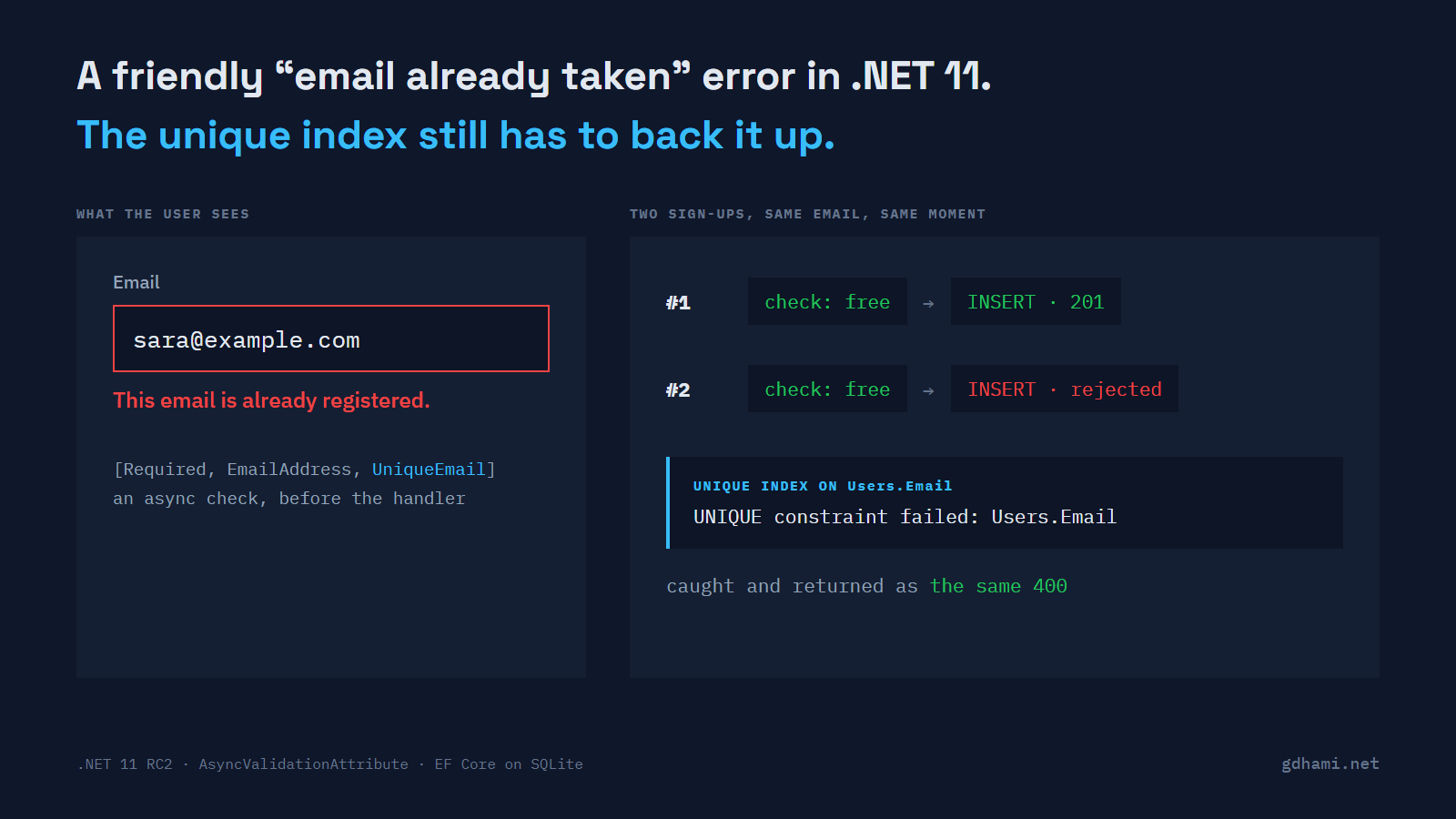
The thing that stops duplicate accounts is a unique index on the email column. Whatever you check in C# before the insert is a nicer error message on top of that index. A nicer message is still worth having, and .NET 11 makes it easier to write: validation on minimal API endpoints can now be async, so an attribute can ask the database whether an email is taken and answer with the same 400 that [Required] gives.
To see how far that goes, I wrote a sign-up endpoint on .NET 11 RC2. I'd use the async check for the message, keep the index as the guarantee, and catch the index violation so it comes back as the same response. One result surprised me, and it's the one I'd want a colleague to hear about before adding a second check to the same model.
The check as an async attribute
An async check is a class that derives from AsyncValidationAttribute and overrides IsValidAsync. You turn validation on once with builder.Services.AddValidation(), and minimal APIs run it before your handler. Here's mine. Keep an eye on where the DbContext comes from, because I'll come back to it.
public sealed class UniqueEmailAttribute : AsyncValidationAttribute
{
    public UniqueEmailAttribute() => ErrorMessage = "This email is already registered.";

    protected override async Task<ValidationResult?> IsValidAsync(
        object? value, ValidationContext context, CancellationToken cancellationToken)
    {
        if (value is not string email || email.Length == 0)
            return ValidationResult.Success; // [Required] reports this one

        var dbFactory = context.GetRequiredService<IDbContextFactory<AppDb>>();
        await using var db = await dbFactory.CreateDbContextAsync(cancellationToken);
        var taken = await db.Users.AnyAsync(u => u.Email == email, cancellationToken);

        return taken
            ? new ValidationResult(FormatErrorMessage(context.DisplayName), [context.MemberName!])
            : ValidationResult.Success;
    }
There's also a synchronous IsValid to override. It's abstract, so leaving it out doesn't compile. Mine throws, since the docs say the minimal API path only ever calls the async one. With [Required, EmailAddress, UniqueEmail] on the Email property, a second sign-up with the same address gets this back:
400 application/problem+json
{"type":"https://tools.ietf.org/html/rfc9110#section-15.5.1","title":"One or more validation errors occurred.","status":400,"errors":{"Email":["This email is already registered."]},"traceId":"00-9c7a07561614a8d8a2095f43ca85aee4-9fa2ca09e6cf5fd4-02"}
When [Required] or [EmailAddress] fails, the lookup doesn't run at all. I counted queries with an EF interceptor, and "not-an-email" got its 400 with zero lookups. I expected that to depend on the order I wrote the attributes in. It didn't: with [UniqueEmail] first, still zero.
I'd put this check in an attribute and not at the top of the handler. The handler only runs once every other rule has passed, so a user with two bad fields would find out about the taken email on their second try. As an attribute, it lands in the same errors list as everything else, in one response.
Two sign-ups at the same moment
The async check has the weakness every check-then-insert has. Two requests with the same new email can both ask whether it's taken, both hear no, and both insert. To make that happen on demand, my handler awaits a gate right after validation, and the test's gate holds both requests until both have arrived. With the unique index dropped, both came back 201 and the table had two rows for one address.
With the index in place, the first insert wins and the second throws a DbUpdateException. Nothing catches it, so that user gets a 500. The guarantee works, but the message is awful. A few lines in the handler turn the violation back into the validation error:
var user = new User { Email = request.Email };
db.Users.Add(user);
try
{
    await db.SaveChangesAsync(ct);
}
catch (DbUpdateException ex) when (ex.IsUniqueViolation())
{
    // Lost the race: answer exactly like the validation error does.
    return Results.ValidationProblem(new Dictionary<string, string[]>
    {
        ["Email"] = ["This email is already registered."]
    });
}
IsUniqueViolation() is a small extension that looks for SQLite's unique-constraint code, 2067. SQL Server and PostgreSQL have their own codes, so that's the line you'd change. With the catch, the losing request gets a 400 whose body matches the validation error once you ignore the trace ID. The client can't tell which layer said no, and it shouldn't need to.
In a code review I'd push back on any uniqueness attribute that has no index behind it. It passes every test you'd run by hand, and the duplicate rows show up later, when two requests happen to land together.
"errors":{"Email":["This email is already registered."]}}
Two async checks and one DbContext
My first version of the attribute didn't use a factory. It asked the validation context for AppDb, the request's scoped DbContext, the same way the docs sample asks for its user service. Then I added a second async check, [UniqueUserName], to the same model. Fifty sign-ups in a row all worked.
That looked too good. The docs say async validations can run in parallel, and a DbContext can't run two queries at once. So I tested the parallel part on its own: two attributes that each wait 100 ms finished in a little over 100 ms, not 200. They really do overlap.
The fifty sign-ups only worked because Microsoft.Data.Sqlite finishes its async calls synchronously, so each lookup was done before the next check started. A database server on the other end of a network won't do you that favor. I made every lookup wait 50 ms in an EF interceptor, and the very first sign-up failed with a 500:
System.InvalidOperationException: A second operation was started on this context instance before a previous operation completed. This is usually caused by different threads concurrently using the same instance of DbContext.That's why the attribute above opens its own short-lived context from IDbContextFactory<AppDb>. Registering with AddDbContextFactory still gives the endpoints their scoped AppDb, and with the same 50 ms wait every sign-up went through. I'd write it this way from the first async check. The bug waits for whoever adds the second one, and SQLite in your tests won't show it. The docs do say the checks run in parallel; I just wish they said it next to the sample that pulls a service out of the context.
Where each piece belongs
MVC is left out. I put the same model on an MVC controller, and MVC called the synchronous IsValid, which in my attribute throws. The docs agree: this validation covers minimal APIs and Blazor, and MVC and Razor Pages aren't supported.
Keep what runs inside an attribute cheap and local. A lookup on an indexed column is fine. I wouldn't make an HTTP call to another service from one. It runs on every request before your handler, alongside the other checks, so a slow service makes every sign-up slow, and a failing one turns them into 500s before your own code has run.
So on a sign-up endpoint I'd write three things, in this order: the unique index, the catch that maps its violation to the field error, and [UniqueEmail] so most people see the message before they reach the insert. If there's only time for one of them today, add the index.